Quick Summary
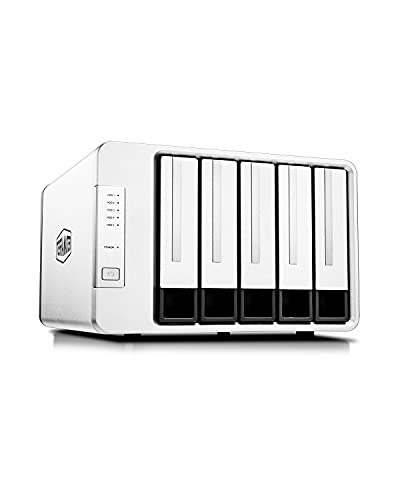
The TERRAMASTER D5-300 is a 5-bay external hard drive enclosure with a USB 3.1 Gen1 Type-C interface and diskless design. It supports RAID 0, 1, 5, 10, Clone, JBOD and Single Disk modes, giving buyers a choice of storage setups within one enclosure.
It is compatible with Mac, Windows and Linux computers, and also works with computers that have a Thunderbolt 3 interface. The product is designed for use with user-supplied drives, so the hard drives are not included.
Who It Is Best For
This enclosure suits buyers who need external multi-drive storage and want to choose between different RAID and single-disk configurations. It also suits users who need to connect the enclosure to a compatible Mac, Windows or Linux computer, or a Thunderbolt 3-equipped computer.
Key Details
| Detail | Verified information and buyer relevance |
|---|---|
| Brand | TERRAMASTER. |
| Model | D5-300. |
| Product type | 5-bay external hard drive enclosure. |
| Connection | USB 3.1 Gen1 Type-C interface for connecting to a compatible computer. |
| Drive support | Supports five SATA hard drives, with compatibility stated for 3.5 inch SATA hard drives, 2.5 inch SATA hard drives and SSDs. |
| Storage capacity | Up to 90TB storage capacity is stated in RAID 0. |
| RAID modes | RAID 0, 1, 5, 10, Clone, JBOD and Single Disk are listed. |
| Compatibility | Compatible with Mac, Windows and Linux computers, and also works with computers possessing a Thunderbolt 3 interface. |
| Included drives | Diskless design, so users need to purchase their own hard drives. |
| Cooling and build | Features an aluminium-alloy shell and low-noise fans. |
Why Buyers Choose It
- Five drive bays give one enclosure space for multiple SATA drives.
- RAID 0, 1, 5, 10, Clone, JBOD and Single Disk support gives flexibility when choosing a storage setup.
- The stated USB 3.1 Gen1 Type-C interface and up to 220MB/s transmission speed are useful when comparing connection and transfer requirements.
- The diskless format means the buyer can match the enclosure with their own choice of drives.
How It Works
- Install your own compatible SATA hard drives or SSDs into the enclosure.
- Connect the enclosure to a compatible computer using the USB 3.1 Gen1 Type-C interface.
- Select the RAID mode or single-disk setup that matches your storage needs.
- Use the enclosure for the stated storage applications, such as backup or archiving.
Real World Use
The D5-300 is described for a range of storage tasks, including video editing, photo backup, technical document storage, archival backup, music libraries, financial records, video surveillance recordings and corporate data storage. The enclosure’s diskless format also means storage can be built around the drives the buyer already plans to use.
What To Know Before You Buy
Check the connection type on your computer before ordering, and confirm that your planned operating system matches the stated compatibility. The product is diskless, so drives must be purchased separately.
Review the selected RAID mode before setup, especially if you want to balance storage capacity and data protection within the stated options. The description also notes that mac OS 14 and above is not compatible, so Mac users should check their version carefully.
Common Buyer Questions
Does this enclosure include hard drives?
No. It is a diskless enclosure, so the drives are not included.
Which drive types are stated as compatible?
3.5 inch SATA hard drives, 2.5 inch SATA hard drives and SSDs are listed.
What computers can it connect to?
It is stated as compatible with Mac, Windows and Linux computers, and it also works with computers possessing a Thunderbolt 3 interface.
Which RAID options are available?
RAID 0, 1, 5, 10, Clone, JBOD and Single Disk are listed.
Final Buying View
If you need a 5-bay external enclosure with multiple RAID options and a USB 3.1 Gen1 Type-C connection, the D5-300 gives a clear specification set to compare against your storage plan. Confirm your computer connection, your operating system version and the drives you intend to fit before choosing.