Quick Summary
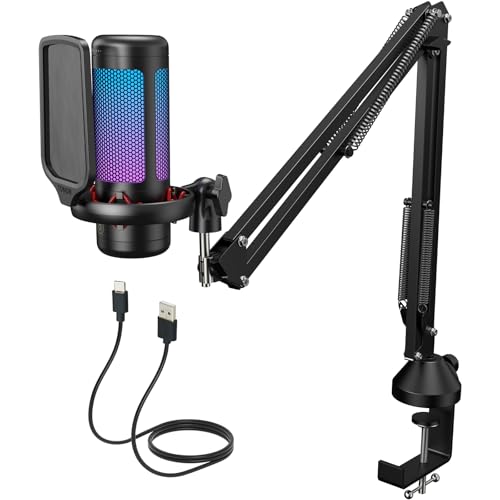
The TONOR TC310+ is a gaming USB microphone with a boom arm mounting kit, made for streaming, podcast recording, studio singing and use with computer, laptop, Mac and PS4. It includes adjustable RGB lighting, with four lighting modes, and the brightness can be adjusted by rotating the bottom of the microphone.
The microphone also includes touch mute on the top and gain adjustment by rotating the top, giving you direct control during use. The boom arm and microphone are both adjustable, and the clamp is stated to fit most desks with a thickness not exceeding 2.36 inches.
Who It Is Best For
This microphone suits buyers who want a USB mic for desktop use and need the flexibility of a boom arm. It is aimed at streaming, podcast recording, studio singing and similar voice capture tasks, with compatibility stated for computer, laptop, Mac and PS4.
Key Details
| Detail | Verified information and buyer relevance |
|---|---|
| Model | TC310+ for clear product identification. |
| Product type | Gaming USB microphone with a boom arm mounting kit. |
| Lighting | Adjustable RGB lighting with four modes and brightness control. |
| Mute control | Touch mute on the top for quick audio muting during use. |
| Gain control | Top rotation adjusts microphone gain. |
| Mounting | Metal boom arm with a clamp stated to fit most desks up to 2.36 inches thick. |
| Compatibility | Stated for computer, laptop, Mac and PS4. |
| Intended use | Streaming, podcast recording, studio singing and gaming voice use. |
Why Buyers Choose It
- Four RGB modes give you a choice of lighting effects, including static, gradient and breathing styles.
- Brightness adjustment lets you change the lighting level to suit your setup.
- Touch mute and gain rotation place basic microphone controls close at hand.
- The adjustable boom arm gives more flexibility over microphone position and height.
How It Works
- Set the microphone on the included boom arm mounting kit.
- Use the clamp on a desk within the stated 2.36 inch thickness limit.
- Adjust the boom arm and microphone angle or height as needed.
- Tap the top of the microphone to mute sound.
- Rotate the top of the microphone to adjust gain.
- Touch the lighting icon to change RGB mode, or long-tap it to turn the lights off.
- Rotate the bottom of the microphone to change RGB brightness.
Real World Use
In everyday use, the microphone is set up on a desk with the boom arm clamp and then positioned to suit the speaker or performer. The adjustable arm makes it easier to place the mic at the right angle or height for streaming, recording or singing, while the top controls keep mute and gain changes within reach.
What To Know Before You Buy
Check that your desk suits the stated clamp thickness limit of 2.36 inches before ordering. The microphone is described for computer, laptop, Mac and PS4 use, so confirm that your intended setup matches those devices. If lighting matters to your setup, review the four RGB modes and brightness control so you can choose the effect you want.
Common Buyer Questions
Can I turn the RGB lights off?
Yes. Long-tap the lighting icon to switch the RGB lights off.
How do I change the microphone gain?
Rotate the top of the microphone to adjust gain.
Does the boom arm fit any desk?
The clamp is stated to fit most desks with a thickness not exceeding 2.36 inches, so check your desk size first.
What devices is it stated to work with?
It is stated for computer, laptop, Mac and PS4.
Final Buying View
If you want a TONOR USB microphone with a boom arm, RGB lighting and direct touch controls, the TC310+ gives you a clear set of stated features. Check desk thickness and device compatibility before choosing it for your setup.