



Quick Summary
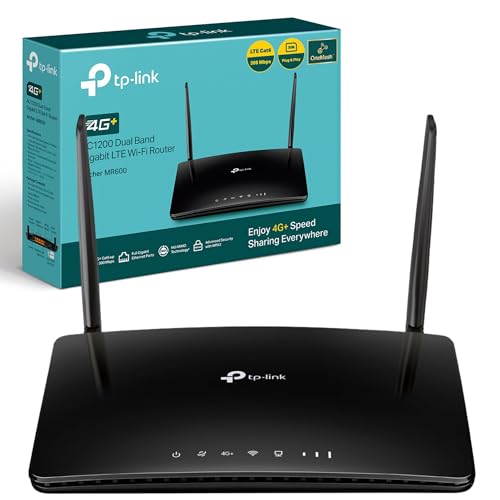
TP-Link Archer MR600 is a 4G+ Cat6 wireless dual band router with a SIM slot. It is presented as a plug-in and use router with no configuration required, and it also supports WiFi router mode through the LAN/WAN port.
The router is described as supporting 4G+ Cat6 for data speeds of up to 300 Mbps, with MU-MIMO technology, Guest Network and Parental Control.
Who It Is Best For
This router suits buyers who want a SIM slot router for 4G+ connectivity, or who need a backup internet option through the Ethernet LAN/WAN port. It is also relevant if you want both wireless and wired connections from the same device.
Key Details
| Detail | Verified information and buyer relevance |
|---|---|
| Brand | TP-Link. |
| Model | Archer MR600. |
| Product type | AC1200Mbps 4G+ Cat6 wireless dual band router with SIM slot. |
| 4G+ Cat6 support | Listed as supporting 4G+ Cat6 with data speeds of up to 300 Mbps. |
| Wireless bands | Dual band wireless connectivity is stated in the title. |
| SIM slot | Built-in SIM slot for plug-in setup. |
| External antennas | Two external LTE antennas are stated for connection use. |
| Wired ports | Full gigabit ports are stated for wired devices. |
| WiFi router mode | Can use an Ethernet cable in the LAN/WAN port as a backup access option. |
| Management features | Guest Network and Parental Control are stated in the title. |
Why Buyers Choose It
- 4G+ Cat6 support is stated with speeds of up to 300 Mbps, which gives a clear reason to compare it against your connection needs.
- The SIM slot and no configuration required wording point to a straightforward setup approach.
- WiFi router mode with the LAN/WAN port gives an additional access option when a 4G connection is not available.
- Guest Network and Parental Control are included for buyers who want those router management features.
How It Works
- Insert a SIM card into the SIM slot.
- Use the router for 4G+ connectivity with no configuration required.
- If needed, connect an Ethernet cable to the LAN/WAN port and use WiFi router mode.
- Manage the router through the Tether app, as stated in the description.
Real World Use
The two external LTE antennas are stated to support stable and efficient connections across devices. The full gigabit ports are intended for wired devices such as game consoles and STBs, according to the description.
The product is also described as compatible with SIM cards in 100+ countries, but overseas use may require special manual settings from your network vendor.
What To Know Before You Buy
Check that the SIM slot and router mode match how you plan to connect. If you intend to use the router while travelling overseas, confirm with your network vendor whether special manual settings are needed. Review the need for wired gigabit connections or Guest Network and Parental Control before ordering.
Common Buyer Questions
Does it need manual setup?
No configuration is stated as required, and the router is described as plug and play.
Can it work without a 4G connection?
Yes. WiFi router mode is stated, with an Ethernet cable used in the LAN/WAN port as a backup access option.
What speed support is stated?
It is described as supporting 4G+ Cat6 data speeds of up to 300 Mbps.
Does it include parental controls?
Yes. Parental Control is listed in the product title.
Final Buying View
TP-Link Archer MR600 is aimed at buyers who want a SIM slot router with 4G+ Cat6 support, wired gigabit ports and a backup router mode option. Check your SIM and connection requirements before choosing.