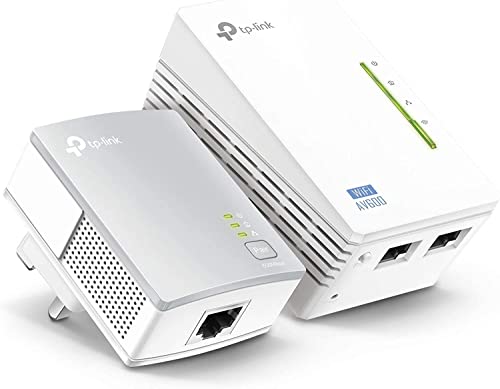
Quick Summary
The TP-Link TL-WPA4220T V1.20 AV600 Wi-Fi Powerline Network Kit is a powerline network kit with Wi-Fi and multiple Ethernet ports. It is described as HomePlug AV standard compliant, with wireless connections up to 300 Mbps and a Wi-Fi Clone button for simpler network setup.
It is aimed at extending network access to harder-to-reach areas of a home or office while offering wired and wireless connection options.
Who It Is Best For
This kit suits buyers who want to extend network access to places where a direct connection is harder to reach, while still using Wi-Fi and wired connections where needed. It may also suit users who want a simpler setup using the Wi-Fi Clone button.
Key Details
| Detail | Verified information and buyer relevance |
|---|---|
| Model | TL-WPA4220T V1.20, which helps identify the exact version. |
| Product type | AV600 Wi-Fi Powerline Network Kit for extending network access. |
| Powerline standard | HomePlug AV standard compliant for powerline networking. |
| Wireless speed | Up to 300 Mbps wireless connections, which is the stated Wi-Fi figure. |
| Ethernet ports | Multiple Ethernet ports for wired connections to devices such as game consoles, smart TVs and NAS. |
| Wi-Fi Clone button | One Touch for super range extension with a Wi-Fi Clone button to simplify configuration. |
| Setup | Plug, pair and play setup is stated, with start-up in minutes. |
Why Buyers Choose It
- HomePlug AV standard compliance and powerline networking support give it a clear role in carrying network access through the home wiring.
- Up to 300 Mbps wireless connections provide a stated Wi-Fi figure for extending access into harder-to-reach areas.
- Multiple Ethernet ports offer wired connection options for devices that use Ethernet rather than Wi-Fi.
- The Wi-Fi Clone button is a simple way to copy and extend Wi-Fi settings with one touch.
How It Works
- Plug the kit in.
- Pair the powerline network.
- Use the plug, pair and play setup to start the wired or wireless connection.
- If you want simpler Wi-Fi setup, use the Wi-Fi Clone button for one-touch extension.
What To Know Before You Buy
Check that you want a powerline network kit rather than a standard router or access point. The wireless figure is stated as up to 300 Mbps, and the product also includes multiple Ethernet ports for wired devices. If you plan to use the Wi-Fi Clone function, make sure that one-touch setup is the feature you want before ordering.
Common Buyer Questions
Does it support both wired and wireless connections?
Yes. It includes multiple Ethernet ports for wired devices and Wi-Fi for wireless connections.
Is setup complicated?
No. The kit is described as plug, pair and play, with setup in minutes.
What does the Wi-Fi Clone button do?
It simplifies Wi-Fi configuration and helps build a unified home network with one touch.
Final Buying View
Choose this kit if you want a powerline network solution with Wi-Fi, wired ports and one-touch Wi-Fi cloning. Compare the stated wireless figure, Ethernet needs and setup method with your intended use before ordering.