




Quick Summary
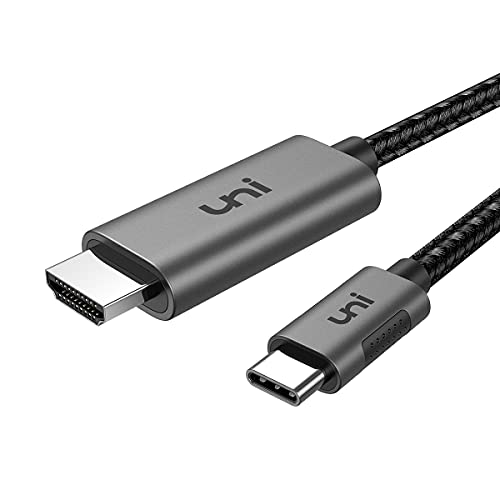
The uni USB C to HDMI Cable is a 1 m Type-C to HDMI 2.0 cable for sending video from a USB-C device to an HDMI display. The stated output support includes 4K at 60 Hz and 2K at 120 Hz, and the cable is listed as Thunderbolt 4/3 compatible.
The grey finish and shorter length make it a neat option where a compact connection is preferred. If you are choosing between offers, check the device compatibility list, the required input and output connections, and whether 1 m is long enough for your setup.
Key Details
| Detail | Verified information and buyer relevance |
|---|---|
| Product type | USB C to HDMI cable for connecting a USB-C device to an HDMI display. |
| Length | 1 m, which is the key check for desk spacing and device placement. |
| Video support | 4K@60Hz and 2K@120Hz are stated, so resolution and refresh-rate needs matter. |
| Standard | HDMI 2.0, useful when comparing display and cable requirements. |
| Compatibility | Listed as Thunderbolt 4/3 compatible. |
| Colour | Grey. |
What to Compare Before Buying
- Length: This cable is 1 m long. Compare that with the distance between your device and screen.
- Video requirement: The stated support is 4K@60Hz and 2K@120Hz. Match that to the resolution and refresh rate you need.
- Connection type: It is a USB C to HDMI cable, so your device needs the correct USB-C output and the display needs an HDMI input.
- Compatibility: Thunderbolt 4/3 compatibility is listed, and several device families are named. Check your exact model before choosing.
Compatibility, Size and Fit
Compatibility is central with this cable. It is listed for MacBook Pro/Air, iPhone 17, 16 and 15, iPad Pro, Surface Pro, Pixel Book, Galaxy S10 and more, with a note that it is not compatible with Samsung A series. The 1 m length is also important if you want a short run between a laptop, tablet or phone and a display.
What Else You May Need
You will need a display or monitor with an HDMI input. Your device also needs to support video output over USB-C in a way that matches this cable and the device model you plan to use.
Before You Decide
Confirm the exact device model, the HDMI input on your display and the 1 m length before choosing an offer. If you need a longer run, compare the other length options mentioned for the same cable family.


