

Quick Summary
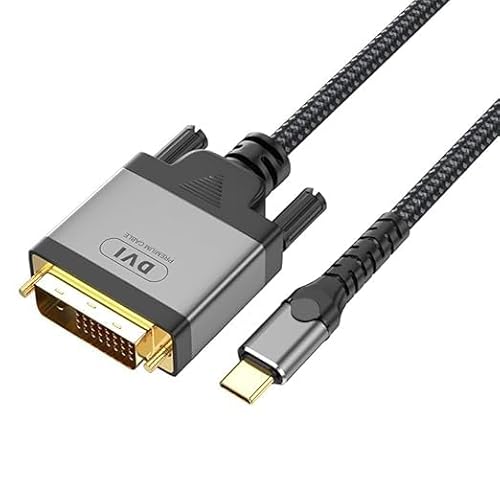
The USB-C to DVI Cable 2 m is a USB Type-C to DVI adapter cable for connecting a USB-C device to a DVI-equipped display such as a monitor, TV or projector. The stated video support is up to 4K@30Hz, and the cable is described as compatible with devices that support DP Alt Mode for video output over USB Type-C.
It is presented as a plug-and-play cable with no driver or software needed. The product is also described as suitable for one or two DVI-D displays, so the exact display setup matters when choosing it.
Key Details
| Detail | Verified information and buyer relevance |
|---|---|
| Product type | USB-C to DVI cable adapter for linking a USB-C device to a DVI display. |
| Length | 2 m, which helps with reach between the device and the display. |
| Video support | Up to 4K@30Hz, so the display setup should match the required resolution and refresh rate. |
| Connection requirement | USB-C host port requires DP Alt Mode support for video output. |
| Included item | 1 x Type C to DVI Cable. |
What to Compare Before Buying
- USB-C video support: Check that the device’s USB-C port supports DP Alt Mode for video output.
- Display input: Confirm that the monitor, TV or projector has a DVI input.
- Resolution needs: The stated support is up to 4K@30Hz, so compare this with the resolution your display setup needs.
- Cable length: The cable is 2 m long, which matters if the device and screen are not close together.
- Display setup: The cable is described as suitable for one or two DVI-D displays, so check that your intended setup matches that use.
Compatibility, Size and Fit
This cable is described as compatible with a range of USB-C devices, including MacBook, MacBook Air, MacBook Pro, iMac, iMac Pro, iPad Pro, Acer Aspire Switch, Predator, Surface Book 2, Surface Go, HP Envy, Samsung Galaxy Series, Galaxy Book, Dell XPS, Intel NUC, Chromebook Flip and Pixelbook. It is also described as working with DVI-enabled TVs, monitors and projectors.
For the best match, check the exact device model, the USB-C video-output support and the display input on the screen you want to use.
What Is Included
- 1 x Type C to DVI Cable, 2 m
Before You Decide
Confirm that your USB-C device supports DP Alt Mode and that your display has a DVI input. Check the 2 m length against your setup, and make sure the selected cable is the right version for the device and screen you plan to connect.