Quick Summary
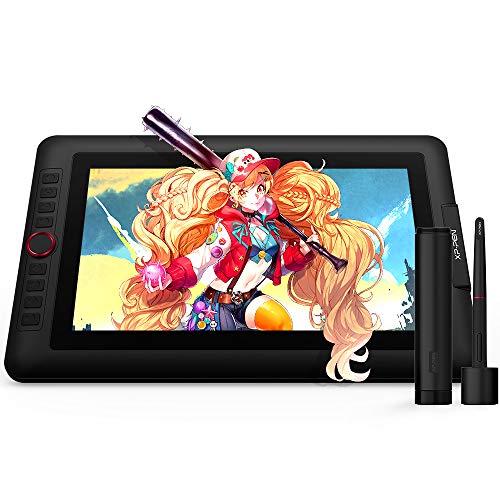
XP-PEN Artist13.3 Pro is a 13.3-inch portable digital pen display for art and design work. It combines a 1920 x 1080 HD drawing display with a battery-free stylus, making it a compact option for drawing, painting and other creative tasks.
The display area is described as portable and quick to connect to a computer with a 3-in-1 cable design, so it is set up for use with a computer rather than as a standalone device.
Who It Is Best For
This pen display suits buyers who want a portable screen for creative work and who need a display tablet that connects to a computer. It is also a fit for users who want shortcut controls and stylus pressure sensitivity for drawing, animation, photography, fashion or architecture design.
Key Details
| Detail | Verified information and buyer relevance |
|---|---|
| Brand | XP-PEN, which identifies the product line clearly. |
| Model | Artist13.3 Pro, which helps confirm the exact version. |
| Product type | Portable digital pen display / drawing tablet for art and design work. |
| Screen size | 13.3-inch display area, useful for buyers checking working size. |
| Display resolution | 1920 x 1080 HD, which defines the stated display detail. |
| Stylus | Battery-free PA2 passive pen, so the pen does not need charging. |
| Pressure sensitivity | 8192 levels, supporting fine stroke control for drawing. |
| Report rate | 266RPS, a stated pen response figure. |
| Tilt support | Up to 60 degrees, for stylus tilt recognition. |
| Shortcut controls | 8 fully customizable shortcut keys plus a red dial for workflow control. |
| Connectivity | 3-in-1 cable design for connection to a computer without an adapter. |
| Compatibility | Windows 10/8/7, Linux, and Mac OS X 10.10 and higher, with support for most art software listed in the description. |
Why Buyers Choose It
- The 13.3-inch portable format is easier to carry than a larger pen display when working away from a fixed desk.
- The battery-free stylus removes the need for pen charging.
- 8 shortcut keys and a red dial give direct access to programmable controls.
- The fully laminated display is described as reducing offset and helping the pen feel closer to the screen.
How It Works
- Connect the Artist13.3 Pro to your computer using the 3-in-1 cable design.
- Use the battery-free PA2 stylus on the 13.3-inch display area for drawing and design work.
- Set the shortcut keys and red dial to your preferred functions.
- Switch software without resetting the shortcut key and dial functions, as stated in the description.
Real World Use
The pen display is described for drawing, animation, photography, fashion, architecture design and other creative work. Its portable size makes it easier to move between workspaces, while the built-in shortcut controls support faster navigation through creative tasks.
What To Know Before You Buy
Check that you want a 13.3-inch pen display rather than a larger working area. Confirm that your computer meets the listed Windows, Linux or Mac OS X compatibility requirements before ordering. If you want to use shortcut functions, you can customise the 8 keys and red dial to suit your workflow.
Common Buyer Questions
Does the pen need charging?
No. The included PA2 stylus is battery-free and does not need to be charged.
Can the shortcut keys be changed for different software?
Yes. The shortcut keys and dial can be customised, and the description says you can switch software without resetting them.
Is it for computer use?
Yes. It connects to a computer through a 3-in-1 cable design.
Final Buying View
XP-PEN Artist13.3 Pro is a portable 13.3-inch drawing display for computer-based creative work, with a battery-free pen, shortcut controls and listed system compatibility. Check the screen size and your computer setup before choosing it.