




Quick Summary
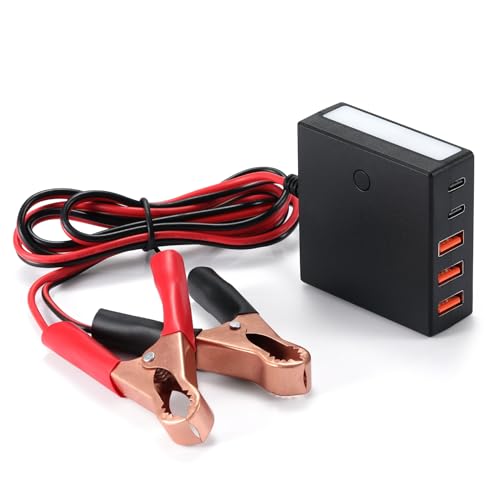
The YBBOTT 60W 12V-24V to 5V DC step down converter is a USB charging adapter with 5 ports and LED light functions. It is presented as a DC input unit with 3 USB-A ports and 2 USB-C ports, plus SOS flashing mode for the light.
For buyers, the main checks are the input voltage range, total power limit, port layout and whether the USB output arrangement matches the devices you plan to charge.
Key Details
| Detail | Verified information and buyer relevance |
|---|---|
| Brand | YBBOTT, so the product can be matched to the correct model. |
| Product type | 60W 12V-24V to 5V DC step down converter with USB charging ports. |
| Ports | 3 USB-A ports and 2 USB-C ports, giving 5 charging points. |
| Input | DC 12V-24V, with 8V-30V also stated for the input range. |
| Output | DC 5V, 2.4A per port, 60W total power. |
| Extra functions | LED light with two brightness levels and SOS flashing mode. |
| Protection | 10A fuse, reverse polarity protection, and independent short-circuit and overcurrent protection for each USB port. |
What to Compare Before Buying
- Input voltage: Check that your power supply sits within the stated 12V-24V range, with 8V-30V also stated for input.
- Output needs: The unit outputs 5V with 2.4A per port and 60W total power, so compare that with the devices you want to charge.
- Port mix: It includes 3 USB-A ports and 2 USB-C ports, which matters if you need a specific connector type.
- Protection features: The fuse and protection functions are part of the product and may matter where the installation or connected devices need extra checks.
What Else You May Need
You will need a suitable 12V-24V DC power source for the converter to work as intended. If you are planning to charge specific devices, check that their charging lead or USB connector matches one of the available ports.
Before You Decide
Confirm the input voltage, total power limit and USB port mix before choosing this unit. If you need a different connector arrangement or a higher output specification, compare another step down converter instead. Follow the manufacturer’s instructions for installation and use.


