Quick Summary
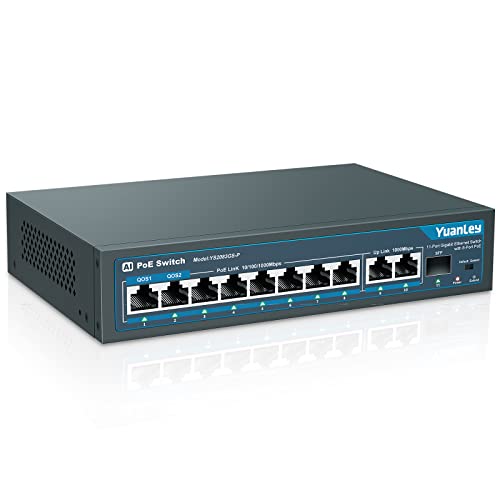
The YuanLey 10 Port PoE Switch is an unmanaged network switch with 8 PoE+ ports, 2 Gigabit uplink ports and a stated 120W PoE power limit. It supports IEEE 802.3af/at and is described as plug and play, with no configuration required.
It also includes an extend function, VLAN isolation on ports 1 to 8, and a metal fanless design. The unit is positioned for network setups where power and data are carried together through the switch.
Who It Is Best For
This switch suits buyers who need a 10 port PoE switch with a mix of PoE and uplink connections, and who want an unmanaged unit with simple setup. It is also relevant where the stated extend mode, VLAN isolation and metal fanless build are part of the buying decision.
Confirm that your equipment is compatible with IEEE 802.3af/at before ordering. If you use a device that requires 24V passive PoE, check compatibility carefully.
Key Details
| Detail | Verified information and buyer relevance |
|---|---|
| Brand | YuanLey, so the product can be identified clearly in search and on a product comparison page. |
| Port count | 10 ports in total, made up of 8 PoE ports and 2 uplink ports. |
| PoE port speed | 8 PoE ports are stated at 10/100Mbps. |
| Uplink speed | 2 uplink ports are stated at 1000Mbps Gigabit. |
| PoE standard | Supports IEEE 802.3af/at. |
| PoE power | Maximum 120W total PoE power is stated, with each port up to 30W and 15.4W at the same time. |
| Extend function | When extend mode is enabled, a single PoE port supports 250m transmission distance and 10Mbps speed. |
| VLAN support | Ports 1 to 8 support VLAN isolation, which is stated to reduce network congestion and improve network safety. |
| Design | Metal, fanless and unmanaged. |
Why Buyers Choose It
- 8 PoE+ ports and 2 Gigabit uplink ports give you a mixed port layout for powered devices and network uplinks.
- The stated 120W PoE power limit helps when comparing it with the power needs of connected equipment.
- Extend mode and VLAN isolation are included, so the switch offers more than basic port expansion.
- The metal, fanless design is a relevant check for buyers who want to confirm the build style before ordering.
How It Works
- Connect the power cord and network cable.
- Attach compatible devices to the PoE ports or uplink ports as required.
- No configuration is required for basic use, as the switch is described as plug and play.
- Enable extend mode when the longer-distance PoE function is needed, with the stated 250m and 10Mbps limit.
- Use VLAN isolation on ports 1 to 8 when the network layout calls for separated traffic.
Real World Use
The switch is described for IP cameras, wireless access points, IP phones and computer networks. In practice, that means the port layout and PoE support are the main things to check against the equipment you plan to connect.
Its fanless metal build and LED lights are part of the physical design, so buyers can factor that into cabinet space or installation planning.
What To Know Before You Buy
Check that your devices support IEEE 802.3af/at before ordering. Devices that need 24V passive PoE are stated as not compatible.
Review the port split carefully: 8 PoE ports are 10/100Mbps and the 2 uplink ports are Gigabit. If you need long cable runs, extend mode is stated to support 250m on a single PoE port at 10Mbps.
Pros: The switch combines 8 PoE+ ports, 2 Gigabit uplink ports and VLAN isolation in one unmanaged unit.
Cons: The stated compatibility does not include devices that require 24V passive PoE.
Common Buyer Questions
Does this switch need setup?
No, it is described as plug and play with no configuration required.
Which PoE standard does it support?
It supports IEEE 802.3af/at.
Can it be used with 24V passive PoE devices?
No, those devices are stated as not compatible.
What is the port layout?
It has 8 PoE ports and 2 Gigabit uplink ports, giving 10 ports in total.
Final Buying View
If you need an unmanaged 10 port PoE switch with 8 PoE+ ports, 2 Gigabit uplinks and stated extend and VLAN functions, this model gives you a clear specification set to compare against your equipment. Confirm the PoE standard and port speeds before ordering.