

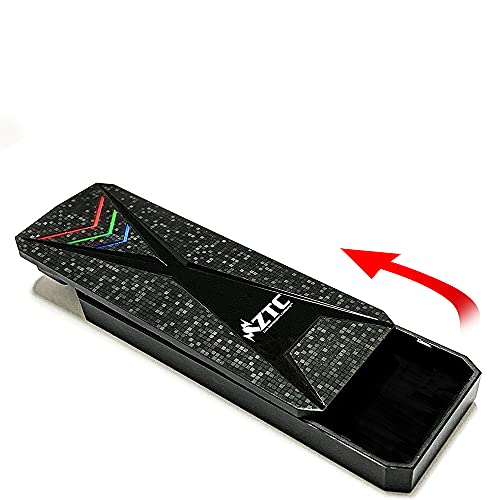
Quick Summary
The ZTC M.2 NVMe Tool-Free Portable Enclosure is a portable enclosure for M.2 PCIe NVMe SSDs, with a screwless design and RGB lighting. It is listed as supporting M.2 PCIe NVMe SSD sizes 2230, 2242, 2260 and 2280, and it uses USB-C 3.2 Gen 2 with a stated 10 Gbps connection.
This enclosure also has an RGB power and drive activity indicator, so you can see when it is powered and when the drive is active. It is a useful option for anyone checking M.2 size, interface type and computer system compatibility before ordering.
Who It Is Best For
This enclosure is for buyers who want to use a supported M.2 PCIe NVMe SSD in a portable external enclosure and who prefer a tool-free or screwless design. It is also relevant for anyone who needs to match the SSD size and the host connection type carefully.
Key Details
| Detail | Verified information and buyer relevance |
|---|---|
| Brand | ZTC, as shown in the product title. |
| Model | ZTC-EN013, which identifies the specific enclosure version. |
| Product type | M.2 NVMe portable enclosure with a tool-free, screwless design. |
| Supported SSD type | M.2 PCIe NVMe SSD, so the drive must match this type. |
| Supported sizes | 2230, 2242, 2260 and 2280, which helps confirm fit before purchase. |
| Connection | USB-C 3.2 Gen 2 with a stated 10 Gbps support figure. |
| Indicator | RGB power and drive activity indicator. |
| Interface support | USB 3.2, 3.1, 3.0, 2.0 and 1.1 are listed in the description. |
| Operating systems | Windows 2000, XP, Vista, 7, 8 and 10, Mac OS 10.X and Linux 2.4.2 and above are listed. |
Why Buyers Choose It
- The screwless design removes the need for a tool during installation or drive swapping.
- The stated support for 2230, 2242, 2260 and 2280 sizes helps buyers match the enclosure to a compatible M.2 drive.
- The RGB power and drive activity indicator gives a visible status check during use.
- The USB-C 3.2 Gen 2 connection and 10 Gbps figure provide the stated host connection specification.
How It Works
- Insert a supported M.2 PCIe NVMe SSD in one of the stated sizes.
- Use the screwless enclosure design to complete the installation.
- Connect the enclosure using the USB-C 3.2 Gen 2 interface.
- Check the RGB indicator for power and drive activity.
Real World Use
In day-to-day use, this enclosure is intended to house a supported NVMe SSD in a portable format for connection through USB-C. The listed interface support across USB 3.2, 3.1, 3.0, 2.0 and 1.1 gives useful system-check information when matching it to your equipment.
What To Know Before You Buy
Check that your SSD is an M.2 PCIe NVMe drive and that its size is one of the supported 2230, 2242, 2260 or 2280 formats. Confirm that your computer or device connection matches the USB-C 3.2 Gen 2 setup you plan to use.
The operating system list includes Windows 2000, XP, Vista, 7, 8 and 10, Mac OS 10.X and Linux 2.4.2 and above, so it is worth checking your own system against that list before ordering.
Common Buyer Questions
Which SSDs fit this enclosure?
It supports M.2 PCIe NVMe SSDs in 2230, 2242, 2260 and 2280 sizes.
What connection does it use?
It uses USB-C 3.2 Gen 2 and states support for 10 Gbps.
Does it have any status lighting?
Yes, it has an RGB power and drive activity indicator.
Which operating systems are listed?
Windows 2000, XP, Vista, 7, 8 and 10, Mac OS 10.X and Linux 2.4.2 and above are listed.
Final Buying View
The ZTC-EN013 is a straightforward choice if you need a portable enclosure for a supported M.2 PCIe NVMe SSD and want a screwless design with RGB status lighting. Confirm the SSD size and host connection before you decide.


