


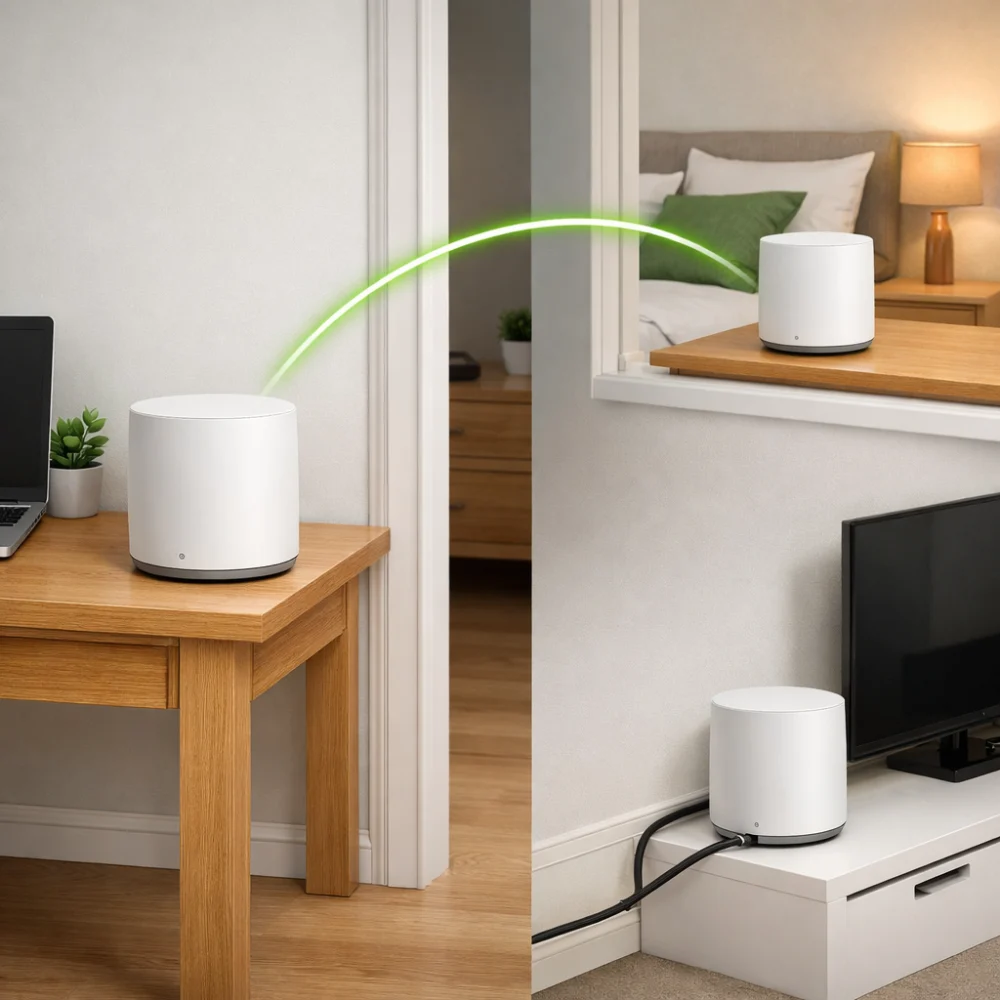
A mesh Wi-Fi system uses a main unit and one or more additional nodes to provide Wi-Fi from multiple points around a home. It can be worth considering when one router does not provide the coverage you need, but the right setup depends on your layout, internet connection and devices.
Choose by considering where the units can go, how they communicate with each other and whether you can use existing network equipment. A larger pack or higher headline speed is not automatically a better fit.
What should you look for in a mesh Wi-Fi system?
Start with the areas where you need a stronger connection and the barriers between those areas and your current Wi-Fi source. Then compare the system’s node count, supported Wi-Fi generation, bands and connection options. The main trade-off is between adding coverage points and keeping each unit connected to the network effectively; more nodes do not guarantee better results.
Compare the main buying factors
| Feature | What it means | Why it matters | What to check |
|---|---|---|---|
| Number of units | The pack includes a main unit and additional nodes, though the exact arrangement varies. | More units may provide more possible coverage points, but need space and power. | Confirm the included unit count and whether the system can be expanded with compatible units. |
| Wi-Fi generation and bands | These describe the wireless standards and frequency bands the system supports. | They affect which devices and network features may be supported, but do not alone determine real-world performance. | Check the full specifications and compare them with the capabilities of your devices. |
| Connection between nodes | Nodes may communicate wirelessly or, on systems that support it, through Ethernet cabling. | The connection between units affects how the mesh shares network traffic and what installation options are available. | Check whether wired connections are supported and what ports are provided on each unit. |
| Internet and router compatibility | The main unit must work with the equipment and service already in your home. | You may need to retain an existing modem or gateway, or use a supported operating mode. | Check your internet provider’s equipment requirements and the system’s supported modes. |
| Management and updates | Setup and network management may use an app, web interface or both. | Management requirements can affect convenience, account setup and ongoing administration. | Check the stated setup method, account requirements, update policy and support information. |
Decide which features matter for your home
Coverage and placement options
Think about the rooms and areas where you use Wi-Fi, not just the overall size of the property. Walls, floors, building materials and the distance between units can affect how well the nodes communicate. Use coverage figures, if provided, as guidance rather than a guarantee for your particular layout.
Node count and expansion
A two-unit setup may suit a simpler layout, while a larger or more divided home may call for additional nodes. The best number depends on where units can be placed and whether they can maintain a useful connection with one another. Specifications vary by model, so always check the individual product page before buying.
Wi-Fi generation, bands and devices
Wi-Fi generation and band support are useful comparison points when you have newer devices or several devices sharing a connection. A system’s advertised wireless speed is not a promise of the speed each device will receive: the internet service, distance, interference, network traffic and device capabilities all matter. Check the standards and bands supported by both the system and the devices you intend to connect.
Wireless or wired links between nodes
Wireless links avoid running network cables between units, but the nodes still need a suitable wireless connection to each other. Some systems support Ethernet backhaul, where compatible units are connected by cable. This can be useful if suitable cabling is already available; check the product details for support and port availability before relying on it.
Existing equipment and internet service
A mesh system does not replace every part of an internet connection. Depending on your service, you may still need a modem or provider-supplied gateway. Check whether the mesh main unit can work with your existing equipment and whether the system supports the mode you need. If you hope to replace a router or gateway, confirm the requirements with the internet provider and the product information first.
Ports, setup and management
Ethernet ports may be useful for wired devices or connections between units, but their number and purpose vary. Also consider whether setup and routine management suit you: some systems rely on an app, and account or internet requirements can differ. Check these details, plus how software updates and ongoing support are described.
Types and variations
Different pack sizes: Systems are sold with different numbers of units. Choose based on the areas you want to cover and practical placement options, rather than assuming that the largest pack is necessary.
Different Wi-Fi generations and bands: Models vary in the wireless standards and bands they support. More advanced specifications may be useful for compatible devices or particular network demands, but they do not guarantee a specific result in every home.
Wireless or Ethernet-connected nodes: Some setups use wireless links between units; others may support a wired connection. Wired options depend on compatible equipment and usable cabling, while wireless setups avoid that cabling requirement.
Mesh with existing equipment: Some buyers want the mesh system to work alongside an existing router or gateway; others may be able to use its main unit as the primary router. Which arrangement is suitable depends on the product and internet service, so verify the supported modes.
Choose for your particular needs
- To address a weak-signal area: Focus on whether the system lets you place a node in a useful position while keeping it connected to the main unit. Check the guidance and compatibility information for the specific system.
- For a home with several floors or separated rooms: Consider the layout and the possible locations for each unit. A higher unit count may offer more placement choices, but walls and distance can still limit the link between nodes.
- For newer or numerous connected devices: Compare supported Wi-Fi standards, bands and device compatibility. Consider your internet service and typical use as well as headline wireless figures.
- Where Ethernet cabling is available: Check whether the mesh supports wired links between nodes and whether its ports suit your intended connections.
- When keeping existing equipment: Confirm that the mesh system can work with the modem, router or gateway you plan to retain, and check for any service-provider requirements.
Common mistakes and misunderstandings
- Choosing by advertised speed alone. Headline figures are not the same as the speed a particular device will receive. Compare supported standards and bands, and consider the internet service, devices and layout.
- Assuming more nodes always improve Wi-Fi. Extra units need suitable positions and reliable links to the rest of the mesh. Decide how many coverage points you need before choosing a pack.
- Ignoring the connection between units. A node placed far from the main unit may not have a useful link. Consider placement options and check whether wired backhaul is supported if cabling could help.
- Assuming a mesh system replaces all provider equipment. A modem or gateway may still be required, and supported network modes vary. Verify the arrangement for your service before buying.
- Overlooking devices and ports. Older or specialist devices and wired equipment may have different needs. Check the system’s specifications against the devices and connections you plan to use.
Safety and suitability
Choose a system intended for home networking and check its stated operating and environmental requirements. Before buying, confirm that the units can be placed where you have suitable power and that the system works with your internet service and equipment. If the network will be used for work, study or other important tasks, consider the support and update information as part of your suitability check.
Ownership, maintenance and storage
Mesh units are powered network equipment, so allow for the power connections and space needed at each planned location. Check whether the system’s management app or interface indicates software updates and what ongoing support is provided. Keep the product information and any account details needed to manage the network; there is no need to buy extra units unless your coverage needs or setup call for them.
A practical buying process
- Identify the rooms or areas where you need Wi-Fi and note any existing weak spots.
- Check your internet equipment and provider requirements, including whether you need to keep a modem, router or gateway.
- Decide how many units you can place and whether wireless or Ethernet connections between them suit your home.
- Compare Wi-Fi standards, bands, ports and device compatibility against your actual needs.
- Read the individual product details for included units, supported modes, setup requirements, updates and support.
Buyer checklist
- Have I identified the areas I want the mesh to cover?
- Does the included number of units suit my layout and placement options?
- Are the Wi-Fi standards and bands appropriate for my connected devices?
- Does the system support the wireless or Ethernet links I intend to use?
- Will it work with my internet service and any equipment I need to retain?
- Are the ports, setup method, account requirements and update information acceptable?
Frequently asked questions
Is a mesh Wi-Fi system the same as a single router?
No. A mesh setup uses multiple units working together, typically with one main unit and additional nodes. Whether it replaces an existing router depends on the system’s supported modes and your internet equipment.
Will mesh Wi-Fi make my internet faster?
It does not increase the speed supplied by your internet plan. It may change how Wi-Fi is distributed around the home, but device speeds depend on several factors, including the service, equipment, distance and network conditions.
How many mesh units do I need?
There is no single number that suits every home. Consider the areas you need to cover, the layout and where units can be placed, then check the product’s guidance for the specific system.
Can I add another node later?
Some systems support expansion, but compatibility can depend on the system and unit. Check the manufacturer’s product information before assuming another mesh unit can be added.
Can mesh nodes connect by Ethernet?
Some systems support Ethernet connections between units, while others may rely on wireless links. Check that wired backhaul is supported and that the units have suitable ports before choosing on that basis.
Can I use mesh Wi-Fi with my current router?
It depends on the mesh system and the router or gateway. Check the supported operating modes and your internet provider’s requirements to confirm whether the devices can work together in your intended setup.


