

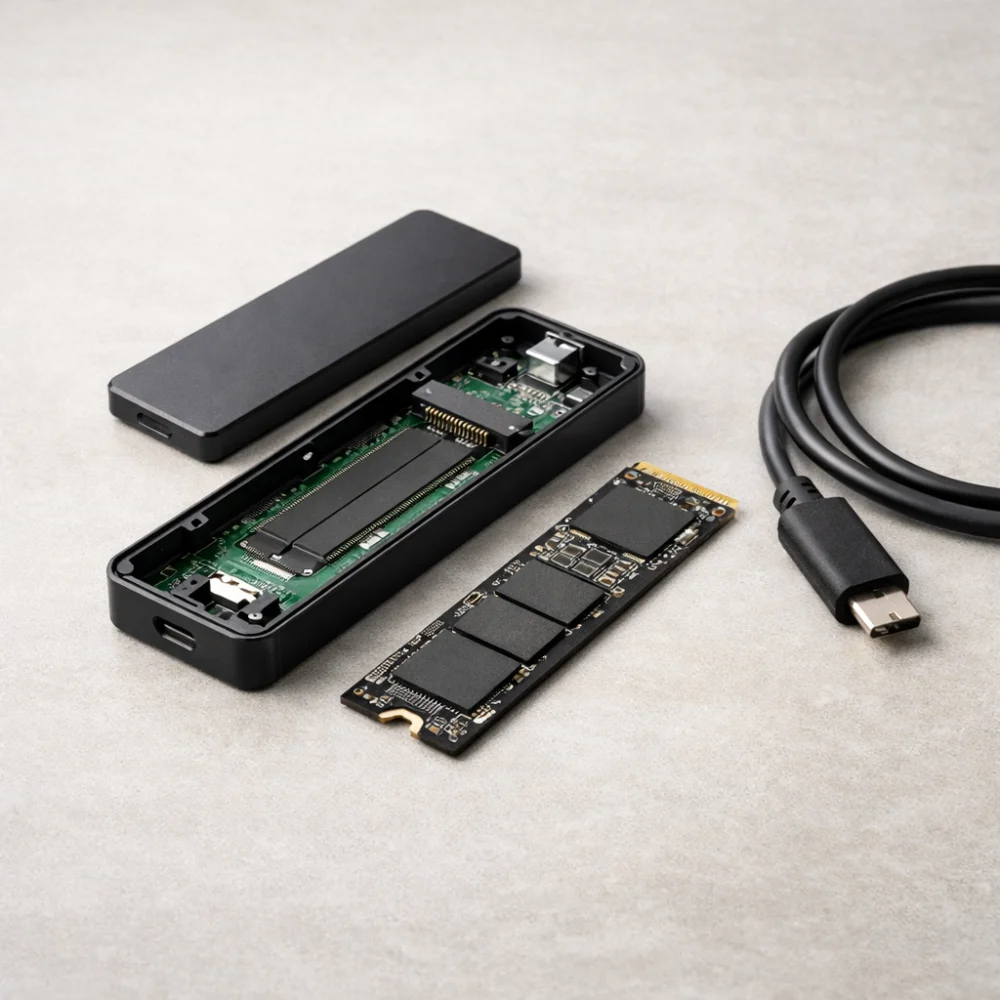
A portable NVMe enclosure houses a compatible M.2 NVMe solid-state drive and connects it to a computer as external storage. It can suit someone reusing a drive or assembling a portable storage setup, but the enclosure and drive need to match.
The key decision is compatibility first, then the connection and design features that matter for your use. Check whether a drive is included, and confirm the enclosure supports the drive’s interface, size and keying before comparing other details.
Which portable NVMe enclosure should you choose?
Start with the exact model of M.2 drive you plan to use, or identify the drive requirements you want the enclosure to support. Match its NVMe interface, physical length and connector key to the enclosure’s stated compatibility. Then check that its connection suits your computer and that any cooling or portability trade-offs fit your intended use. Specifications vary by model, so always check the individual product page before buying.
Compare the features that affect your choice
| Feature | What it means | Why it matters | What to check |
|---|---|---|---|
| Drive interface | The enclosure must support the drive’s data protocol, such as NVMe rather than SATA. | M.2 describes a drive form factor; it does not by itself confirm that the drive and enclosure use the same interface. | Check the drive’s specification and the enclosure’s stated NVMe compatibility. Do not rely on connector shape alone. |
| Drive length and key | M.2 drives come in different physical lengths and connector key arrangements. | A compatible protocol is not enough if the drive cannot fit or its connector is not supported. | Compare the drive’s size designation and key with the enclosure’s supported sizes and keys. |
| Connection and host port | The enclosure connects to the computer through a cable and host port, often using USB. | The enclosure, cable and computer port all affect the connection you can use. | Check connector type and supported interface on both the enclosure and the computer. A matching plug shape alone does not confirm matching performance. |
| Drive inclusion and capacity support | Some listings may describe an enclosure alone; others may specify a drive or a supported capacity range. | You need to know whether you are choosing a housing for your own drive or a complete storage item. | Read what is included and any stated drive-capacity limits for the exact product. |
| Cooling and enclosure design | Designs may differ in how they manage heat and in their physical construction. | Drive workload, sustained use and portability can make heat management more or less relevant. | Look for the cooling approach and any stated use limitations. Do not assume a particular material or cooling feature from appearance alone. |
| Installation and portability | Enclosures differ in how the drive is fitted and in their size and included accessories. | Frequent drive changes, travel and desk use can call for different priorities. | Check fitting requirements, dimensions, included cable or accessories, and whether the design suits how you will carry or use it. |
What to check before choosing
Match the drive interface, size and key
Confirm the drive is an M.2 NVMe SSD, rather than assuming every M.2 drive is NVMe. Some M.2 SSDs use SATA, and an enclosure intended for NVMe may not support them. Check the drive’s exact length, commonly shown as a number such as 2280, and its connector key against the enclosure’s compatibility information. A B+M-key connector does not, by itself, establish that the drive’s protocol is supported.
Check the full connection path
Compare the enclosure’s interface and connector with the computer’s available ports, and check which cable or adapters are included. The connection’s shape is not a reliable guide to its supported data rate. The drive, enclosure, cable and host port all contribute to the result, and practical transfer speeds can be lower than an interface’s stated maximum.
Consider capacity and what is in the box
If you already own a drive, check that its capacity is within the enclosure’s stated support. If you do not, check carefully whether a listing includes an SSD or describes an enclosure for a separately supplied drive. Also note any included cable or installation components rather than assuming they will be supplied.
Balance cooling with size and use
Heat management may matter more during extended transfers or other sustained use than during occasional file access. Enclosure designs can use different approaches, and a larger or more complex design may be less convenient to carry. Consider your expected workload and check the product information for its stated cooling features and any relevant limitations.
Check installation and system requirements
Look at how the drive is secured and whether the stated fitting process suits your preference. Check the enclosure’s listed operating-system or device compatibility against your intended setup. An external drive may also need a suitable file system or configuration for the devices you plan to use; do not assume that one setup works unchanged everywhere.
Types and design variations
The main distinction is compatibility: some enclosures are intended for NVMe drives only, while others may explicitly support both NVMe and SATA M.2 drives. A dual-protocol design can offer more flexibility, but only if it lists support for the particular drive and key you own.
Other differences include supported M.2 lengths, fitting style, connection, cooling approach and enclosure size. A simpler compact design may suit occasional transport, while a design with more substantial cooling features may be worth considering for sustained use. Neither description replaces checking the exact drive and host compatibility.
Choose for how you will use it
| Your need | Prioritise | Trade-off to consider |
|---|---|---|
| Reusing an M.2 drive you already own | Exact NVMe or SATA protocol support, drive length, key and capacity compatibility. | A compact or inexpensive-looking design is not useful if it does not support the drive. |
| Moving files between computers | A connection supported by the computers you use, plus a suitable cable and file-system plan. | Different ports or systems may affect connection options and how the drive is configured. |
| Frequent or sustained transfers | Host and enclosure interface compatibility, along with the stated cooling design. | Do not assume the highest advertised interface figure will be achieved in every setup. |
| Carrying external storage regularly | Compact dimensions, a secure drive fit and convenient cable arrangements. | A smaller design may offer less room for particular cooling or installation features; check the individual product details. |
| Buying a complete storage setup | Whether an SSD is included, supported capacity and the intended connection. | An enclosure-only product needs a compatible drive purchased separately. |
Common buying mistakes
- Assuming every M.2 SSD is NVMe: M.2 is a physical format, not a guarantee of protocol. Check whether the drive uses NVMe or SATA and match the enclosure accordingly.
- Choosing by connector shape alone: Similar-looking connectors do not confirm support for a drive’s protocol or key. Check all three: interface, size and key.
- Equating USB-C with a particular speed: USB-C describes a connector shape. Check the supported interface and the computer port, cable and enclosure specifications together.
- Reading an interface figure as a promised transfer speed: It may describe a maximum for part of the connection rather than the result in every setup. Compare the complete chain and treat advertised figures in context.
- Overlooking what is included: A product described as an enclosure may be housing only. Confirm whether an SSD, cable and any necessary fitting parts are listed as included.
- Ignoring the intended workload: A design suited to occasional file access may not be the best fit for prolonged transfers. Consider cooling and the manufacturer’s stated use information.
Safety and suitability
Use an enclosure only with a drive and host setup that its product information identifies as compatible. If you are unsure of a drive’s interface or physical specification, confirm it before buying rather than relying on its appearance. Keep important files backed up elsewhere: an enclosure is not, by itself, a backup plan or a guarantee of data protection.
Care, storage and ongoing use
Consider where the enclosure will be kept and carried, and whether its size and cable arrangement suit that routine. Protect the drive and its connector from knocks, dust and moisture as appropriate, but do not assume an enclosure is rugged, waterproof or sealed unless the individual product information explicitly supports that claim. If the enclosure has a particular power or cooling requirement, follow the information supplied for that model.
A straightforward buying process
- Identify the drive you have or intend to use, including its NVMe or SATA interface, M.2 length, key and capacity.
- Filter for enclosures that explicitly support those drive characteristics.
- Check the enclosure’s connection against the computer ports and cables you plan to use.
- Choose the cooling, fitting style and physical size that suit your workload and portability needs.
- Review what is included, stated system compatibility and any relevant product limitations before deciding.
Buyer checklist
- Does the enclosure support the drive’s NVMe or SATA interface?
- Are the drive’s M.2 length and connector key listed as compatible?
- Is the drive’s capacity supported, and is an SSD included or not?
- Will the enclosure, cable and computer port work together?
- Does the cooling and fitting design suit your expected use?
- Have you checked system compatibility, included accessories and any stated limitations?
Frequently asked questions
Can any M.2 SSD go in a portable NVMe enclosure?
No. M.2 describes a physical form factor, and drives can use different interfaces. Check that the enclosure supports the drive’s protocol, length and connector key.
Can an NVMe enclosure work with a SATA M.2 drive?
Only if the enclosure explicitly supports SATA as well as NVMe. Do not infer dual-protocol support from the drive bay or connector appearance.
Does a USB-C connector guarantee fast transfers?
No. USB-C identifies the connector shape, not the full data capability. Check the interface supported by the enclosure, cable and computer port, and remember that the drive and the rest of the connection affect practical transfer speeds.
Do portable NVMe enclosures usually include an SSD?
Do not assume they do. Check the product’s included-items information to establish whether it is an enclosure alone or a package that also contains a drive.
Do I need a cooling feature?
That depends on the drive, enclosure design and how you expect to use it. Cooling details may be more relevant for sustained transfers; check what the individual product specifies rather than assuming all enclosures manage heat in the same way.
Will the drive work with every computer once it is enclosed?
Not necessarily. The host needs a compatible connection, and the drive’s format or system configuration may affect use across devices. Check the enclosure’s stated compatibility and consider the computers on which you plan to use the drive.
Is an external NVMe drive automatically a backup?
No. It can store files, but a single drive does not provide another copy if the data is lost or the drive fails. Keep separate copies of important data according to your own backup needs.


