
3D Printers
3D printers are designed to turn digital models into physical objects using compatible printing materials. Whether you are making hobby projects, replacement parts, prototypes, models, miniatures, tools, gifts or educational items, the right 3D printer can open up a practical and creative way to make things at home, school or work.
This category can include filament 3D printers, resin 3D printers, beginner 3D printers, desktop printers, enclosed printers, larger build volume printers and related printing systems, depending on the products listed. Features vary widely, so always check build size, material compatibility, software support, setup requirements, safety guidance and maintenance needs before buying.
- 3D Printers
Sovol SV06 ACE 3D Printer Open Source, 600mm/s Max High Speed 3D Printers, Fully Auto Leveling, with Camera Upgraded Structure Planetary Dual Gear Direct Drive Printing Size 8.66×8.66×9.84 inch
Original price was: £239.99.£209.00Current price is: £209.00. *View On Amazon* - 3D Printers
Tina2 Plus 3D Printer, WEEFUN 250mm/s High Speed FDM 3D Printers Fully Open Source, Auto Leveling Mini 3D Printer with WiFi Cloud Print, Fully Assembly 3D Printers for Beginners, Office, Home, School
Original price was: £249.00.£208.97Current price is: £208.97. *View On Amazon* - 3D Printers
Official Creality K1 3D Printer High Speed with 600 mm/s 3D Printers Auto Leveling, Dual Fans Cooler, 0.1 mm Smooth Detail, Printing Size 8.66×8.66×9.84 in, Straight Out of The Box for Beginners
Original price was: £279.00.£269.00Current price is: £269.00. *View On Amazon* - 3D Printers
TINA2S 3D Printer, WEEFUN 3D Printer Fully Assembled with WiFi Cloud Print, Silent Mini 3D Printers for Beginners and Kids, Auto Bed Leveling DIY 3D Printers with Resume Print, Fully Open Source
Original price was: £209.00.£187.54Current price is: £187.54. *View On Amazon* - 3D Printers
Flashforge Adventurer 5X 3D Printer with Multi-Color Printing,Customize with IFS,AD5X Multi-Material/Full-auto leveling 3D Printer,Max Speed: 600mm/s,Auto 4kg Filament Refill,Compact Integrated Design
Original price was: £399.00.£299.00Current price is: £299.00. *View On Amazon* - 3D Printers
3D Printer Enclosure with Ventilation Kit Compatible with Bambulab A1/A1 Mini Combo with AMS lite,Fireproof Dustproof Tent with LED Light Constant Temperature Protective Cover-825 * 585 * 585mm
Original price was: £75.99.£54.39Current price is: £54.39. *View On Amazon* - 3D Printers
UniTak3D Ender 3 Direct Drive Upgrade Conversion Bracket for Ender 3 V2,Ender 3 Pro and Voxelab Aquila 3D Printer for B-MG&Dual Gear&Bowden Extruder(NOT for Neo Series,Extruder&Hotend NOT Include)
Original price was: £18.92.£18.04Current price is: £18.04. *View On Amazon* - 3D Printers
QIDI Q1 Pro 3D Printer, Enclosed 3D Printer with Camera, Max 600mm/s High Speed, Fully Auto-Leveling & Auto-Calibration, 60℃ Chamber Heat, 350°C Hotend, Tangle Detection, Printing Size 245x245x240 mm
Original price was: £429.00.£300.30Current price is: £300.30. *View On Amazon* - 3D Printers
UniTak3D Ender 3 3D Printer LED Light 24V 7.5W Dual Sides Embedded Light Bar Strip Upgrades for Ender 3 V2,Ender 3 V2 Neo,Ender 3,Ender 3 Neo,Ender 3 Pro,Ender 3 S1,CR6SE,Voxlab Aquila(2020 Profile)
Original price was: £8.54.£6.99Current price is: £6.99. *View On Amazon* - 3D Printers
ANYCUBIC 3D Printer Camera for Kobra 3, Kobra 2 Pro, Kobra 2 Plus and Kobra 2 Max, Remote Monitoring Accessory, 1920 * 1080, 2 Step Easy to Assemble
Original price was: £14.99.£11.99Current price is: £11.99. *View On Amazon*


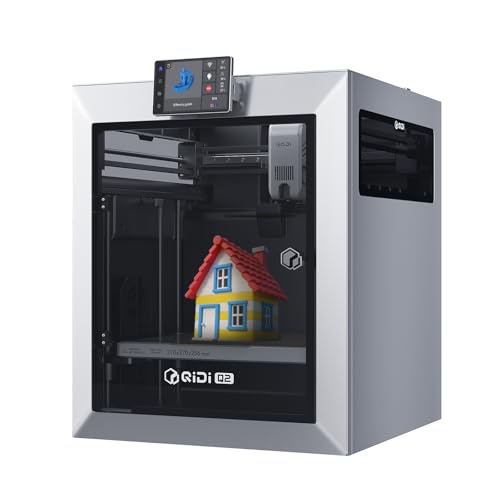


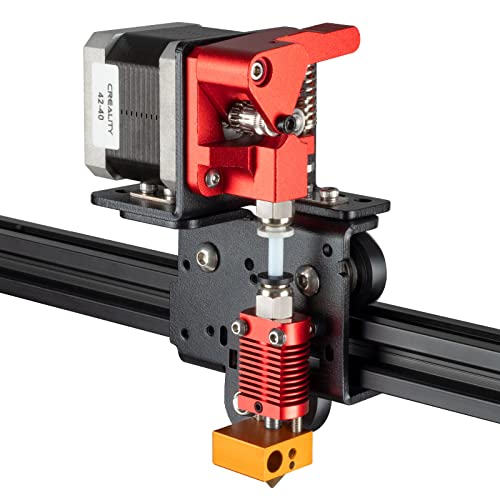


What Are 3D Printers?
3D printers are machines that create three dimensional objects from digital design files. The printer builds the item layer by layer, using a material such as filament or resin, depending on the printer type.
Different 3D printers use different printing methods. Filament printers often melt plastic filament and place it layer by layer, while resin printers usually use liquid resin and light to form detailed objects where suitable. The right type depends on what you want to make, how much detail you need and how comfortable you are with setup and maintenance.
What Are 3D Printers Used For?
3D printers are used for hobby making, model building, tabletop gaming pieces, engineering prototypes, craft items, household parts, educational projects, design testing, cosplay accessories, decorations and workshop use.
For beginners, a 3D printer can be a way to learn design, printing and practical problem solving. For hobby users, it can support miniatures, models and custom projects. For students and educators, it can help bring design ideas into the real world. For small workshops or businesses, it may be useful for prototypes, jigs, test parts or visual samples where suitable.
How To Choose The Right 3D Printer
Start by deciding what you want to print most often. If you want larger, practical parts, a filament printer may be worth comparing. If you want highly detailed miniatures or small display pieces, a resin printer may be suitable where listed.
Next, check the build volume. This tells you the approximate maximum size of item the printer can produce in one piece, where listed. A larger build area gives more flexibility, but it may also require more desk space and careful setup.
Also consider how much hands on work you are comfortable with. Some printers may include assisted levelling, enclosed designs, touchscreen controls, filament sensors or easier setup features where listed. Others may need more manual adjustment, tuning and maintenance.
Key Features To Compare
Printer type is one of the most important features to compare. Filament printers and resin printers work differently, use different materials and need different care routines.
Build volume matters if you plan to print larger objects. Check the listed size carefully and think about the biggest items you are likely to make.
Material compatibility is also important. Filament printers may work with materials such as PLA, PETG, ABS or other filaments where compatible and listed. Resin printers require suitable resin types. Always follow the product guidance, as not every printer works with every material.
Other useful features to compare include bed levelling method, print speed guidance where listed, nozzle size where stated, heated bed, enclosed frame, software support, file format support, connectivity, noise guidance, camera features where listed and replacement part availability.
Filament 3D Printers Compared With Resin 3D Printers
Filament 3D printers are often chosen for general projects, larger parts, prototypes and practical everyday prints. They usually use spools of plastic filament and are popular with beginners and hobby users.
Resin 3D printers are often chosen for finer detail, small models, miniatures and decorative pieces where suitable. They can produce detailed results, but they usually require more careful handling, cleaning and curing processes.
The main trade off is size and practicality versus fine detail. Filament printers can be more versatile for larger everyday prints, while resin printers may be better for small, detailed work. The right choice depends on your projects, space, safety setup and maintenance comfort.
3D Printers Compared With Laser Cutters and CNC Machines
3D printers build objects layer by layer from a digital model. They are useful for creating shapes, parts and prototypes that may be difficult to make by hand.
Laser cutters usually cut or engrave flat materials where suitable, while CNC machines remove material from a block or sheet using cutting tools. These machines serve different making needs and require different materials, safety routines and workspace considerations.
The main choice is the type of making you want to do. A 3D printer is best for building objects from scratch, while other tools may be better for cutting, engraving or shaping existing materials.
Guidance For Beginners, Regular Makers And Experienced Users
Beginners should focus on easy setup, clear instructions, reliable material compatibility and simple maintenance. A printer that is straightforward to learn on is often more useful than one with advanced features that feel overwhelming.
Regular makers may want to compare build volume, material options, print consistency, software workflow, replacement nozzles, bed surfaces and spare parts. If you print often, cleaning, calibration and reliability become more important.
Experienced users may look more closely at motion system design, firmware support where listed, enclosure options, nozzle temperatures where stated, bed temperature guidance, slicer compatibility, multi material options and upgrade potential.
Use Cases By Project Type
For home projects, a 3D printer can be useful for organisers, hooks, brackets, cases, stands, labels, small tools and simple replacement parts where the material and design are suitable.
For model making, printers may be used for scenery, miniatures, figures, vehicles, props and display pieces. Resin printers may be worth comparing where fine detail is important.
For education, 3D printers can help with design technology, engineering concepts, STEM projects, art, architecture models and practical learning.
For prototyping, a printer can help test shapes, fit and ideas before committing to more expensive production methods. Always remember that printed prototypes may not match final production strength or finish.
For craft and creative use, 3D printers can support custom decorations, jewellery forms, stamps, mould patterns, cosplay parts and personalised designs where suitable.
Fit, Compatibility And Software Considerations
Before buying a 3D printer, check that it works with your computer, operating system and preferred software where listed. Many 3D printers use slicing software to prepare digital models for printing.
File compatibility can matter. A 3D model may need to be prepared, scaled, supported or sliced before printing. Beginners should expect a learning curve, especially when adjusting print settings.
Connectivity varies by product. Some printers may use USB, memory cards, Wi Fi or app based control where listed. Choose a workflow that suits how you plan to use the printer.
Also check material compatibility carefully. The printer, nozzle, bed, enclosure and temperature guidance all affect which materials may be suitable.
Space, Ventilation And Setup
3D printers need a stable, level space with enough room around them for loading material, removing prints and carrying out maintenance. A desk, bench or dedicated workstation may be needed depending on printer size.
Ventilation is important, especially with resin printers and certain filament types. Always follow the product and material safety guidance. Some materials may produce odours or fumes, so the printer should be used in a suitable space.
Noise can also matter. If the printer will run in a bedroom, office or shared living area, check noise guidance where listed and think about how long print jobs may run.
Safety Considerations
3D printers include hot parts, moving parts and electrical components. Nozzles, print beds, resin vats, curing equipment and other areas may need careful handling depending on the printer type.
Keep children and pets away from active printers unless properly supervised. Do not touch hot parts, moving parts or uncured resin. Follow all safety instructions for materials, cleaning fluids, gloves, eye protection and ventilation where required.
Resin printing needs extra care. Liquid resin should be handled safely according to the product guidance, and waste should be managed responsibly. Filament printing also needs sensible use, especially around heat, moving parts and suitable materials.
Care, Cleaning And Maintenance
3D printers need regular care to work well. Maintenance may include cleaning the print bed, checking nozzles, levelling the bed, replacing worn parts, removing dust, updating software where suitable and checking belts or moving parts where relevant.
Filament printers may need nozzle cleaning, bed cleaning and occasional calibration. Resin printers may need vat cleaning, resin handling, screen care, filter use and curing equipment maintenance where listed.
Always follow the manufacturer’s instructions. If print quality changes, check basic issues first, such as bed adhesion, material condition, nozzle condition, temperature settings, supports and slicer settings.
Storage Tips For Printers And Materials
Store 3D printing materials carefully. Filament should usually be kept dry and clean, as moisture can affect print quality depending on material type. Resin should be stored according to the product safety guidance.
Keep tools, spare nozzles, scrapers, gloves, cleaning items and small parts organised. A tidy workspace makes printing safer and easier.
If the printer will not be used for a while, clean it properly, remove or store materials as instructed and keep it covered where suitable to reduce dust.
Useful Accessories To Consider
Useful accessories may include compatible filament, resin where suitable, build plates, nozzles, scraper tools, bed adhesives where appropriate, cleaning cloths, gloves, safety glasses, resin filters, curing stations where needed, storage boxes, replacement parts and digital callipers.
For filament printing, spare filament, nozzle tools and bed cleaning supplies can be useful. For resin printing, gloves, cleaning supplies, curing accessories and safe storage containers may be especially important where compatible.
Why Buy From YPC?
At YPC, we understand active lifestyles and the need for practical products that work in real use. 3D printers can vary by printing method, build volume, material compatibility, software support, setup process, safety needs and maintenance requirements, so it helps to compare the details carefully before choosing.
YPC makes it easier to browse 3D printers in a practical way, with options that can be compared by listed features, project type and user needs. Whether you are buying for hobby making, education, prototyping, model building, home projects or creative work, you can browse and compare 3D printers at YPC to find suitable options for your making setup.
FAQs
What is a 3D printer?
A 3D printer is a machine that creates physical objects from digital models by building them layer by layer using compatible materials.
What can I make with a 3D printer?
You can make models, prototypes, miniatures, household parts, organisers, craft items, educational projects and custom designs, depending on the printer, material and design file.
What is the difference between filament and resin 3D printers?
Filament printers usually use plastic filament to build objects layer by layer. Resin printers use liquid resin and light to create detailed prints where suitable. They have different materials, safety needs and maintenance routines.
Are 3D printers good for beginners?
Some 3D printers may be suitable for beginners where they offer simple setup, clear instructions and easy material compatibility. Beginners should expect some learning around software, settings and maintenance.
Do 3D printers need a computer?
Some 3D printers may need a computer for preparing files, while others may also support memory cards, USB or app based workflows where listed. Digital models normally need to be prepared with suitable software before printing.
Are 3D printers safe to use at home?
They can be used at home if set up and operated according to the product and material safety guidance. Hot parts, moving parts, ventilation and resin handling where relevant all need careful attention.
What materials do 3D printers use?
Materials depend on the printer type. Filament printers may use compatible filaments where listed, while resin printers use suitable liquid resin. Always check the printer and material compatibility before buying.
Do 3D printers need ventilation?
Ventilation is important, especially with resin printers and certain filament types. Always follow the product and material safety instructions and use the printer in a suitable space.
How much maintenance does a 3D printer need?
Maintenance varies by printer type and use. It may include bed cleaning, nozzle checks, calibration, material handling, resin vat cleaning, software updates and replacing worn parts where needed.
What accessories do I need with a 3D printer?
Useful accessories may include compatible filament or resin, spare nozzles, scraper tools, cleaning supplies, gloves, safety glasses, storage containers and curing equipment where required for the printer type.
Find out more with our 3D Printer Buyers Guide.
 Getting ready for Summer? View our Home and Garden Products

Heading outdoors this winter? Take a look at our Outdoor Clothing.