




Sleek Everyday Power in a Slimline Package
The Acer Aspire C24-1650 All-in-One PC combines style, efficiency, and modern performance into one minimalist desktop. Designed to save space while delivering the essentials for work and play, it comes with a 23.8-inch Full HD IPS display for sharp detail and vibrant colours across wide angles.
At its core is the Intel Core i5-1135G7 processor, a 4-core CPU with speeds up to 4.2GHz, capable of running office applications, browsing, and video conferencing without slowdowns. With 8GB DDR4 RAM, multitasking feels smooth, whether you’re running spreadsheets, managing staff schedules, or editing documents while on video calls.
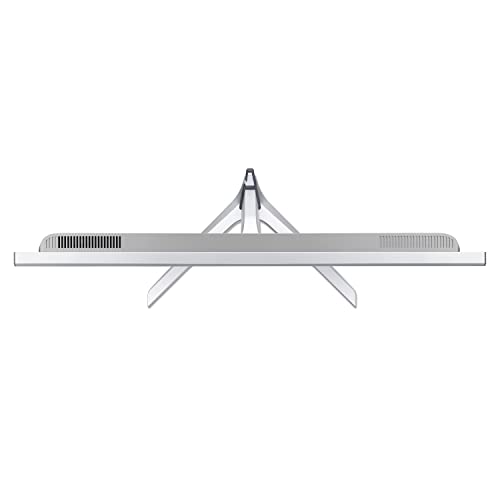
The 512GB PCIe SSD balances speed and storage, allowing fast boot times and plenty of space for documents, photos, and videos. Its ultra-slim silver design, supported by a stylish 3-point stand, makes it as much a centrepiece for the desk as a productivity tool.
Pros & Cons
Pros
Reliable Intel Core i5 performance for daily workloads
23.8″ Full HD IPS display with bright, accurate visuals
Slim, modern design that reduces desk clutter
Wireless keyboard and mouse included
Quiet operation with efficient cooling
Cons
No dedicated GPU for advanced gaming or editing
Limited upgrade potential due to compact chassis
Non-touch display
What This Product Is Used For
Park offices: Ideal for reception or bookings with its professional look and smooth multitasking.
Home offices: A clutter-free setup for remote working or studying.
Admin teams: Handles spreadsheets, email, and video calls with ease.
Entertainment: Great for streaming, browsing, or family video chats.
Why We Like This Product
At YPC, we like the Aspire C24-1650 for its balanced design: it’s powerful enough for office and home workloads, yet slim enough to keep workspaces clean. Our team found it especially handy at the activity park front desk, where space is limited but reliability is vital. The included wireless keyboard and mouse also mean setup is seamless.
Alternatives Worth Considering
HP Pavilion 24 AIO – Similar everyday performance with a stronger audio system.
Lenovo IdeaCentre AIO 3 – Budget-friendly with Ryzen CPUs and a stylish design.
Apple iMac 24″ (M1) – Superb 4.5K Retina display, ideal if you’re in the Apple ecosystem.
Dell Inspiron 24 5000 – Robust build and excellent screen quality for office users.
Tips on How to Use Correctly
Keep Windows 11 updates enabled for the latest features and security.
Use cloud storage or external drives if you need more than 512GB of space.
Adjust Windows power settings to balance quiet operation with performance.
Position the screen at eye level to reduce strain during long sessions.
Tech Specification
Brand / Model: Acer Aspire C24-1650
Display: 23.8-inch Full HD (1920 x 1080), IPS, slim-bezel design
Processor: Intel Core i5-1135G7, 4 cores, 8 threads, base 2.4GHz, boost up to 4.2GHz
Graphics: Integrated Intel Iris Xe Graphics
RAM: 8GB DDR4 (upgradeable)
Storage: 512GB PCIe NVMe SSD
Connectivity:
Wi-Fi 6
Bluetooth 5.0
USB 3.2 and USB 2.0 ports
HDMI output
Camera: Integrated HD webcam with microphone
Audio: Stereo speakers
Peripherals: Wireless keyboard and mouse included
Operating System: Windows 11 Home
Colour: Silver slimline chassis with 3-point stand
EAN: Not specified
Comparisons With Likely Alternatives
Versus HP Pavilion 24 AIO: Acer is slimmer and more affordable, HP offers stronger built-in speakers.
Versus Lenovo IdeaCentre AIO 3: Acer has better screen quality, Lenovo often offers larger storage options.
Versus Apple iMac 24″: iMac wins in screen sharpness and colour, Acer offers better value for Windows users.
FAQs
Is the RAM upgradeable?
Yes, the Aspire C24 supports memory upgrades beyond 8GB.Does it have a touchscreen?
No, this model features a non-touch IPS display.Is it good for gaming?
It can run casual games, but it lacks a dedicated graphics card for demanding titles.What operating system is installed?
Windows 11 Home.Does it come with peripherals?
Yes, a wireless keyboard and mouse are included.Can I add more storage?
Yes, it supports storage upgrades via M.2 or external drives.Is the display height adjustable?
No, it is fixed but can be tilted for comfortable viewing.Does it support dual monitors?
Yes, via the HDMI output.What kind of graphics does it use?
Integrated Intel Iris Xe Graphics.Is it suitable for office productivity software?
Absolutely, it runs office applications, email, and conferencing smoothly.
Looking for more options?
Browse our full range of All In One PC's for other great choices to suit your space, goals, and budget.


