
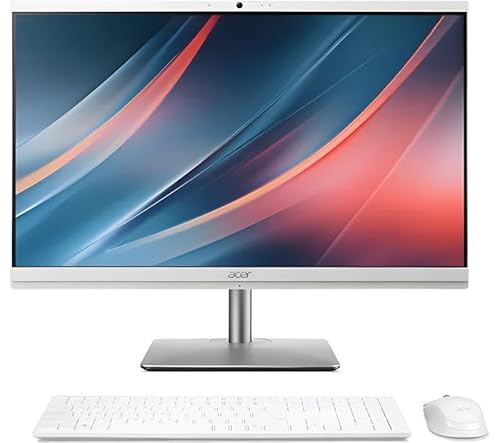




What This All in One PC Is Used For
The Acer Aspire C24 195ES is a modern All in One desktop designed for users who want forward looking performance, strong everyday responsiveness and built in AI acceleration. It is aimed at home offices, professional users, students and households that rely on multitasking, communication and connected devices.
Typical use cases include productivity work, AI assisted applications, video conferencing, content consumption, document editing and general everyday computing. With its ergonomic adjustable stand and eye comfort features, it is also well suited to long working sessions.
This system is ideal for users who want a future ready PC that takes advantage of new AI features built into Windows and Intel hardware.
Performance and Real World Benefits
Processor
The Intel Core Ultra 5 125U is an AI enabled processor featuring Intel AI Boost. This dedicated AI engine offloads supported AI workloads from the main CPU, improving efficiency and responsiveness in compatible applications. It is designed to handle modern productivity tasks smoothly while enabling new AI driven features in Windows and supported software.
Memory
With 16GB of system memory, this All in One supports smooth multitasking and responsive everyday performance. It is well suited to users who regularly work across multiple applications, browser tabs and background processes.
Storage
The 512GB solid state drive provides fast boot times, quick application launches and responsive file access. This capacity is suitable for software, documents and everyday media storage.
AI Features
Intel AI Boost, Copilot in Windows and Acer Intelligence Space work together to enhance productivity. These features help streamline AI workloads, provide generative assistance and recommend compatible AI applications based on system hardware.
Display and Ergonomics
Display
The 23.8 inch Full HD display offers a 1920 by 1080 resolution with narrow bezels for a high screen to body ratio. Acer BlueLightShield technology helps reduce eye strain, making the display comfortable for extended use.
Ergonomic Stand
The adjustable ergostand allows screen tilt from minus 5 degrees to 25 degrees, swivel up to 30 degrees left and right and height adjustment up to 120 millimetres. This flexibility helps users maintain good posture and a comfortable viewing position.
Connectivity and Communication
Wireless and Ports
This system supports WiFi 6E for fast and stable wireless connectivity and Bluetooth 5.4 with LE audio. USB 3.2 Gen 2 Type C and HDMI connectivity allow easy connection of peripherals and external displays.
Camera and Audio
A high resolution 1440p QHD webcam with privacy shutter is included, alongside dual digital microphones. AI enhanced audio features such as Acer PurifiedVoice and Windows Studio Effects help reduce background noise and improve call clarity. Dual speakers provide clear sound for media and communication.
Pros and Cons
Pros
AI enabled Intel Core Ultra processor
16GB RAM supports strong multitasking
Fast solid state storage
Excellent webcam quality with privacy shutter
Advanced AI noise reduction features
Highly adjustable ergonomic stand
Modern wireless connectivity
Cons
Full HD resolution rather than higher resolutions
Integrated graphics only
Windows 11 Home rather than Pro
Why We Like This Product at YPC
At our activity centre at YPC, communication quality and system responsiveness are becoming just as important as raw performance. We like this Aspire C24 because it embraces where desktop computing is heading.
The AI features genuinely improve video calls and productivity, and the adjustable stand makes a noticeable difference for comfort during long working days. It feels like a well thought out system rather than a basic All in One.
Comparisons With Similar All in One PCs
Compared to older Intel Core i5 systems, this model benefits from dedicated AI acceleration and newer platform features.
Against entry level All in One PCs with 8GB RAM, it offers far better multitasking headroom and longevity.
When compared to business focused models with Windows Pro, this system is more home and prosumer oriented but still highly capable.
Alternatives Worth Considering
All in One PCs with higher resolution displays if pixel density is a priority
Windows 11 Pro systems for advanced business features
27 inch Aspire C models if larger screen size is preferred
Tips on How to Use This PC Correctly
Enable Copilot in Windows to take advantage of AI assistance
Use the adjustable stand to set proper ergonomic height and angle
Enable BlueLightShield for long working sessions
Keep AI features and drivers updated for best performance
Use WiFi 6E compatible routers to maximise wireless speed
Full Technical Specification
Brand
Acer
Model
Aspire C24 195ES
Form Factor
All in One Desktop
Display Size
23.8 Inch
Display Resolution
1920 x 1080 Full HD
Display Type
LED LCD
Display Features
Narrow bezels
Acer BlueLightShield
Processor
Intel Core Ultra 5 125U
AI Engine
Intel AI Boost
Memory
16GB RAM
Storage
512GB SSD
Graphics
Integrated Intel Graphics
Wireless
WiFi 6E
Bluetooth 5.4 with LE audio
Ports
USB 3.2 Gen 2 Type C
HDMI
Additional ports not specified
Webcam
1440p QHD webcam with privacy shutter
Microphones
Dual digital microphones
Audio
Dual speakers
Operating System
Windows 11 Home
Colour
White
Frequently Asked Questions
Is this PC suitable for gaming
It is suitable for light casual gaming but not demanding titles.
Does it support AI features
Yes. It includes Intel AI Boost and Windows Copilot support.
Is the webcam good for video calls
Yes. A 1440p QHD webcam with AI enhancements is included.
Can it handle multitasking
Yes. 16GB RAM supports smooth multitasking.
Is the display adjustable
Yes. It supports tilt, swivel and height adjustment.
Does it include noise reduction for calls
Yes. Acer PurifiedVoice AI noise reduction is included.
Is WiFi fast
Yes. WiFi 6E is supported.
Does it include Windows 11
Yes. Windows 11 Home is pre installed.
Is the screen comfortable for long use
Yes. BlueLightShield helps reduce eye strain.
Is this suitable for home office use
Yes. It is well suited to home and professional environments.
Buyer’s Guide
If you are choosing between modern AI enabled All in One PCs, our All in One Desktop PC Buyer’s Guide explains how AI acceleration, memory capacity, display ergonomics and connectivity affect real world usability and future readiness.
Looking for more options?
Browse our full range of Computers and Accessories for other great choices to suit your space, goals, and budget.


