
What This All in One PC Is Used For
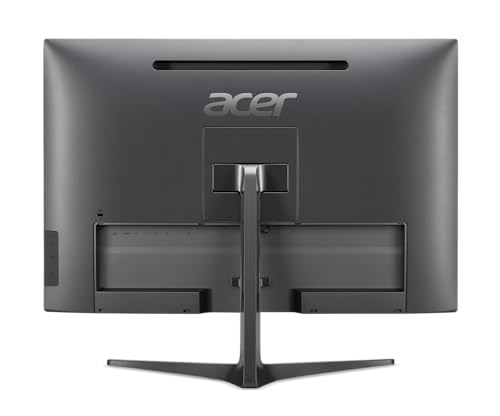
The Acer Chromebase CA24V2 is a premium All in One desktop designed for professional and business environments that rely on cloud based workflows, browser centric applications and secure user management. Running ChromeOS, it is particularly well suited to organisations using Google Workspace, shared workstations, reception desks, education settings and remote collaboration roles.
This system is aimed at users who value fast boot times, strong security, simple management and reliable multitasking rather than traditional Windows software compatibility. The large touchscreen and high quality webcam make it ideal for conferencing, presentations and interactive workflows.
As a renewed system, it offers high end specifications at a more accessible price point while retaining warranty cover.
Performance and Real World Benefits
Processor
The Intel Core i7 8550U is a quad core, eight thread processor designed for efficient performance in professional environments. With a base frequency of 1.4GHz and turbo boost up to 4.0GHz, it delivers responsive performance for multitasking, browser heavy workloads, cloud applications and video conferencing while maintaining low power consumption.
Memory
This system has been upgraded to 16GB of DDR4 system memory. This is a strong configuration for ChromeOS, allowing multiple user sessions, large numbers of browser tabs and simultaneous applications to run smoothly without slowdown.
Storage
The 1TB PCIe NVMe solid state drive provides fast access to applications, cached data and offline files. While ChromeOS relies heavily on cloud storage, the large local capacity is useful for offline working, media storage and fast system responsiveness.
Touchscreen Display
The 23.8 inch Full HD IPS touchscreen offers a 1920 by 1080 resolution with 250 nits brightness, anti glare coating and multi touch support. This makes it suitable for long working sessions, interactive tasks and shared screen use in professional settings.
Operating System
ChromeOS delivers very fast boot times, automatic updates and built in security features. It is designed to minimise maintenance overhead, making it ideal for busy teams and managed environments.
Pros and Cons
Pros
Strong Intel Core i7 performance for ChromeOS
16GB RAM ideal for heavy multitasking
Large fast 1TB NVMe storage
Full HD IPS touchscreen with anti glare coating
Excellent webcam and audio for video conferencing
ChromeOS offers high security and low maintenance
Cons
Not suitable for traditional Windows only software
Older processor generation compared to current models
Renewed product rather than factory sealed
Why We Like This Product at YPC
At our activity centre at YPC, ChromeOS systems are particularly appealing for shared and front facing roles. What we like about this Chromebase is how well specified it is for a ChromeOS machine.
The combination of 16GB RAM, fast NVMe storage and a high quality touchscreen makes it feel genuinely premium in day to day use. For organisations already invested in Google based workflows, this is a very practical and reliable desktop solution.
Comparisons With Similar All in One PCs
Compared to entry level Chromebase systems with 8GB RAM, this model offers noticeably smoother multitasking and better longevity.
Against Windows based All in One PCs, this system trades software flexibility for simplicity, security and ease of management.
When compared to newer Intel platforms, the performance remains very strong for ChromeOS workloads, especially given the memory and storage configuration.
Alternatives Worth Considering
Newer Acer Chromebase models with updated processors
Windows based All in One PCs if legacy software is required
Compact ChromeOS desktops paired with external monitors
Tips on How to Use This PC Correctly
Use Google Workspace for maximum integration
Enable multiple user profiles for shared environments
Take advantage of touchscreen features for navigation and presentations
Use wired Ethernet for stable video conferencing
Keep ChromeOS updates enabled for security and performance
Full Technical Specification
Brand
Acer
Model
Chromebase CA24V2
Form Factor
All in One Desktop
Display Size
23.8 Inch
Display Resolution
1920 x 1080 Full HD
Panel Type
IPS
Brightness
250 nits
Aspect Ratio
16 by 9
Touchscreen
Yes multi touch
Processor
Intel Core i7 8550U
Cores
4
Threads
8
Base Frequency
1.4GHz
Max Turbo Frequency
Up to 4.0GHz
Memory
16GB DDR4
Storage
1TB PCIe NVMe SSD
Graphics
Intel UHD Graphics
Operating System
ChromeOS
Wireless
WiFi 5
Bluetooth 4.2
Wired Networking
Gigabit Ethernet
Ports
HDMI
Webcam
5MP Integrated
Audio
Stereo Speakers
Keyboard and Mouse
UK Keyboard and Mouse Included
Condition
Amazon Renewed
Warranty
1 Year Joint Cybist and Amazon Renewed Warranty
Frequently Asked Questions
Is this PC suitable for Windows applications
No. It runs ChromeOS and does not support native Windows software.
Is this good for business use
Yes. It is well suited to cloud based business environments.
Does it support video conferencing
Yes. It includes a 5MP webcam, microphone and stereo speakers.
Is the touchscreen responsive
Yes. It supports multi touch input.
Is this a brand new product
It is a renewed system with upgraded components and warranty cover.
Can it handle heavy multitasking
Yes. 16GB RAM and a fast NVMe drive support smooth multitasking.
Is it suitable for shared workspaces
Yes. ChromeOS user profiles make it ideal for shared environments.
Does it include keyboard and mouse
Yes. A UK keyboard and mouse are included.
Is local storage important on ChromeOS
It is useful for offline access and performance, although cloud storage is central.
Does it support external displays
Yes. An HDMI port is included.
Buyer’s Guide
If you are deciding between ChromeOS and Windows All in One PCs, our All in One Desktop PC Buyer’s Guide explains the key differences in software compatibility, security, performance expectations and ideal use cases to help you choose the right platform.
Looking for more options?
Browse our full range of Computers and Accessories for other great choices to suit your space, goals, and budget.