

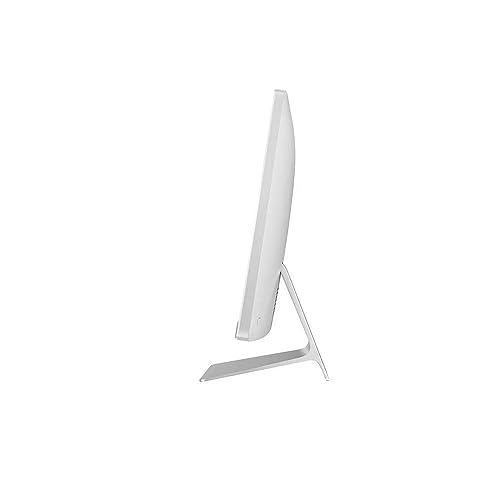

A Simple, Stylish, and Efficient All-in-One Solution
The ASUS M3700 27″ All-in-One PC combines elegant design with reliable performance, making it a perfect choice for home offices, families, and students. With a 27-inch Full HD display, this system provides vibrant visuals for streaming, browsing, and everyday work.
Powered by the AMD Ryzen 3 5300U processor, it offers 4 cores and 8 threads for smooth multitasking across daily tasks. Whether you’re running office applications, streaming your favourite shows, or handling light productivity work, this CPU delivers efficient performance.
Equipped with 8GB RAM and a 512GB SSD, the ASUS M3700 ensures fast boot times, responsive app performance, and plenty of storage for documents, photos, and entertainment. Its sleek, space-saving design makes setup quick and hassle-free, keeping your desk neat and clutter-free.
Pros and Cons
Pros:
Large 27″ Full HD display for clear, immersive visuals
Ryzen 3 5300U CPU handles daily tasks efficiently
512GB SSD provides quick boot-up and fast storage
Slim all-in-one design simplifies setup and reduces clutter
Suitable for both work and entertainment
Cons:
Only 8GB RAM, limiting heavier multitasking
Ryzen 3 is entry-level compared to Ryzen 5 or i7 models
No dedicated GPU for advanced gaming or rendering
What the Product is Used For
This ASUS AIO is ideal for:
Students and families who need a shared computer
Professionals working from home with light-to-moderate workloads
Users who want a large-screen desktop for streaming, browsing, and office apps
Anyone who values a simple, plug-and-play all-in-one solution
Why We Like This Product (YPC Team Review)
At YPC, we set up the ASUS M3700 in one of our meeting rooms and were impressed at how quickly it was ready to use. The display was bright and crisp for presentations, and the SSD made everything feel responsive. While it isn’t built for heavy workloads, we liked its balance of performance, simplicity, and style, especially at this screen size.
Alternatives Worth Considering
Lenovo IdeaCentre AIO 3i 27″ – larger memory upgrade options and touchscreen functionality.
HP 24-cr0047sa – smaller screen but Intel i5 performance for stronger multitasking.
MSI Modern AM242TP – more powerful with 32GB RAM and 1TB SSD for demanding users.
Tips on How to Use Correctly
Upgrade RAM to 16GB for smoother multitasking if needed.
Position the 27″ display ergonomically for comfort during long sessions.
Use external storage or cloud solutions if 512GB isn’t enough.
Keep Windows 11 updated for the latest features and security.
Comparisons
Compared with the Lenovo AIO 3i 27″, the ASUS M3700 is simpler but more budget-friendly.
Against the HP 24-cr0047sa, ASUS offers a larger display but slightly less CPU performance.
Versus the MSI AM242TP, ASUS is more affordable but offers far less RAM and storage.
Full Tech Specification
| Specification | Details |
|---|---|
| Brand | ASUS |
| Model | M3700 (M3700WUAK-WA117W) |
| Display | 27″ Full HD (1920 × 1080) |
| Processor | AMD Ryzen 3 5300U, 4 cores, 8 threads |
| Graphics | Integrated AMD Radeon Graphics |
| Memory (RAM) | 8GB |
| Storage | 512GB SSD |
| Operating System | Windows 11 Home |
| Camera | Integrated webcam (not detailed) |
| Audio | Integrated speakers |
| Connectivity | Wi-Fi, Bluetooth, USB ports, HDMI (details not specified) |
| Keyboard & Mouse | Not specified |
| Colour | Not specified |
| EAN | Not specified |
Frequently Asked Questions
1. Does it include a keyboard and mouse?
Not specified; check with the retailer.
2. Can I upgrade the RAM?
Yes, it can be upgraded for smoother performance.
3. Is the screen touchscreen-enabled?
No, this model does not support touch.
4. Is the 512GB SSD fast?
Yes, it uses NVMe technology for quick boot and load times.
5. Does it run Windows 11?
Yes, it comes pre-installed with Windows 11 Home.
6. Is the display 4K?
No, it’s a Full HD (1920 × 1080) screen.
7. Can I use it for gaming?
Casual gaming is fine, but it lacks a dedicated GPU for advanced titles.
8. Does it support dual monitors?
Yes, via HDMI output.
9. Is it easy to set up?
Yes, it’s designed for plug-and-play simplicity.
10. Is this model suitable for creative work?
Yes, for basic creative tasks, but not intensive 3D rendering or video editing.
Looking for more options?
Browse our full range of All In One PC's for other great choices to suit your space, goals, and budget.


