




Quick Summary
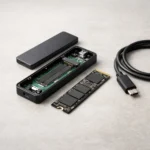
The Beikell M.2 NVMe enclosure is a tool-free SSD enclosure and USB to NVMe adapter with a stated transfer speed of up to 10Gbps through USB 3.2 Gen 2 * 1. It supports M.2 NVMe and SATA SSDs in 2230, 2242, 2260 and 2280 sizes, with M-Key or M+B Key drives.
It also comes with a USB C to C cable and a USB A to C cable, and the enclosure includes an LED indicator for connection status.
Who It Is Best For
This enclosure suits buyers who need to access an M.2 SSD through USB and want a tool-free way to insert the drive. It is also a good fit for anyone who wants to connect to a laptop, desktop, phone or tablet for file access.
Key Details
| Detail | Verified information and buyer relevance |
|---|---|
| Brand | Beikell. |
| Product type | M.2 NVMe enclosure and NVMe to USB adapter. |
| Connection interface | USB 3.2 Gen 2 * 1 with USB C. This is the stated connection for the enclosure. |
| Stated transfer speed | Up to 10Gbps, which is the key data rate figure given for file transfers. |
| Supported SSD types | M.2 NVMe and SATA SSDs are listed. |
| Supported sizes | 2230, 2242, 2260 and 2280. |
| Key compatibility | M-Key or M+B Key drives are listed. |
| Included cables | USB C to C and USB A to C cables are included. |
| Design features | Tool-free installation, LED indicator and a small, slim form are stated. |
| Material | Aluminium alloy with a groove design. |
Why Buyers Choose It
- Up to 10Gbps transfer speed gives a clear specification for moving files through the enclosure.
- Tool-free installation means the SSD can be inserted without additional tools.
- USB C to C and USB A to C cables are included, so there are two stated connection options in the box.
- The LED indicator gives a visible connection status check.
How It Works
- Open the lid.
- Insert the M.2 SSD.
- Secure the drive.
- Connect the enclosure using the included USB C to C cable or USB A to C cable.
Real World Use
The slim format makes the enclosure easier to carry in a bag, and the included cables reduce the need to carry extra leads. The stated USB C interface makes it straightforward to connect to compatible devices for file access.
What To Know Before You Buy
Check that your SSD matches the listed size and key type before ordering. Confirm that you need support for M.2 NVMe or SATA SSDs, and choose the included cable that suits your device connection.
Common Buyer Questions
What SSD sizes does it support?
It supports 2230, 2242, 2260 and 2280 M.2 SSDs.
Are cables included?
Yes, a USB C to C cable and a USB A to C cable are included.
Does it need extra software?
No additional driver or software is required, and it is stated as plug and play.
Final Buying View
If you need a tool-free M.2 enclosure with a stated 10Gbps USB 3.2 Gen 2 connection, this Beikell option gives a clear set of connection and size checks. Review the SSD key type, supported size and the cable you plan to use before ordering.


