

Quick Summary
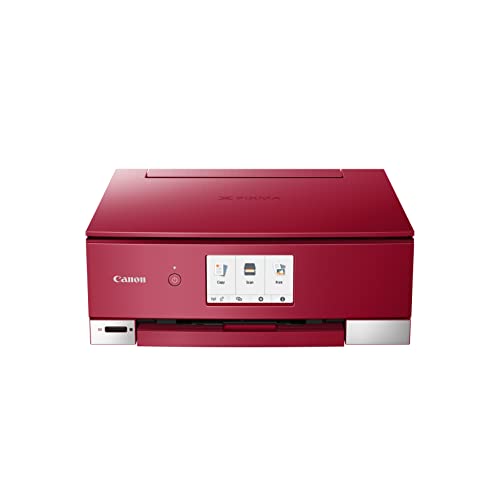
The Canon PIXMA TS8352a is an all-in-one printer with 6 individual inks, including Photo Blue. It also includes a 2-way paper feed and SD card compatibility, so it brings together printing, copying and scanning in one device.
It is set up for users who want Wi-Fi control, cloud linking and support for Smart devices, with the Canon PRINT app plus AirPrint for iOS and Mopria for Android.
Who It Is Best For
This model will suit buyers looking for an all-in-one printer for creative work, photo printing and everyday home use. The listed app support and SD card compatibility make it relevant if you want to print from a memory card or from a connected device.
Key Details
| Detail | Verified information and buyer relevance |
|---|---|
| Model | Canon PIXMA TS8352a, which identifies the exact printer variant. |
| Product type | All-in-One printer for printing, copying and scanning. |
| Ink system | 6 individual inks, including Photo Blue, for a setup with separate ink slots. |
| Paper feed | 2-way paper feed, giving more than one paper loading option. |
| Media and card support | SD card compatibility for direct access from compatible cards. |
| Connectivity | Wi-Fi with 5Ghz band support, plus Canon PRINT app, AirPrint and Mopria support. |
| Included components | Canon PIXMA TS8350a Series is listed as included. |
| Weight | 6.6 kilograms, which is useful when checking placement and handling. |
| Windows support | Windows 10 is listed as an operating system reference. |
| Print speed | Up to 10.0 pages per minute in colour and 15.0 images per minute in black and white are listed. |
Why Buyers Choose It
- 6 individual inks, including Photo Blue, give a separate ink setup for the printer.
- Wi-Fi links with 5Ghz band support let the printer connect to compatible networks.
- Canon PRINT app support, plus AirPrint and Mopria, gives several ways to print from supported devices.
- SD card compatibility is useful if you want to print from a card without relying only on a device connection.
- The 2-way paper feed gives more than one way to load paper.
How It Works
- Connect the printer using the available Wi-Fi option or use a supported app or service such as Canon PRINT, AirPrint or Mopria.
- Load paper using the 2-way paper feed.
- If needed, insert an SD card for compatible card-based access.
- Use the printer for printing, copying and scanning.
- For creative use, the listed apps include Easy-PhotoPrint Editor, Creative Park and the Nail Sticker Creator app.
What To Know Before You Buy
Check that you want the TS8352a variant, as the model name is part of the product identity. Review whether you need SD card compatibility and 5Ghz Wi-Fi support, since those are part of the listed setup. The weight is 6.6 kilograms, so allow for that when planning placement.
The listed operating system reference is Windows 10, and the printer is also described with iOS and Android app support through AirPrint and Mopria. Review the intended connection method and software support before ordering.
Common Buyer Questions
Can I print from a phone or tablet?
Yes. The printer supports Canon PRINT, AirPrint for iOS and Mopria for Android.
Does it support direct card use?
Yes. SD card compatibility is listed.
What functions does it cover?
It is an all-in-one model for printing, copying and scanning.
Is there a colour ink setup?
Yes. It uses 6 individual inks, including Photo Blue.
Final Buying View
The Canon PIXMA TS8352a is a multi-function printer for buyers who want an all-in-one setup with 6 individual inks, SD card compatibility and Wi-Fi app support. Check the exact model variant, the connection method you plan to use and the placement space before ordering.


