
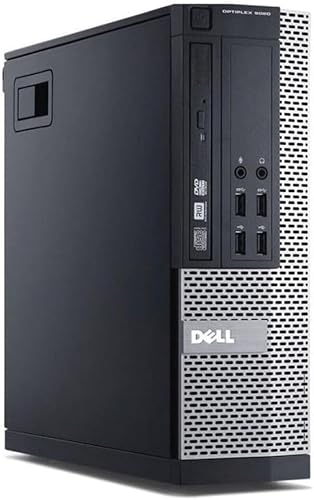


This Dell OptiPlex 7020 or 9020 Small Form Factor desktop is aimed at users who want strong everyday performance in a compact, business grade system. It suits home offices, professional workspaces, and power users replacing an older PC that can no longer keep up. Typical uses include heavy multitasking, large spreadsheets, accounting and admin software, web based platforms, coding, remote working, and media playback.
This is a PC only package with no monitor included, making it ideal for buyers who already have screens and peripherals.
Real world performance explained
The Intel Core i7 4th generation processor offers four physical cores with turbo speeds up to 3.90GHz. In real use, this delivers quick application launches, smooth multitasking, and consistent responsiveness even when several programs are open at once.
With 16GB of DDR3 RAM, the system comfortably handles demanding everyday workloads such as multiple browser windows, office applications, background services, and virtual meetings running together. The solid state drive provides fast boot times and quick access to files, making the whole system feel noticeably faster than hard drive based PCs.
Overall, this OptiPlex feels powerful and responsive for day to day professional use, despite its compact size.
Pros and Cons
Pros
• Intel Core i7 quad core processor delivers strong performance
• 16GB RAM supports heavy multitasking
• Solid state drive improves speed and responsiveness
• Compact small form factor saves desk space
• Windows 11 Professional installed
• WiFi included via USB adapter
• Dual DisplayPort outputs for modern monitors
Cons
• PC only with no monitor included
• Older processor generation compared to current models
• Limited internal expansion due to SFF design
Why we like this product at YPC Outdoors
At YPC Outdoors, we like this OptiPlex configuration because it offers excellent real world performance for the money. During assessment, it stood out as a system that still feels fast and capable for modern workloads. It is particularly appealing for users who want a compact desktop that can comfortably handle multitasking without the cost of a brand new workstation.
Alternatives worth considering
If you need newer generation hardware, a 7th or 8th generation Core i5 or i7 OptiPlex may be worth considering. Users who want maximum internal expansion could look at a mid tower desktop. For ultra compact setups, a micro desktop may be a better fit.
Comparisons with similar options
Compared with Core i5 based systems of the same generation, this i7 configuration offers better multitasking and higher peak performance. Against newer entry level desktops, it may offer similar real world speed at a lower cost. When compared to laptops, it delivers stronger sustained performance and better connectivity for fixed workspaces.
Tips on how to use it correctly
Place the PC in a well ventilated area to maintain consistent performance. Keep Windows and drivers up to date for security and stability. If you work with large files, consider adding external storage to supplement the internal SSD.
Full Tech Specification
• Brand: Dell
• Model: OptiPlex 7020 or OptiPlex 9020
• Form factor: Small Form Factor
• Condition: Renewed
• Package contents: PC only, no monitor
• Operating system: Windows 11 Professional 64 bit
• Processor: Intel Core i7 4th generation
• Cores: 4
• Processor speed: Up to 3.90GHz
• Memory: 16GB DDR3 RAM
• Storage: 500GB solid state drive
• Graphics: Integrated graphics
• Video outputs: 2x DisplayPort
• Wireless: 300Mbps USB WiFi adapter included
• Power cable: UK 3 pin lead included
• Optical drive: Not specified
Frequently Asked Questions
Does this PC include a monitor
No. This is a PC only package.
Is Windows installed and ready to use
Yes. Windows 11 Professional is installed.
Can it handle heavy multitasking
Yes. The Core i7 processor and 16GB RAM are well suited to multitasking.
Is this suitable for office and home working
Yes. It performs very well for professional workloads.
Does it support dual monitors
Yes. Two DisplayPort outputs are included.
Is WiFi included
Yes. A USB WiFi adapter is supplied.
Is this a gaming PC
No. It is designed for productivity rather than gaming.
Can the storage be upgraded
Yes. Storage upgrades are usually possible.
Is it noisy during use
Noise levels are generally low during normal operation.
Which model will I receive, 7020 or 9020
You will receive either a 7020 or 9020 SFF depending on availability, with equivalent specifications.
Buyer’s Guide
If you are comparing refurbished performance desktops, our Desktop PC Buyers Guide explains processor choices, memory requirements, storage options, and how to judge long term value.
Looking for more options?
Browse our full range of Computers and Accessories for other great choices to suit your space, goals, and budget.


