Desktop PC's
Desktop PC’s are designed for people who want a reliable computer setup for home, office, study, gaming, creative work or everyday digital tasks. Whether you need a simple family computer, a more powerful workstation or a gaming focused system where listed, the right desktop PC can give you a stable and practical setup in one place.
This category can include tower PCs, compact desktop computers, gaming desktops, office PCs, mini PCs, refurbished style systems where listed, and desktop bundles, depending on the products shown. Features vary widely, so always check the product details for processor, memory, storage, graphics, operating system, ports, size, included accessories and intended use before buying.
Showing 1–24 of 105 resultsSorted by popularity
- Desktop PC's
Lenovo ThinkCentre M80Q G3 Tiny Desktop – i5-12500T (6 Cores, 2.0/4.4GHz), 1TB PCIe Gen 4.0×4 NVMe, 16GB DDR5, vPro, Intel UHD Graphics 770, GbE, WIFI 6 & BT5.1, Windows 11 Pro (Renewed)
£615.00Original price was: £615.00.£595.00Current price is: £595.00. *View On Amazon*
What Are Desktop PC’s?
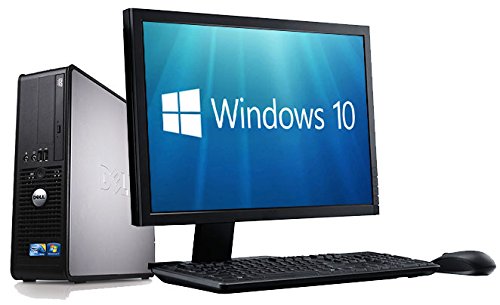
Desktop PCs are computers designed to be used in a fixed location, usually on or near a desk. They normally connect to a monitor, keyboard, mouse and other accessories, although what is included can vary by product.
Unlike laptops, desktop PCs are not mainly designed for portability. Their advantage is that they can create a comfortable, permanent workspace with a larger screen, full size keyboard, separate mouse and more flexible accessory setup where compatible.
What Are Desktop PC’s Used For?
Desktop PCs are used for work, study, web browsing, email, video calls, online shopping, streaming, gaming, photo storage, creative software, spreadsheets, design tasks, file management and general home computing.
For home users, a desktop PC can provide a shared family computer for everyday tasks. For office users, it can support a consistent desk setup with monitors, printers and accessories. For gamers, a desktop may offer more room for gaming focused hardware where listed. For creative users, memory, storage, processor and graphics capability may become more important depending on the software used.
How To Choose The Right Desktop PC
Start by thinking about what you need the computer to do. A basic desktop for browsing and documents has very different requirements from a gaming PC, video editing workstation or business computer.
Next, compare the main specifications. Processor, memory, storage and graphics all affect how suitable a desktop PC may be for different tasks. A computer used for simple documents and browsing may not need the same hardware as one used for demanding games or creative software.
Also check what is included. Some desktop PCs may be sold as the tower only, while others may include a monitor, keyboard, mouse or other accessories where listed. Always read the product information carefully so you know exactly what you are buying.
Key Features To Compare
Processor type is one of the most important features to compare because it affects how the computer handles everyday tasks, multitasking and demanding software where suitable.
Memory, often called RAM, helps the computer run programs and switch between tasks. More memory may be useful for multitasking, creative work or gaming, depending on the system and software.
Storage affects how much space you have for files, applications, photos, videos and games. Some systems may include SSD storage for faster everyday response, hard drive storage for larger capacity, or a combination where listed.
Graphics capability is also important. Some desktop PCs use integrated graphics, which may suit basic use. Others may include a dedicated graphics card where listed, which can be useful for gaming, design, video work or certain creative applications.
Other useful features to compare include operating system, Wi Fi support where listed, Bluetooth where listed, USB ports, display connections, case size, cooling, noise guidance where stated, upgrade options and included accessories.
Desktop PC’s Compared With Laptops
Desktop PCs are usually better suited to fixed workspaces. They can be paired with larger monitors, full size keyboards and more comfortable desk accessories, which can make long sessions easier.
Laptops are better when portability matters. They include a screen, keyboard, trackpad and battery in one device, making them useful for travel, school, university or flexible working.
The main trade off is portability versus a dedicated setup. A laptop can move with you, while a desktop PC can create a more permanent and comfortable workstation.
Desktop PC’s Compared With All In One Computers
An all in one computer combines the computer and screen into one unit. This can make a desk look tidier and reduce cable clutter, depending on the design.
A traditional desktop PC usually separates the computer tower from the monitor. This can give more flexibility when choosing screen size, replacing accessories or upgrading parts where suitable.
The main choice is neatness versus flexibility. An all in one computer may suit simple home or office use, while a desktop tower may be better if you want more control over the setup.
Desktop PC’s Compared With Mini PCs
Mini PCs are compact desktop computers designed to save space. They can be useful for small desks, media setups, office work or basic home computing where the listed specifications are suitable.
Larger desktop PCs may offer more internal space, more ports, stronger cooling or more upgrade options where listed. This can be useful for gaming, creative work or more demanding tasks.
The main trade off is size versus expansion. A mini PC can be neat and compact, while a larger desktop may offer more room for hardware and future changes.
Guidance For Beginners, Regular Users And Experienced Users
Beginners should focus on a desktop PC that is easy to set up, suitable for everyday tasks and supplied with clear compatibility information. A simple system for browsing, email, documents and video calls may be enough for many home users.
Regular users may want to compare performance, storage, monitor support and desk comfort more carefully. If the computer will be used daily, smooth multitasking and reliable accessory connections can make a big difference.
Experienced users may look more closely at motherboard features, graphics card options, memory capacity, cooling, storage expansion, power supply details and upgrade potential where listed. These details can matter more for gaming, content creation and advanced workloads.
Use Cases By User Type
For home users, a desktop PC can be a practical shared computer for browsing, shopping, family admin, photos, streaming and homework.
For students, a desktop can be useful for study at home, research, essays, online lessons and file storage. A comfortable monitor, keyboard and mouse may make longer study sessions easier.
For office and remote workers, a desktop PC can support a stable desk setup with monitors, webcams, printers, headsets and storage devices where compatible.
For gamers, a desktop PC may be chosen for dedicated graphics, cooling, storage space and upgrade options where listed. Always check the system requirements of the games you want to play before choosing.
For creative users, processor, memory, graphics, display connections and storage can all matter. Photo editing, video editing, music production and design work may need different specifications depending on the software.
Fit, Compatibility And Desk Setup
Before buying a desktop PC, check the space where it will be used. A tower needs room for airflow, cables and access to ports. A compact PC may fit more easily on a small desk, but may offer fewer expansion options where listed.
Check monitor compatibility. Display connections may include HDMI, DisplayPort, VGA, USB C or other ports depending on the product. Make sure the desktop PC and monitor can connect using compatible cables.
Also think about keyboard, mouse, speakers, webcam, printer, external drives and networking. A desktop PC should have enough suitable ports or compatible wireless features for the accessories you plan to use.
Performance, Storage And Upgrade Considerations
Desktop PC performance depends on the whole system, not just one part. A strong processor can be limited by low memory, slow storage or unsuitable graphics, depending on the task.
Storage should be chosen around real use. Documents and browsing need less space than games, videos, creative projects and large photo libraries. If you keep lots of files, compare storage capacity carefully.
Some desktop PCs may allow future upgrades where listed, while others may be more limited. If upgrades matter, check internal space, memory support, storage bays, power supply guidance and case layout before buying.
Safety And Practical Setup
Desktop PCs should be set up according to the product instructions. Place the system on a stable surface with good ventilation and avoid blocking air vents.
Use suitable power cables, surge protection where appropriate and safe cable routing. Cables should not be stretched across walkways or placed where chair wheels can damage them.
Keep liquids away from the computer, keyboard, monitor and power accessories. Do not use damaged plugs, cracked cables or accessories that become unusually hot. If you are working inside a desktop PC, switch it off, unplug it and follow safe component handling guidance.
Care, Cleaning And Maintenance
Keep desktop PCs clean, dry and well ventilated. Dust can build up around vents, fans and filters, which may affect airflow over time.
Clean the outside of the case, monitor and accessories using suitable methods. Avoid harsh cleaners unless the product instructions say they are safe. Do not spray liquid directly into ports, vents or keyboards.
Back up important files regularly using suitable external storage or cloud storage where appropriate. Check software updates, security settings and storage space from time to time to keep the computer easier to manage.
If the computer becomes noisy, slow, unstable or unusually hot, check the basics first, such as dust, cables, storage space and running programs. Seek suitable technical help if you are unsure.
Storage And Organisation Tips
Keep the desktop PC in a position where cables can be organised and air can circulate. A desk cable tray, ties or clips may help keep power and data cables tidy.
Store spare cables, adapters and accessories together so they are easy to find. Labelling similar cables can help avoid confusion, especially in home offices and gaming setups.
If you keep recovery drives, software keys or manuals, store them safely. For shared computers, it can also help to organise user accounts, folders and backup routines clearly.
Useful Accessories To Consider
Useful accessories may include monitors, keyboards, mice, mouse mats, wrist rests, speakers, webcams, headsets, external storage drives, USB hubs, surge protectors, desk lamps, printer cables, monitor stands and cleaning cloths.
For work and study, a comfortable keyboard, mouse and monitor can make the setup easier to use. For gaming, a suitable monitor, headset, mouse and keyboard may be useful where compatible. For home use, speakers, webcams and external drives may help complete the setup.
Why Buy From YPC?
At YPC, we understand active lifestyles and the need for practical products that work in real use. Desktop PC’s can vary by processor, memory, storage, graphics, size, operating system, ports, upgrade options and included accessories, so it helps to compare the details carefully before choosing.
YPC makes it easier to browse desktop PC’s in a practical way, with options that can be compared by listed features, user needs and setup goals. Whether you are buying for home, work, study, gaming, creative projects or everyday computing, you can browse and compare desktop PC’s at YPC to find suitable options for your desk setup.
FAQs
What is a desktop PC?
A desktop PC is a computer designed to be used in a fixed place, usually with a separate monitor, keyboard and mouse. It is commonly used for home, work, study, gaming and general computing.
Is a desktop PC better than a laptop?
A desktop PC may be better for a fixed desk setup, larger monitors, easier accessory use and upgrade options where listed. A laptop is better if portability is the main priority.
What should I check before buying a desktop PC?
Check the processor, memory, storage, graphics, operating system, ports, size, included accessories and whether it suits the tasks you need it for.
Do desktop PC’s come with monitors?
Some desktop PC’s may include a monitor where listed, while others are sold as the tower only. Always check the product description to see what is included.
Are desktop PC’s good for gaming?
Some desktop PC’s may be suitable for gaming where they include the right graphics, processor, memory and storage for the games you want to play. Always check game requirements and product specifications.
Can desktop PC’s be upgraded?
Some desktop PC’s can be upgraded where the case, motherboard, power supply and internal layout allow it. Others may be more limited, so check the product details before buying.
What is the difference between a desktop PC and a mini PC?
A mini PC is a compact type of desktop computer that saves space. A larger desktop PC may offer more room for components, cooling and upgrades where listed.
Do I need a keyboard and mouse with a desktop PC?
Most desktop PC setups need a keyboard and mouse, but they may or may not be included. Check the product listing carefully and buy compatible accessories if needed.
How much storage do I need in a desktop PC?
This depends on how you use the computer. Basic documents and browsing need less space, while games, videos, photos and creative files may need much more storage.
How do I care for a desktop PC?
Keep it clean, dry and well ventilated. Avoid blocking vents, manage cables safely, back up important files and check for dust, updates and storage space regularly.
Find out more with our Desktop PC Buyers Guide.
Getting ready for Summer? View our Home and Garden Products
Heading outdoors this winter? Take a look at our Outdoor Clothing.