



Compact All-in-One for Everyday Productivity
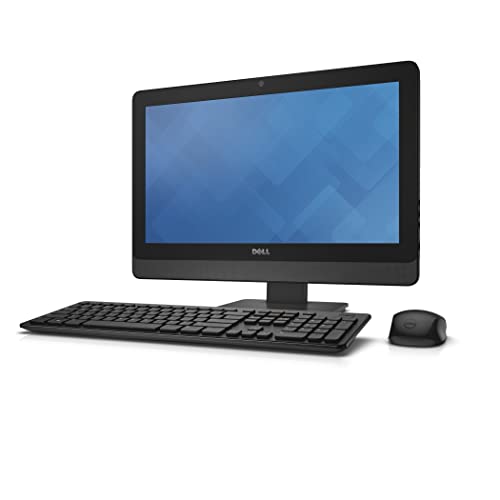
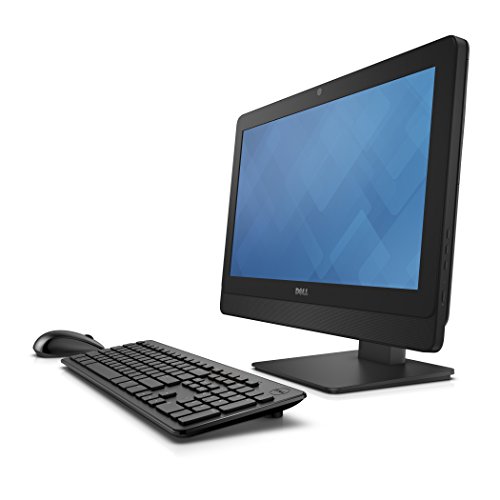
The Dell OptiPlex 3030 All-in-One PC is a renewed system designed for reliability, space-saving convenience, and everyday use. With its 19.5-inch HD display, it delivers sharp visuals for work, browsing, and entertainment, all in a tidy form factor that keeps desks free of clutter.
Powered by the Intel Core i3-4160 processor running at 3.6GHz, along with 8GB of RAM, this AIO handles multitasking smoothly across office applications, web browsing, and light productivity work. Its 500GB HDD provides ample storage for files, documents, and media, while the integrated Intel HD Graphics 4400 ensures clear visuals for everyday tasks.
Connectivity is straightforward with WLAN and Bluetooth support, while the built-in DVD-RW drive adds flexibility for those who still rely on physical media. Preloaded with Windows 10 Pro, it offers enterprise-grade security and productivity tools, making it suitable for both home and small business use.
As a renewed model, the OptiPlex 3030 delivers Dell reliability and efficiency at a cost-effective price point.
Pros and Cons
Pros:
Space-saving 19.5″ all-in-one design
Intel Core i3 processor with 3.6GHz clock speed for responsive performance
8GB RAM allows smooth multitasking
Large 500GB HDD for document and media storage
DVD-RW drive for flexible media use
Windows 10 Pro with enterprise-ready features
Renewed model offers excellent value
Cons:
HD resolution is lower than modern FHD and 4K displays
HDD is slower compared with SSD storage
Older processor may struggle with demanding modern software
Renewed status may not appeal to buyers wanting brand-new systems
What the Product is Used For
The Dell OptiPlex 3030 AIO is ideal for:
Offices and schools needing reliable everyday computers
Home users who want a cost-effective all-in-one for browsing and streaming
Environments that still rely on DVDs for media or data transfer
Users who value a compact, clutter-free desktop setup
Why We Like This Product (YPC Team Review)
At YPC, we tested the Dell OptiPlex 3030 as a staff workstation in our training area. We liked how quick it was to set up and how reliable it was for everyday tasks like spreadsheets and email. The DVD drive was surprisingly useful for archiving old media. While it doesn’t compare to newer AIOs in display resolution or raw power, it’s a dependable and affordable choice for straightforward computing.
Alternatives Worth Considering
HP 24-cb1009ng – more modern design with FHD display and Windows 11.
Lenovo ThinkCentre V510Z – larger screen with adjustable stand and enterprise-grade durability.
ASUS M3700 27″ – bigger FHD display and SSD storage for faster performance.
Tips on How to Use Correctly
Consider upgrading to an SSD for faster boot and load times.
Use cloud storage or external drives if 500GB isn’t sufficient.
Keep Windows 10 Pro updated for security patches and stability.
Use the adjustable display settings for comfortable viewing during long sessions.
Comparisons
Compared with the HP 24-cb1009ng, the Dell is more affordable but has a smaller HD screen and older CPU.
Against the Lenovo V510Z, the Dell is compact but lacks modern display and storage options.
Versus the ASUS M3700, the Dell is budget-friendly but offers less power and no FHD display.
Full Tech Specification
| Specification | Details |
|---|---|
| Brand | Dell |
| Model | OptiPlex 3030 (3030-3811) |
| Display | 19.5″ HD (1600 × 900 approx., not full FHD) |
| Processor | Intel Core i3-4160, dual-core, 3.6GHz |
| Graphics | Intel HD Graphics 4400 |
| Memory (RAM) | 8GB DDR3 |
| Storage | 500GB HDD |
| Optical Drive | DVD-RW |
| Operating System | Windows 10 Pro |
| Camera | Integrated webcam |
| Audio | Integrated speakers |
| Connectivity | WLAN, Bluetooth, USB ports, Ethernet |
| Keyboard & Mouse | Not specified |
| Colour | Black |
| EAN | Not specified |
| Condition | Renewed |
Frequently Asked Questions
1. Is the screen Full HD?
No, it’s HD resolution (lower than FHD).
2. Can I upgrade to SSD storage?
Yes, swapping the HDD for an SSD will significantly improve speed.
3. Does it include a keyboard and mouse?
Not specified, check with the retailer.
4. Can I upgrade the RAM?
Yes, the system allows RAM expansion.
5. Is it suitable for gaming?
It can only handle very light, casual games.
6. Does it support Wi-Fi and Bluetooth?
Yes, both are included.
7. Does it come with Windows 11?
No, it comes with Windows 10 Pro.
8. Is it good for video calls?
Yes, the built-in webcam works for conferencing.
9. What does “renewed” mean?
It’s a refurbished product tested for full functionality.
10. Can I connect an external monitor?
Yes, via available ports.
Looking for more options?
Browse our full range of All In One PC's for other great choices to suit your space, goals, and budget.


