
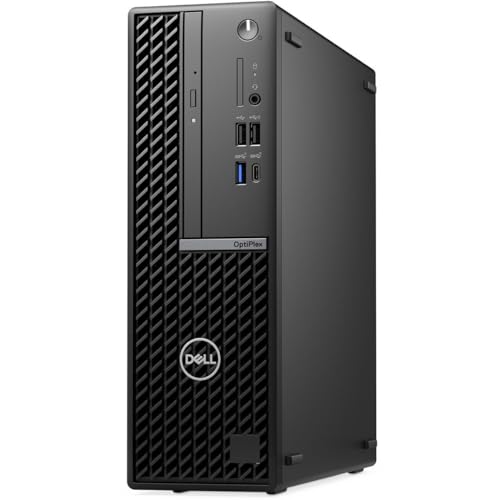


The Dell OptiPlex 7020 Small Form Factor is a compact yet powerful business-class PC that combines 14-core Intel Core i5-14500 performance with the latest DDR5 memory. Featuring 16GB of RAM and a fast 512GB SSD, it is engineered for modern multitasking, security, and reliability. Running Windows 11 Pro, it is perfectly suited for professionals who need a future-proof desktop with excellent energy efficiency in a space-saving chassis.
Pros and Cons
Pros:
Latest Intel Core i5-14500 with 14 cores (6 Performance + 8 Efficient) handles demanding workloads with ease
DDR5 memory delivers higher bandwidth and responsiveness compared to DDR4 systems
512GB SSD ensures fast boot times and application loading
Compact SFF case saves desk space while retaining expandability
Windows 11 Pro offers enterprise-level security and modern productivity features
Trusted Dell OptiPlex line with business-grade build quality
Cons:
SFF case has limited room for large dedicated GPUs
No optical drive for legacy disc media
512GB storage may require external drives for heavy media users
What the Product is Used For
This PC is ideal for professionals, small businesses, and home office setups that demand reliability and modern performance. It excels at:
Productivity applications such as Office, Teams, and Zoom
Multitasking across multiple browser tabs and work apps
Data analysis, light development, and financial software
Remote and hybrid work requiring enterprise security
Why We Like This Product
At YPC, we found the OptiPlex 7020 SFF with i5-14500 impressively quiet and efficient, even under load. The DDR5 RAM makes everyday tasks feel more fluid, and Windows 11 Pro integrates well with modern workflows. It’s compact enough to fit into tight desk spaces, yet still has the power to handle demanding office workloads. For a modern office PC, it’s an excellent all-rounder.
Alternatives Worth Considering
HP EliteDesk 800 G9 SFF – Similar 12th/13th gen Intel performance in a compact design.
Lenovo ThinkCentre M75q Gen 4 – A Ryzen-powered alternative with excellent security features.
Dell OptiPlex 7010 Plus SFF – A slightly lower-tier but more budget-friendly model.
Tips on How to Use Correctly
Place the SFF case in a well-ventilated spot to ensure proper airflow.
Use the SSD for your OS and frequently used applications. Add an external HDD or NAS for large file storage.
Keep Windows 11 Pro security features like BitLocker and Windows Hello enabled for added protection.
Pair with dual monitors via DisplayPort for improved productivity.
Comparisons
Compared to the HP EliteDesk 800 G9, the OptiPlex 7020 offers similar CPU performance but with Dell’s proven manageability tools. Against the Lenovo ThinkCentre M75q, the OptiPlex provides Intel’s hybrid core efficiency, while Lenovo’s Ryzen version may have better multi-threaded performance for certain workloads.
Full Technical Specification
Desktop PC
Brand: Dell
Model: OptiPlex 7020 SFF
Colour: Black
Processor: Intel Core i5-14500, 14 cores (6P + 8E), up to 4.8GHz
RAM: 16GB DDR5 SDRAM
Storage: 512GB SSD
Graphics: Integrated Intel UHD Graphics (on CPU)
Optical Drive: Not included
Operating System: Windows 11 Pro
Connectivity: Gigabit LAN (other ports not specified)
Expansion: Limited by SFF chassis
Condition
Renewed
FAQs
Q1: Does this PC support dual monitors?
A: Yes, via its DisplayPort outputs (exact count varies by configuration).
Q2: Is the RAM upgradeable?
A: Yes, the 7020 SFF has multiple DIMM slots for DDR5 memory expansion.
Q3: Can I add a dedicated graphics card?
A: Yes, but only low-profile GPUs due to the SFF case size.
Q4: Does it come with WiFi?
A: No, this configuration includes LAN only. A WiFi card or dongle would be required.
Q5: Is the storage expandable?
A: Yes, you can add additional SSDs or HDDs depending on the SFF chassis configuration.
Q6: How secure is Windows 11 Pro?
A: It includes enterprise features such as BitLocker encryption and enhanced malware protection.
Q7: Is this PC noisy?
A: No, Dell SFF units are designed for quiet office operation.
Q8: Does it include peripherals?
A: Keyboard and mouse are not specified; check package details before purchase.
Q9: Can it run virtual machines?
A: Yes, the i5-14500 with DDR5 RAM can comfortably run virtualised environments.
Q10: Is this suitable for gaming?
A: Light gaming is possible with integrated graphics, but it’s not designed as a gaming PC.
Looking for more options?
Browse our full range of Desktop PC's for other great choices to suit your space, goals, and budget.


