

What This Product Is Used For
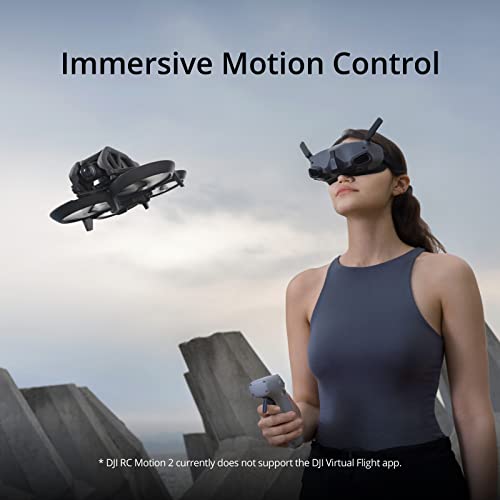
DJI RC Motion 2 is an immersive motion based controller designed to let you fly compatible DJI drones using natural hand and wrist movements. Compared with traditional twin stick controllers, it prioritises intuitive pointing and motion input, making FPV flight feel more direct and accessible while still allowing precise control of direction, speed, and altitude.
Who This Product Is Best Suited To
This controller is best suited to FPV users and creators who want a more immersive flying experience without mastering complex stick inputs. It is ideal for pilots who enjoy dynamic movement, cinematic FPV shots, and one handed operation, as well as users transitioning from standard controllers to motion based flight.
Pros and Cons
Pros
Intuitive motion control makes flying feel natural and engaging
One handed operation reduces fatigue and improves enjoyment
Smooth multidirectional control helps build confidence quickly
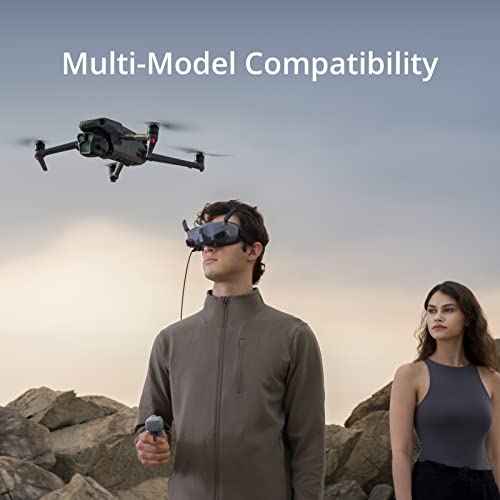
Works across a wide range of compatible DJI drones and goggles
Cons
Not intended to replace traditional dual stick controllers for precision flying
Does not support the DJI Virtual Flight app
Real World Performance and Day to Day Use
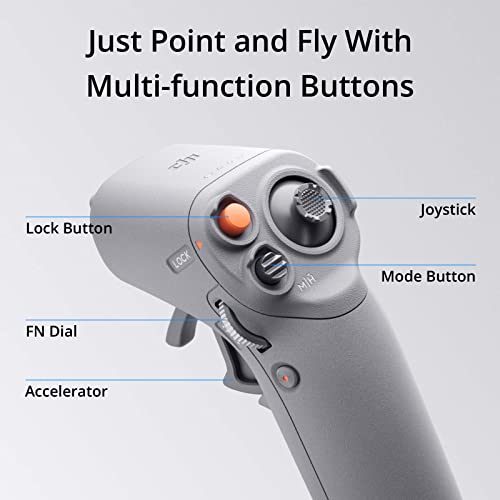
In everyday use, DJI RC Motion 2 feels responsive and fluid. Tilting your wrist controls direction while the joystick manages altitude and movement, making it easy to perform smooth turns and controlled acceleration. The single handed design is comfortable for longer sessions and works especially well when paired with compatible FPV goggles for an immersive point and fly experience.
Why We Like This Product
From the YPC Team perspective, RC Motion 2 stands out because it lowers the barrier to enjoyable FPV flight. A common mistake buyers make is assuming FPV requires complex manual control. This controller shows that immersive flight can be intuitive, fun, and less intimidating while still delivering controlled results.
Comparisons With Similar Systems
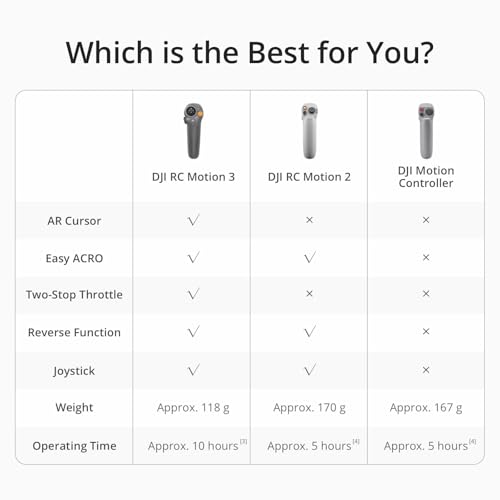
Compared with standard remote controllers, RC Motion 2 makes more sense when immersion and ease of use are priorities. Traditional controllers make more sense when maximum precision and advanced manual manoeuvres are required. Compared with earlier motion controllers, RC Motion 2 offers smoother multidirectional input and more refined control.
Alternatives Worth Considering
If you prefer full manual input for advanced aerobatics, a standard DJI FPV remote controller may be a better fit. If you want a screen based controller for camera drones, a conventional remote with integrated display may suit you better.
Tips for Getting the Best Performance
Pair the controller with compatible FPV goggles for the most immersive experience. Start in open areas to build muscle memory with motion input. Use gentle wrist movements rather than sharp tilts for smoother flight paths.
Full Technical Specification
Product type: Motion based drone controller
Control method: Wrist motion and joystick input
Operation style: Single handed
Directional control: Multidirectional with upgraded joystick
Intended use: FPV and compatible camera drones
Compatibility: DJI Avata 2, DJI Avata, DJI Goggles 2, DJI Goggles Integra, DJI FPV Goggles V2, DJI Mavic 3 Classic, DJI Mavic 3, DJI Mavic 3 Cine, DJI Mavic 3 Pro, DJI Mavic 3 Pro Cine, DJI Air 3, DJI Mini 4 Pro, DJI Mini 3 Pro
App support: DJI Virtual Flight app not supported
Buyer’s Guide
Buy this if you want an immersive, intuitive way to fly compatible DJI drones using natural motion control.
Do not buy this if you prefer traditional dual stick precision control or need Virtual Flight app support.
Frequently Asked Questions
What does DJI RC Motion 2 control?
It controls compatible DJI drones using wrist motion and a joystick.
Is it easy to learn?
Yes, it is designed to be intuitive and beginner friendly.
Can it be used one handed?
Yes, it is optimised for comfortable single handed operation.
Is it suitable for FPV flying?
Yes, it is designed specifically for immersive FPV style flight.
Does it replace a standard controller?
No, it offers a different control style rather than a full replacement.
Is it compatible with DJI goggles?
Yes, it works with several DJI FPV goggles models.
Can it be used with camera drones?
Yes, it supports several compatible DJI camera drones.
Does it support flight simulators?
No, it does not support the DJI Virtual Flight app.
Is it good for long sessions?
Yes, the ergonomic one handed design helps reduce fatigue.
Is this controller suitable for beginners?
Yes, it is well suited to beginners who want an easier entry into FPV flight.
Looking for more options?
Browse our full range of DJI Drones for other great choices to suit your space, goals, and budget.