

Quick Summary
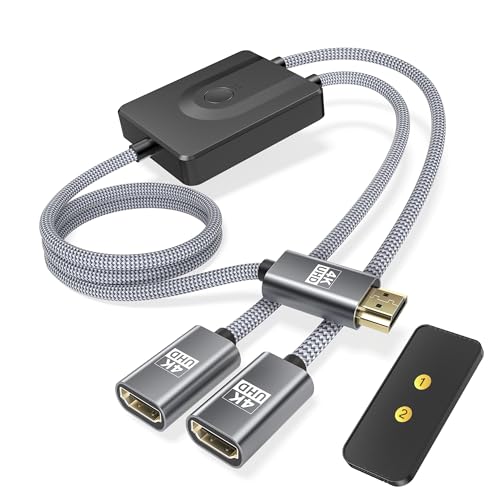
The Elebase HDMI Switch 2 in 1 Out with Remote Control is a bidirectional HDMI switcher cable for managing multiple HDMI devices on one display, or one HDMI source across two displays. It includes a remote control, manual button control, LED indicators, and support for 4K at 30Hz.
Who It Is Best For
This is a practical choice for people who want a simple way to switch between HDMI devices at home, at a desk, or in a shared setup. It may suit gamers, home cinema users, and anyone who needs easier control when the switch is not within reach.
What To Know Before You Buy
Pros: The remote control and manual button give you two ways to switch, and the bidirectional design adds flexibility for different setups.
Cons: The product is described as 4K at 30Hz, so buyers who need a higher refresh rate should check suitability before ordering.
The cable length is listed as 3.3FT, so it is worth checking that this suits your setup before buying.
Common Buyer Questions
Is this an HDMI switch or a splitter?
It is described as a switch, not a splitter, and it can be used in either direction depending on the setup.
Can I use it with a remote control?
Yes, it includes a remote control for easier switching from your seat.
Does it support 4K?
Yes, it is listed as supporting 4K at 30Hz.
What devices is it for?
It is listed for PS5, PS4, Xbox, PC, laptop, FireStick, TV, and projector use.
Is there a manual way to switch inputs?
Yes, you can also use the button on the switch itself.
Key Details
| Detail | What it means in use |
|---|---|
| Brand | Elebase |
| Product type | HDMI switcher cable |
| Configuration | 2 in 1 out bidirectional use |
| Remote control | Allows switching from a distance |
| Manual control | Switching can also be done with the button on the unit |
| Resolution | 4K at 30Hz |
| Cable length | 3.3FT |
Final Buying View
The Elebase HDMI switcher cable is a straightforward option if you want flexible HDMI switching with remote control, manual control, and bidirectional use. Its 4K at 30Hz support and 3.3FT cable length make it important to check that it suits your setup before ordering. If that matches what you need, it is a sensible way to manage multiple HDMI connections more easily.
Using One Connection at a Time
The switch selects between HDMI connections rather than sending the same signal to two displays simultaneously. For a single source used with two displays, it lets you switch which display is connected; for two sources and one display, it lets you select the source. Check that this switching arrangement matches how you want to use your equipment.