

Quick Summary
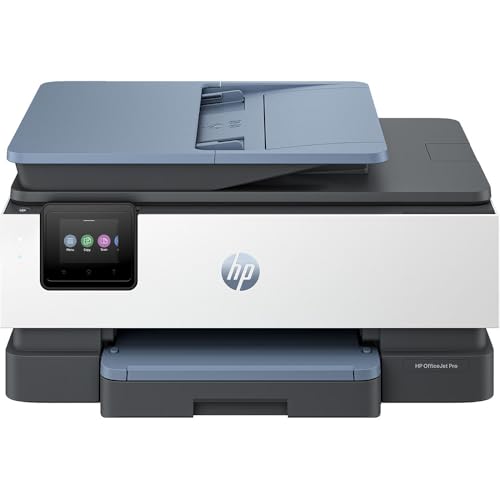
The HP OfficeJet Pro 8135e 40Q47B is an A4 colour inkjet multifunction printer with scan and fax functions, automatic duplex printing and back, and Wi-Fi connectivity. It is listed with print speeds of up to 20 ppm in black and white and 10 ppm in colour, plus a 35-sheet ADF and a 225-page input tray.
For buyers comparing home or small office printing, the main checks are the HP+ requirement, the need for an HP account and continuous internet connection, and the use of original HP ink cartridges for the life of the printer.
Who It Is Best For
This printer suits buyers who need a colour inkjet multifunction device for printing, scanning and faxing on A4 paper, with wireless printing from a computer, smartphone or tablet. It also suits anyone who wants duplex printing and access to mobile printing through the HP Smart app.
Key Details
| Detail | Verified information and buyer relevance |
|---|---|
| Product type | Colour inkjet multifunction printer with scan and fax functions. |
| Model | HP OfficeJet Pro 8135e 40Q47B. |
| Paper size | A4, with support also listed for A5 and A6 when printing. |
| Print speed | Up to 20 ppm in black and white and 10 ppm in colour. |
| Printing features | Automatic duplex and back printing. |
| Paper handling | 35-sheet ADF and 225-page input tray. |
| Connectivity | Wireless Dual Band, Wi-Fi Direct, AirPrint and Mopria via the HP Smart app. USB cable not included. |
| Ink requirement | HP+ requires original HP ink cartridges for the life of the printer. |
| Compatible cartridges | HP 924 Black, Cyan, Yellow and Magenta. |
| Colour | Grey. |
| Included offer | 3 months of Instant Ink included with HP+. |
Why Buyers Choose It
- Automatic duplex and back printing reduces the need to manually turn pages over.
- The 35-sheet ADF is useful when scanning or copying multi-page documents.
- Wireless printing through HP Smart, AirPrint and Mopria gives several supported ways to print from different devices.
- The stated A4, A5 and A6 paper support gives flexibility for different document sizes.
How It Works
- Connect the printer using one of the listed wireless options or through the HP Smart app.
- Use it from a computer, smartphone or tablet once connected.
- Load paper into the 225-page input tray and select the paper size and media type that match your job.
- Use the duplex feature when you want printing on both sides of the page.
- Use the ADF when scanning or handling multi-page documents.
What To Know Before You Buy
Check that you are happy with the HP+ setup requirements before ordering, including the need for an HP account, a continuous internet connection and original HP ink cartridges. The printer is grey, so review the finish if that matters for your setup.
Confirm that the listed paper sizes, print speeds and paper-handling features match the way you plan to print and scan. The USB cable is not included, so make sure you have the connection method you intend to use.
Common Buyer Questions
Does it print on both sides?
Yes. Automatic duplex and back printing are listed.
Can it print from a phone or tablet?
Yes. HP Smart supports printing from a smartphone or tablet, with Wireless Dual Band, Wi-Fi Direct, AirPrint and Mopria listed.
Which cartridges does it use?
It is compatible with HP 924 Black, Cyan, Yellow and Magenta cartridges.
Is a USB cable included?
No. A USB cable is not included.
Final Buying View
The HP OfficeJet Pro 8135e 40Q47B is a colour inkjet multifunction printer for buyers who want wireless A4 printing, scanning and faxing with duplex output. The most important check is whether the HP+ requirements and original HP ink cartridge rule suit your setup before you choose it.


