







Quick Summary
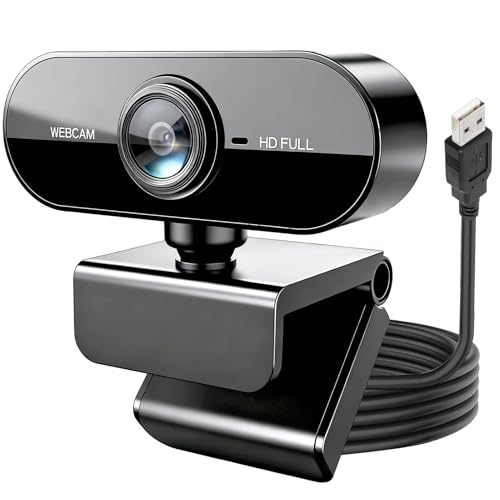
The JagFond USB webcam for PC is a 1080P 30fps Full HD computer camera with a built-in microphone, 85° wide-angle view and 360° rotation. It is a straightforward choice for video calls, streaming and online meetings when you want a USB camera for a laptop or desktop.
The main checks for this model are the video resolution, the microphone, the field of view and how the camera can be positioned on your setup. If those matter for your use, this specification set gives a clear starting point.
Key Details
| Detail | Verified information and buyer relevance |
|---|---|
| Product type | USB webcam for PC, laptop or desktop use. |
| Video resolution | 1080P Full HD, which is the main detail to check if picture clarity matters. |
| Frame rate | 30fps, useful to note for video calls and streaming. |
| Microphone | Built-in microphone for voice capture. |
| Field of view | 85° wide-angle lens for a broader camera view. |
| Rotation | 360° rotatable design for angle adjustment. |
| Connection | USB webcam, so the buyer should check device connection compatibility. |
What to Compare Before Buying
- Image quality: This model is 1080P at 30fps. Compare that with the level of detail and motion smoothness you want for calls or streaming.
- Audio capture: The built-in microphone is included. If voice pickup matters, check whether you prefer an integrated mic or a separate audio setup.
- Viewing angle: The 85° wide-angle lens gives a wider view than a narrow camera. Compare that with whether you want a tighter head-and-shoulders frame or space for more than one person.
- Positioning: The 360° rotation helps with aiming the camera. Check whether your desk, monitor or laptop setup needs flexible placement.
- Connection: It is a USB webcam, so confirm the device you plan to use has a suitable USB connection.
How It Works
This webcam connects by USB and is ready to use for video calls, streaming and conferencing. The built-in microphone handles voice pickup, while the 360° rotation and 30° up-and-down adjustment help you direct the camera toward the right angle.
The 85° lens is broad enough to include more of the scene than a narrow webcam view. That is useful when you want a wider frame for meetings or when more than one person needs to appear on camera.
Before You Decide
Check that 1080P 30fps suits the picture quality you want, that the built-in microphone meets your audio needs, and that the USB connection works with your device. The 85° wide-angle view and 360° rotation are the main positioning features to compare before choosing an offer.


