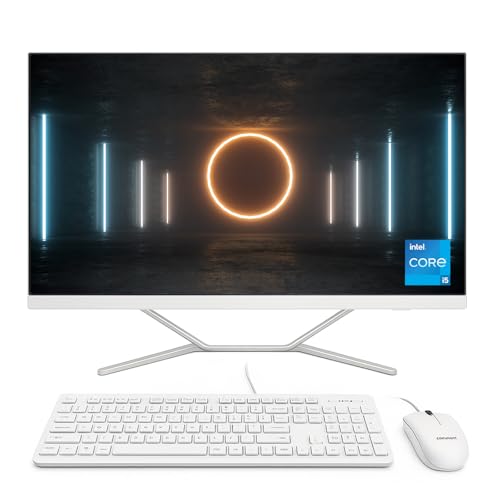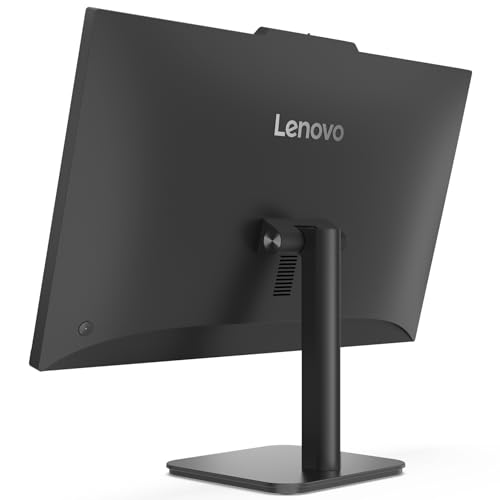
If you’re building a clutter-free home office or upgrading your workspace with a desktop that prioritises speed, clarity, and reliability, the Lenovo 24″ All-in-One PC delivers exactly what modern professionals and students need. Designed for multitasking and daily efficiency, this machine packs serious value behind its elegant Full HD screen.
Powered by an Intel N100 quad-core processor and paired with 16GB of DDR4 RAM and a lightning-fast 512GB PCIe SSD, this system handles everyday tasks like spreadsheets, video calls, document editing, and web research without breaking a sweat. The 23.8″ Full HD anti-glare display provides crisp visuals for long working hours, while Wi-Fi 6 and Bluetooth 5.2 keep your connectivity future-ready.
Whether you’re a student logging into virtual classes, a professional handling heavy workloads, or a creative managing large files, this Lenovo AIO PC brings workstation performance to your desktop — without any cable chaos.
🔍 Full Technical Specifications
| Component | Specification |
|---|---|
| Model Series | Lenovo Business AIO Vent-Hear Series |
| Display | 23.8″ Full HD (1920 x 1080) IPS Anti-Glare, 16:9 Aspect Ratio |
| Processor | Intel Processor N100 (4 Cores, 4 Threads, 6MB Cache, Turbo up to 3.4GHz) |
| RAM | 16GB DDR4 3200MHz (2 x 8GB) – Dual Channel |
| Storage | 512GB PCIe NVMe M.2 SSD |
| Graphics | Integrated Intel UHD Graphics (12th Gen) |
| Operating System | Windows 11 Professional (64-bit) |
| Webcam | Integrated 720p HD Camera with Dual Digital Microphones |
| Audio | Stereo Speakers (3W x 2), Dolby Audio Enhancement |
| Networking | Wi-Fi 6 (802.11ax), Bluetooth 5.2, Gigabit Ethernet (RJ-45) |
| Ports | 2 x USB-A 3.2 Gen 1, 2 x USB-A 2.0, 1 x HDMI-Out, 1 x RJ-45, Audio Combo Jack |
| Keyboard & Mouse | Included (wired, colour-matched) |
| Colour | Matte Black or Business Grey (varies by configuration) |
| Form Factor | All-in-One, Edge-to-Edge Display with Integrated Stand |
✅ Pros and ❌ Cons
Pros:
✔️ Modern quad-core Intel N100 processor with low power draw and zero noise
✔️ Fast PCIe SSD and 16GB RAM make multitasking smooth and snappy
✔️ Large, Full HD screen with anti-glare coating for better eye comfort
✔️ HDMI-Out and multiple USB ports expand your workspace
✔️ Business-ready with Windows 11 Pro and enterprise features
✔️ Sleek, compact design reduces desktop clutter
Cons:
❌ No touchscreen functionality
❌ Integrated graphics not suitable for 3D or GPU-intensive creative work
❌ Webcam is HD, not Full HD
❌ Limited future upgrade paths beyond storage or peripherals
🎯 What This Product is Used For
This AIO desktop is designed for:
Business users: Office apps, emails, VPNs, remote desktop sessions
Home offices: Zoom meetings, documents, spreadsheets, research
Students: Virtual learning, coursework, presentations, file management
Content consumers: Streaming, browsing, and media playback in Full HD
Basic creative use: Light photo editing, web design, Canva, and productivity tools
💬 Why We Like This Product (YPC Team Review)
At Yorkshire Outdoor Activity Park, our admin and booking teams need clean, powerful setups that handle high workloads without fan noise or lag. This Lenovo AIO delivered just that. The Intel N100 surprised us — it’s genuinely responsive for how energy-efficient it is. Paired with 16GB RAM and a blazingly quick SSD, the experience is smooth and stress-free.
We connected a second screen via HDMI-out for shift scheduling and used the built-in webcam for daily remote calls — everything worked out of the box. It’s quiet, quick to boot, and doesn’t take up unnecessary space. A very business-friendly package at a smart price.
🔄 Alternatives Worth Considering
If you’re exploring similar AIOs, here are other great options:
Acer Aspire C24 | Intel Core i3 | 8GB RAM | 512GB SSD
More processing power, slightly smaller screen, ideal for home users.HP 24 All-in-One | AMD Ryzen 3 | Dual Storage (SSD + HDD)
Better storage flexibility and suitable for family use.Lenovo IdeaCentre AIO 3 24″ | AMD Ryzen 5 | 16GB RAM | 512GB SSD
More power and same RAM for users who need faster multitasking or heavier apps.
💡 Tips on Using the Lenovo Vent-Hear AIO Correctly
Use HDMI-Out: Connect an extra monitor to expand your workspace
Optimise RAM usage: 16GB is plenty, but close unused apps for best results
Enable Focus Assist in Windows 11: Great for staying productive
Use OneDrive or Google Drive: Keep the SSD free from large files and avoid clutter
Adjust display brightness: Anti-glare helps, but brightness tuning reduces fatigue
Set Windows Backup or File History: Protect your documents automatically
Use Wi-Fi 6 router: Maximise network speed and reliability
Install essential software early: Get office apps, browsers, and antivirus sorted on day one
Set up Windows Hello: Use secure PIN or facial recognition for faster logins
Keep firmware and drivers up to date: Lenovo’s support app helps with updates easily
🆘 FAQs
1. Can I upgrade the RAM or SSD?
RAM is soldered or slotted depending on the model — likely fixed at 16GB. The SSD is replaceable via M.2 slot.
2. Does it support dual monitors?
Yes, via the HDMI-Out port.
3. Is Windows 11 Pro pre-installed?
Yes, it comes pre-installed and ready to use.
4. Is this good for video calls?
Yes, the HD webcam and dual mics are suitable for Teams, Zoom, and Skype.
5. Does it support Bluetooth headsets?
Yes, Bluetooth 5.2 supports modern audio and input devices.
6. Is it fanless or silent?
The Intel N100 runs very quietly — ideal for shared or quiet environments.
7. Can I use it for Photoshop or editing?
Light editing is fine. For heavy creative work, consider a model with dedicated graphics.
8. Does it come with Office software?
No, Office is not included. You can install Microsoft 365 or use web apps.
9. Is the webcam retractable or does it have a shutter?
No, it’s fixed — but software privacy settings are available.
10. Does it have a touchscreen?
No, this model features a standard non-touch Full HD screen.
📘 Buyer’s Guide Summary
The Lenovo 24″ Business AIO (Vent-Hear Series) is a brilliant desktop for anyone needing solid performance in a sleek, quiet package. With fast boot times, Wi-Fi 6 connectivity, and Windows 11 Pro pre-installed, it’s built for professionals, students, and multitaskers who don’t want the fuss of towers or external peripherals. If you’re looking for a powerful, minimalist desktop that gets the job done — this is it.
Looking for more options?
Browse our full range of All In One PC's for other great choices to suit your space, goals, and budget.