Immersive Computing Without the Clutter
The Elepad Q238 All-in-One PC delivers powerful performance in a slim, elegant design that saves desk space while enhancing your workflow. At its heart, the Intel Core i5-12450H processor provides fast and efficient computing, making it ideal for work, study, or entertainment. With 16GB LPDDR4 RAM and a 256GB SSD, you get responsive multitasking and quick access to your files.
The real star of this machine is its 23.8-inch Full HD curved IPS display. With 99% sRGB colour accuracy, it brings vivid, lifelike visuals whether you’re working on detailed projects or streaming your favourite shows. Combined with integrated 2W stereo audio, this PC is designed to immerse you in every task.
Pros and Cons
Pros
Curved 23.8″ Full HD IPS screen enhances immersion
Intel Core i5-12450H balances power and efficiency
16GB RAM ensures smooth multitasking
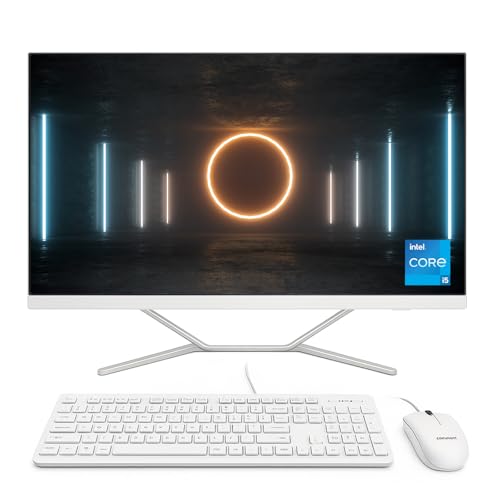
Slim, modern design with white finish
Wi-Fi 6 for faster, more stable wireless connectivity
Includes wired keyboard and mouse out of the box
Cons
256GB SSD is fast but may be limiting for large media libraries
No touchscreen functionality
Integrated audio is good for casual use but not a replacement for external speakers
What This Product Is Used For
The Elepad Q238 is built for everyday productivity and entertainment. It’s perfect for:
Work and study: Smooth multitasking for office apps, research, and video calls
Entertainment: Immersive curved screen for streaming and browsing
Casual gaming: Runs light titles thanks to efficient integrated graphics
Family use: One clean desktop for everyone without the mess of cables
Why We Like This Product (YPC Team Review)
At YPC, we love how the Elepad Q238 brings something different to the table: a curved display on an all-in-one PC. It makes even everyday tasks feel more engaging, and when watching films or working with side-by-side windows, the curved design draws you in.
Performance was more than enough for our team’s needs. The i5-12450H CPU with 16GB RAM handled multiple apps without slowdown, and boot times were lightning fast with the SSD. Although 256GB might feel small for heavy users, pairing it with cloud storage or an external drive solves that quickly.
The clean white finish and minimalist look were also a big hit with our team—it blends well into both home and office environments.
Alternatives Worth Considering
ASUS A3402 24″ All-in-One – Sleek and powerful with a flat display if you prefer a more traditional screen.
Lenovo IdeaCentre AIO 3 27″ – Bigger screen for those who need more workspace.
HP Pavilion 24 All-in-One – Similar specs with premium build quality and optional higher storage.
Tips for Using Correctly
Back up important files regularly, as the 256GB SSD may fill up quickly.
Use cloud storage to expand space without external drives.
Place the PC in a central position to take full advantage of the curved screen.
For better sound, consider pairing with external speakers or headphones.
Comparisons
Elepad Q238 vs ASUS A3402: Elepad has a curved display for immersion, ASUS offers more storage.
Elepad Q238 vs Lenovo AIO 3 27″: Lenovo wins on screen size, but Elepad is more compact and stylish.
Elepad Q238 vs HP Pavilion 24: HP offers a stronger brand presence, while Elepad stands out with its unique curved design.
Full Technical Specification
Model: Elepad Q238 All-in-One
Display: 23.8″ Curved Full HD IPS (1920 x 1080), 99% sRGB
Processor: Intel Core i5-12450H (8 cores, up to 4.4 GHz Turbo)
Graphics: Integrated Intel UHD Graphics
Memory: 16GB LPDDR4 RAM
Storage: 256GB SSD
Operating System: Windows 11 (Home, not touch-enabled)
Audio: 2W integrated stereo speakers
Connectivity: Wi-Fi 6, Bluetooth (version not specified)
Ports: Not fully specified, but includes multiple connectivity options
Accessories: Wired keyboard and mouse included
Colour: White
EAN: Not specified
10 Frequently Asked Questions (FAQs)
1. Does the Elepad Q238 have a touchscreen?
No, this model is non-touch.
2. Can the storage be upgraded?
Yes, you can expand storage with an external SSD or HDD if required.
3. Is 256GB enough for daily use?
It’s sufficient for most office and family tasks, but heavy users may need extra storage.
4. How good is the curved screen?
It makes multitasking and entertainment more immersive compared to flat panels.
5. Does it come with peripherals?
Yes, a wired keyboard and mouse are included.
6. Is it good for gaming?
It handles light gaming well but isn’t designed for high-end titles.
7. Does it have good colour accuracy?
Yes, 99% sRGB provides vivid and accurate colours.
8. Can it connect to Wi-Fi 6 networks?
Yes, it includes Wi-Fi 6 support for faster wireless performance.
9. How powerful is the Intel i5-12450H?
It’s a strong 8-core processor that balances performance and efficiency, perfect for everyday use.
10. Is the design durable?
Yes, the slim frame is sturdy while maintaining a premium finish.
Looking for more options?
Browse our full range of All In One PC's for other great choices to suit your space, goals, and budget.