

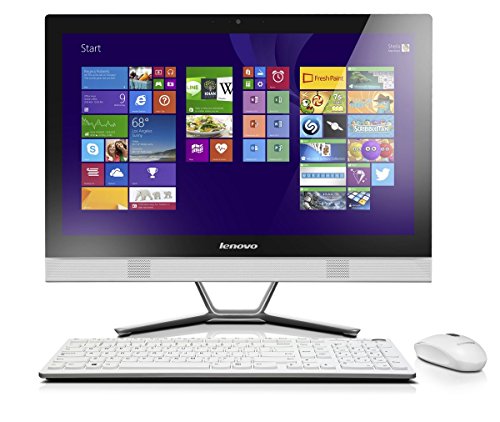





The Lenovo C50 All-in-One PC delivers a smart mix of performance, design, and expandability in a compact form that eliminates desktop clutter. With a crisp 23-inch Full HD display, dedicated NVIDIA graphics, and a capable Intel Core i5 processor, it’s the perfect fit for everyday users who need real performance without the footprint of a traditional tower setup.
Housed in a sleek white chassis with a full-metal v-stand, the C50 is as much a style statement as it is a powerful workstation. Whether you’re editing documents, streaming content, or diving into casual creative tasks, the C50 handles it all with ease. Plus, tool-free expansion means you can keep your system current as your needs grow.
🔍 Full Technical Specifications
| Component | Specification |
|---|---|
| Model | Lenovo C50 All-in-One PC |
| Display | 23-inch Full HD (1920 x 1080) LED-backlit display, Anti-glare |
| Processor | Intel Core i5-4210U (Dual-Core, 4 Threads, 1.7GHz base, 2.7GHz Turbo, 3MB Cache) |
| RAM | 8GB DDR3 (2 x 4GB modules) |
| Storage | 1TB SATA HDD, 7200RPM |
| Graphics | NVIDIA GeForce 820A 1GB DDR3 Dedicated GPU |
| Optical Drive | DVDRW (Tray-load, read/write) |
| Webcam | Integrated HD camera (720p) |
| Audio | Stereo speakers with Dolby Advanced Audio |
| Connectivity | Wi-Fi 802.11 b/g/n, Bluetooth 4.0, Gigabit LAN |
| Ports | 2 x USB 3.0, 3 x USB 2.0, HDMI-Out, Audio combo jack, RJ-45, Card Reader |
| Expansion | Tool-free rear panel access for RAM/HDD upgrades |
| Operating System | Windows 8.1 (64-bit) |
| Colour | White |
| Keyboard & Mouse | Wired USB AccuType Keyboard and Mouse included |
✅ Pros and ❌ Cons
Pros:
✔️ Solid performance with Intel Core i5 and dedicated NVIDIA graphics
✔️ Large 1TB hard drive for media and file storage
✔️ Sleek, minimal design with metal v-stand and white finish
✔️ HDMI-out allows for second monitor or TV connectivity
✔️ Tool-free back panel makes upgrades easy
✔️ Includes ergonomic AccuType keyboard with rounded keys
Cons:
❌ Lacks an SSD, so boot and load speeds are slower than modern machines
❌ DDR3 RAM is older tech and may limit future compatibility
❌ No touchscreen functionality
❌ Windows 8.1 is outdated and may need upgrading to Windows 10/11 for modern apps
🎯 What This Product is Used For
This All-in-One is ideal for:
Home office productivity (documents, spreadsheets, emails)
Streaming and media playback in Full HD
Basic photo and video editing with NVIDIA graphics acceleration
Multi-user family setups where desk space is limited
Educational use for students needing reliable access to online learning and apps
Basic design work, thanks to dedicated GPU and large screen real estate
It’s a strong all-rounder for users who value simplicity, performance, and expandability without the need for high-end hardware.
💬 Why We Like This Product (YPC Team Review)
At the Yorkshire Outdoor Activity Park, this Lenovo C50 found a home in our main office, where it quickly became the go-to for scheduling, media previews, and general admin. The AccuType keyboard is genuinely satisfying to type on, and the HDMI-out let us connect to a large screen for presentation days with zero fuss.
What really sets the C50 apart is the tool-less access panel – when we needed to swap out a hard drive last season, it took minutes, not hours. It’s the kind of flexibility we rarely see in all-in-ones. For its age and price point, it’s still one of the most upgradeable and usable AIOs we’ve come across.
🔄 Alternatives Worth Considering
Looking for something newer or with different features? Consider:
HP All-in-One 24-df0024na | Intel Core i3 | 8GB RAM | 256GB SSD
More modern internals with SSD storage for faster performance.Lenovo IdeaCentre AIO 3 24″ | AMD Ryzen 3 | Full HD | SSD + HDD Combo
Offers more efficient multitasking and a split storage solution.Acer Aspire C24 | Intel Core i5 | SSD + Touchscreen
For users who want a modern OS, fast storage, and touch input in one neat unit.
💡 Tips on Using the Lenovo C50 Correctly
Upgrade to an SSD: Swap the 1TB HDD for a 2.5″ SATA SSD for significantly faster load times
Upgrade the OS: Move to Windows 10 or 11 for continued security updates and app compatibility
Use HDMI-Out: Connect a secondary monitor or TV for extended screen real estate
Keep the fans clean: Use compressed air occasionally to clean out rear vents and avoid thermal throttling
Use GPU acceleration: Apps like Photoshop or video editors can take advantage of the NVIDIA 820A for better performance
Calibrate the display: For content creators, adjusting the colour profile will ensure better visual accuracy
Expand RAM if needed: Upgrade to 12GB or 16GB (DDR3) for more headroom in multitasking
Backup your system: Use built-in Windows Backup or third-party tools to secure important data
Use wired Ethernet: For the fastest and most stable internet connection
Use classic shell: If you’re sticking with Windows 8.1, install Classic Shell to improve the UI experience
🆘 FAQs
1. Can I upgrade the RAM?
Yes, RAM is upgradeable up to 16GB DDR3 via two SO-DIMM slots.
2. Does it support Windows 10 or 11?
Yes, this model supports Windows 10. Windows 11 may run, but check CPU compatibility before upgrading.
3. Is there a touchscreen version?
No, this model is non-touch.
4. Is the HDD replaceable with an SSD?
Yes, you can swap the 1TB HDD for a 2.5″ SATA SSD for faster speeds.
5. Does it come with a webcam?
Yes, it includes an integrated HD webcam suitable for calls and conferences.
6. Can I use it with a second monitor?
Yes, via HDMI-out.
7. Is the graphics card good for gaming?
The NVIDIA GeForce 820A can handle light or older games, but it’s not suitable for modern AAA titles.
8. What ports are available?
Includes USB 2.0, USB 3.0, HDMI-out, audio jacks, and a multi-card reader.
9. Is the keyboard mechanical?
No, but it uses Lenovo’s comfortable AccuType design with rounded keys.
10. Does it include Bluetooth?
Yes, Bluetooth 4.0 is built in for connecting wireless peripherals.
📘 Buyer’s Guide Summary
If you’re after a capable, full-featured All-in-One PC with dedicated graphics, a large Full HD display, and easy upgrade paths, the Lenovo C50 ticks every box. Ideal for families, home offices, or anyone looking for clutter-free performance with long-term flexibility, it’s a great example of Lenovo’s practical design thinking — and with its tool-free upgrade panel, it stays relevant long after unboxing.
Looking for more options?
Browse our full range of All In One PC's for other great choices to suit your space, goals, and budget.


