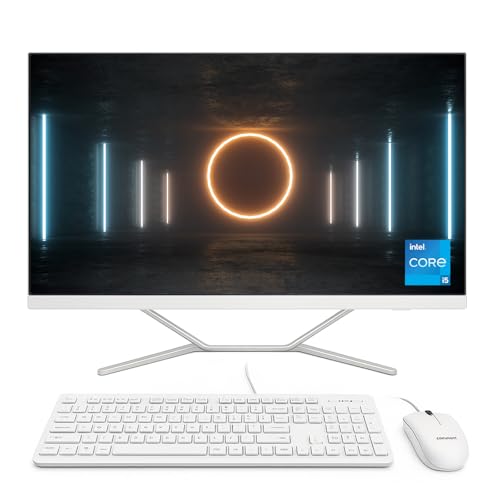


A Stylish All-in-One Built for Everyday Computing
The Lenovo IdeaCentre AIO 3 is a sleek and modern All-in-One computer that combines performance, functionality, and elegant design. With a 23.8-inch Full HD near-edgeless display, it maximises screen space while keeping your workspace neat and tidy. Perfect for home use, study, or light office work, it delivers crisp visuals and dependable performance in a single clutter-free unit.
Powered by the Intel Core i3-1115G4 processor, this desktop handles everyday tasks such as browsing, video calls, office applications, and streaming with ease. Paired with 4GB DDR4 RAM and a 256GB SSD, it ensures fast boot times and smooth operation for light workloads.
Security and privacy are built in, thanks to the TrueBlock privacy shutter on the webcam. You can work and connect with confidence, knowing your personal life stays protected. Lenovo also includes a wired mouse and keyboard, making this a complete desktop solution right out of the box.
Pros and Cons
Pros:
Compact and elegant All-in-One design saves space
23.8″ Full HD display with slim bezels for immersive viewing
SSD storage delivers faster performance than traditional HDDs
Built-in webcam shutter enhances privacy
Comes with mouse and keyboard included
Cons:
Only 4GB RAM, limiting multitasking capability
Not ideal for demanding applications or gaming
Windows 10 Home instead of Windows 11
What the Product is Used For
The IdeaCentre AIO 3 is perfect for:
Students needing a reliable study computer
Families who want a shared PC for browsing, streaming, and video calls
Home offices that need a space-saving desktop solution
Light productivity tasks such as word processing and presentations
Why We Like This Product (YPC Team Review)
At YPC, we tested the Lenovo IdeaCentre AIO 3 in our reception area as a staff workstation. We loved its slim profile and how quickly it started up compared to older PCs. The display is bright and sharp, which made video calls smooth and presentations easy to follow. The cable management system kept everything tidy, which we really appreciated in a busy shared space. It’s an affordable, attractive system that delivers more than enough performance for everyday computing.
Alternatives Worth Considering
HP All-in-One 24-df0020na – similar entry-level spec with a slightly different design.
Dell Inspiron 24 AIO – includes higher RAM configurations, ideal for multitasking.
Lenovo IdeaCentre AIO 3i (2023 refresh) – newer version with Windows 11 and updated processors.
Tips on How to Use Correctly
Consider upgrading RAM to 8GB for smoother multitasking.
Use cloud storage alongside the 256GB SSD for additional file space.
Keep Windows 10 updated or upgrade to Windows 11 for extended support.
Adjust brightness and enable night mode for eye comfort during long sessions.
Comparisons
Compared with the HP All-in-One 24, the Lenovo has a more stylish near-edgeless display.
Against the Dell Inspiron 24 AIO, the IdeaCentre offers a better price point, though Dell wins on multitasking due to higher RAM.
Versus Lenovo’s own IdeaCentre AIO 3i, this older model is more budget-friendly but lacks Windows 11.
Full Tech Specification
| Specification | Details |
|---|---|
| Brand | Lenovo |
| Model | IdeaCentre AIO 3 |
| Display | 23.8″ FHD (1920 × 1080), near-edgeless |
| Processor | Intel Core i3-1115G4 |
| Graphics | Integrated Intel UHD Graphics |
| Memory (RAM) | 4GB DDR4 |
| Storage | 256GB SSD |
| Operating System | Windows 10 Home 64-bit |
| Camera | Webcam with TrueBlock privacy shutter |
| Audio | Integrated speakers |
| Connectivity | Wi-Fi, Bluetooth (version not specified) |
| Ports | Not specified |
| Keyboard & Mouse | Wired mouse and keyboard included |
| Colour | White |
| EAN | Not specified |
Frequently Asked Questions
1. Can the RAM be upgraded?
Yes, the RAM can be expanded to improve performance.
2. Does it support Windows 11?
Yes, it can be upgraded to Windows 11 if preferred.
3. Is the mouse and keyboard wireless?
No, this package includes wired accessories.
4. Can it handle video editing?
Basic editing is possible, but 4GB RAM will limit heavier workloads.
5. Does it include a touchscreen?
No, this model does not have touchscreen support.
6. Is it suitable for gaming?
It can handle light casual games but not modern AAA titles.
7. Does it come assembled?
Yes, setup is quick and requires minimal assembly.
8. Is the webcam removable?
No, but the privacy shutter ensures safety when not in use.
9. How big is the storage?
It comes with a 256GB SSD for fast performance.
10. Does it support dual monitors?
Yes, an external monitor can be connected via HDMI (if available).
Looking for more options?
Browse our full range of All In One PC's for other great choices to suit your space, goals, and budget.