





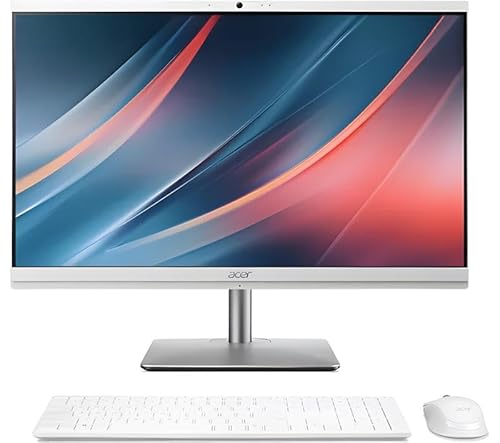
A Modern All-in-One Built for Performance and Clutter-Free Desks
The Lenovo ThinkCentre Neo 50a Gen 5 is designed for professionals who want maximum power without the cable clutter of a traditional desktop. With a 23.8-inch Full HD display and 13th Gen Intel Core processors, it delivers smooth multitasking, clear visuals, and an elegant workspace setup.
This machine combines performance, energy efficiency, and low-noise operation, making it ideal for front-office environments, home offices, and hybrid working setups.
Pros and Cons
Pros:
Compact all-in-one design saves desk space
13th Gen Intel Core CPU ensures fast performance
Low noise output for a distraction-free workspace
Energy efficient, reducing long-term running costs
23.8-inch FHD display offers sharp visuals
Cons:
GPU performance not suited for heavy 3D rendering or gaming
Limited internal upgrade options compared with traditional desktops
Touchscreen option availability depends on model variant
What This Product Is Used For
The ThinkCentre Neo 50a Gen 5 is designed for front-office tasks, business applications, video conferencing, and multitasking. It suits environments where clean design, reliable processing power, and energy efficiency matter more than high-end gaming or creative workloads.
Why We Like This Product (YPC Team Review)
At our activity centre at YPC, we tested the Neo 50a Gen 5 in our administrative hub. What impressed us most was how quietly it ran even under load, making it perfect for meeting rooms and open-plan spaces. The minimalist design also keeps desks tidy, which our team values in a fast-paced environment. It strikes a balance between corporate-grade durability and modern user comfort.
Alternatives Worth Considering
HP EliteOne 840 G9 All-in-One – Offers a slightly larger 24-inch display with similar specs but with a stronger emphasis on security features.
Dell OptiPlex 7410 All-in-One – Known for enterprise-level manageability, ideal if IT control and fleet deployment are priorities.
Apple iMac 24-inch (M3, 2023) – A good option for creative professionals needing macOS, though less business-focused than Lenovo or Dell.
Tips on How to Use Correctly
Keep Windows and Lenovo Vantage software updated for optimal performance and security.
Use the built-in webcam shutter for extra privacy when not in video calls.
If using multiple monitors, enable display scaling in Windows for consistent colour and resolution.
Place the system on a stable surface with adequate ventilation to preserve long-term component health.
Comparisons with Alternatives
Compared to the HP EliteOne 840 G9, the Lenovo Neo 50a Gen 5 is slightly more compact and runs quieter, though HP offers enhanced enterprise-grade security features.
Against the Dell OptiPlex 7410, the Lenovo is more energy efficient but less customisable for large-scale IT deployments.
When measured against the Apple iMac 24-inch, Lenovo takes the lead in business-focused functionality, while Apple excels in creative applications and visual performance.
Full Technical Specification
Display: 23.8-inch Full HD (1920 × 1080), anti-glare, available with or without touchscreen
Processor: 13th Gen Intel Core (options vary: i5 or i7 depending on configuration)
Memory: Up to 16GB DDR4 (expandable depending on model)
Storage: Up to 512GB SSD (NVMe PCIe)
Graphics: Integrated Intel UHD Graphics
Audio: Stereo speakers with Dolby Audio
Camera: Integrated webcam with privacy shutter
Connectivity: Wi-Fi 6, Bluetooth 5.1, Ethernet port
I/O Ports: USB-C, USB 3.2, HDMI, headphone/mic combo jack (specific port count varies by model)
Operating System: Windows 11 Pro (Windows 11 Home optional)
Dimensions: Compact AIO design (exact size not specified)
Weight: Not specified
Power Supply: Energy efficient, internal PSU
FAQs
Q1: Can I upgrade the RAM in the Lenovo ThinkCentre Neo 50a Gen 5?
Yes, it supports upgrades depending on the configuration.
Q2: Does it come with Windows 11 Pro?
Most business configurations ship with Windows 11 Pro, but Home is available.
Q3: Is the display touchscreen?
It depends on the variant. Some models include touch functionality.
Q4: Does it support multiple monitors?
Yes, you can connect additional monitors via HDMI or USB-C.
Q5: How secure is this system for business use?
It includes TPM 2.0 and BIOS-level security for enterprise protection.
Q6: Can it handle video conferencing?
Yes, the built-in webcam and Dolby Audio make it ideal for calls.
Q7: Is the storage SSD or HDD?
SSD storage is standard, with faster boot and load times.
Q8: Can I use this PC for gaming?
It handles casual gaming but is not designed for high-end gaming.
Q9: How loud is the fan noise?
It runs with ultra-low noise, suitable for quiet office spaces.
Q10: Is it VESA mountable?
Yes, certain configurations support VESA mounting.
Buyer’s Guide – YPC Recommendation:
If you need a clutter-free, energy-efficient business desktop with solid performance for office and administrative work, the Lenovo ThinkCentre Neo 50a Gen 5 is a smart investment. It’s not built for heavy design workloads or gaming, but it excels in reliability, efficiency, and noise reduction.
Looking for more options?
Browse our full range of All In One PC's for other great choices to suit your space, goals, and budget.


