



Purpose-Built for VDI and Cloud Workspaces
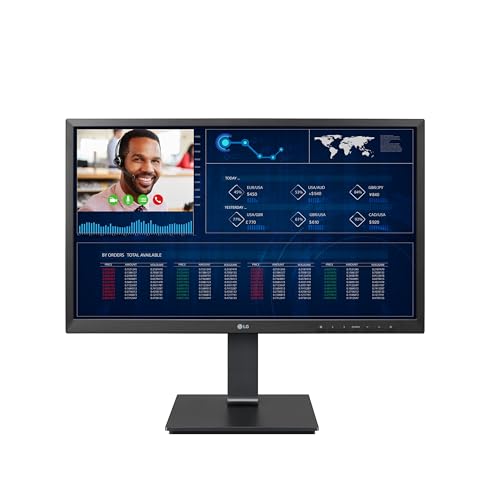
The LG Cloud Device Thin Client AIO 24CQ650N combines a 24-inch Full HD IPS display with the functionality of a thin client in one sleek, space-saving unit. With 178° wide viewing angles and IPS clarity, it’s perfect for shared office environments, delivering consistent, accurate visuals whether you’re working on reports or presenting to colleagues.
Powered by the Intel Celeron N5105 processor, this all-in-one is optimised for VDI deployments (Virtual Desktop Infrastructure), offering smooth multitasking in cloud environments. The system supports major VDI platforms, making it a reliable choice for businesses moving to virtualised desktops.
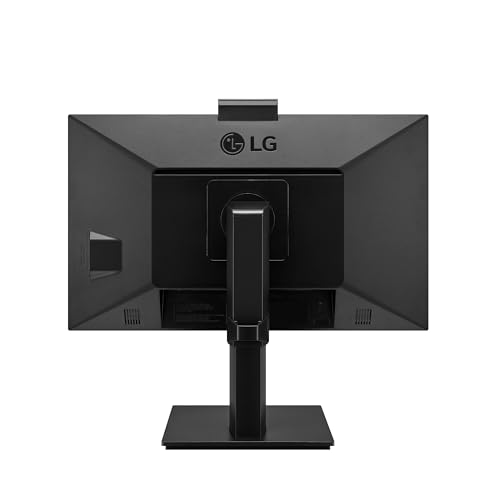
A fanless design ensures silent operation, lower power consumption, and extended lifespan — ideal for open-plan offices. With a pop-up webcam for secure video conferencing and integrated stereo speakers, the 24CQ650N is ready for modern hybrid collaboration.
The ergonomic stand allows tilt, height, pivot, and swivel adjustments, ensuring maximum comfort, and its one-click stand assembly makes mass deployment fast and hassle-free.
Pros and Cons
Pros:
24-inch Full HD IPS display with wide viewing angles
Intel Celeron N5105, optimised for thin client/VDI workloads
Fanless design for silent operation and reduced maintenance
Pop-up webcam for privacy and video conferencing
Adjustable stand supports tilt, height, pivot, and swivel
One-click stand assembly simplifies IT deployment
Wi-Fi and Bluetooth connectivity included
Cons:
Non-OS model, requires integration into a VDI/cloud environment
Not suitable for standalone use or gaming
Entry-level processor unsuitable for heavy local workloads
What This Product Is Used For
The LG 24CQ650N is designed specifically for business and enterprise environments, especially those deploying virtual desktop infrastructure (VDI), cloud computing, or thin client systems. It’s ideal for front offices, call centres, educational institutions, and hybrid workplaces.
Why We Like This Product (YPC Team Review)
At YPC, we set up the LG Cloud Device Thin Client in our training centre. The silent fanless design made it unobtrusive, and the adjustable stand gave flexibility for long working sessions. The pop-up webcam and built-in speakers worked well for video conferencing, and we appreciated how easy the one-click stand assembly was for IT setup. For organisations deploying multiple thin clients, it’s a real time-saver.
Alternatives Worth Considering
Dell OptiPlex 7410 AIO (VDI-compatible) – Offers more raw CPU performance but is louder and more power-hungry.
HP t640 Thin Client (with external monitor) – Compact thin client box, but lacks the integrated AIO simplicity.
Lenovo ThinkCentre Neo 50a (23.8-inch) – A business AIO with local Windows OS instead of thin client design.
Tips on How to Use Correctly
Ensure it’s connected to your organisation’s VDI infrastructure before deployment.
Use the adjustable stand to set correct ergonomic height and reduce strain.
Deploy in offices where silent, low-maintenance operation is a priority.
Retract the pop-up webcam when not in use for extra security.
Comparisons with Alternatives
Compared to the Dell OptiPlex 7410 AIO, the LG 24CQ650N is quieter thanks to its fanless design, but Dell offers stronger local performance.
Against the HP t640 Thin Client, the LG AIO combines screen, speakers, and webcam into one unit, reducing cable clutter.
Versus the Lenovo ThinkCentre Neo 50a, the LG is dedicated to VDI workloads, while Lenovo is a standard Windows AIO.
Full Technical Specification
Display: 24-inch Full HD (1920 × 1080), IPS panel, 5ms response time, 178° viewing angle
Processor: Intel Celeron N5105 quad-core
Graphics: Integrated Intel UHD Graphics
Memory: Not specified (thin client configs typically 4–8GB)
Storage: Not specified (thin client storage usually eMMC/SSD for OS or cache)
Connectivity: Wi-Fi, Bluetooth, Ethernet
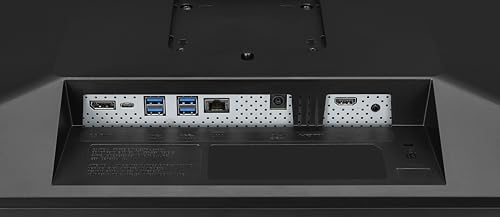
Ports: USB, HDMI (exact port count not specified)
Camera: Pop-up FHD webcam
Audio: Built-in stereo speakers
OS: Non-OS (VDI thin client deployment required)
Design: Fanless for silent operation, grey chassis
Stand: Tilt, height, pivot, and swivel adjustments; one-click assembly
Power Supply: Energy efficient, internal PSU
Dimensions/Weight: Not specified
FAQs
Q1: Does this AIO come with Windows pre-installed?
No, it’s a thin client with no OS. It’s designed for VDI environments.
Q2: Can I use it as a standalone PC?
No, it requires a VDI or cloud infrastructure to operate as intended.
Q3: What makes it different from a standard AIO?
It’s optimised for VDI with a fanless design, pop-up webcam, and enterprise-ready ergonomics.
Q4: Does it support video calls?
Yes, it has a built-in pop-up webcam and stereo speakers.
Q5: Is the fanless design reliable?
Yes, fanless systems reduce dust intake and mechanical wear, extending lifespan.
Q6: What processor does it use?
An Intel Celeron N5105 quad-core CPU.
Q7: What kind of display does it have?
A 24-inch Full HD IPS panel with wide viewing angles.
Q8: Is it easy to set up in bulk?
Yes, the one-click stand assembly makes deployment faster.
Q9: Does it include Wi-Fi and Bluetooth?
Yes, both wireless standards are included.
Q10: Who should buy this product?
IT managers, businesses, or educational organisations running VDI infrastructures.
Buyer’s Guide – YPC Recommendation:
The LG Cloud Device Thin Client AIO 24CQ650N is a specialist all-in-one for enterprise cloud computing and VDI setups. Its fanless, low-maintenance design, paired with strong ergonomics and collaboration tools, make it a smart choice for businesses looking for silent, efficient, and easy-to-deploy solutions.
Looking for more options?
Browse our full range of All In One PC's for other great choices to suit your space, goals, and budget.


