


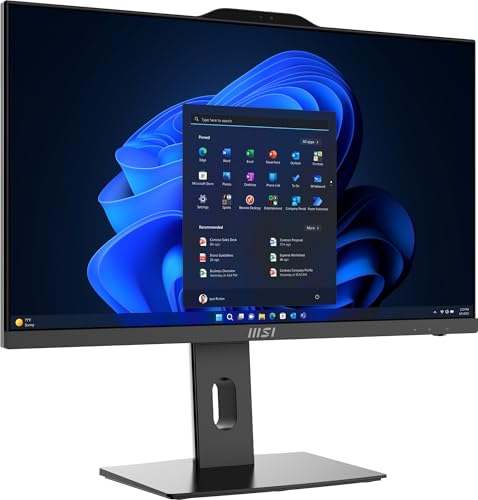


Professional Performance in a Compact All-in-One
The MSI PRO AP242P 14M is designed for businesses, creators, and enthusiasts who want a customisable all-in-one desktop that balances style with power. Its 23.8-inch Full HD IPS display delivers wide viewing angles and vivid colour accuracy, enhanced by a 100Hz refresh rate for smoother visuals whether you’re working, streaming, or multitasking. An anti-glare coating and reduced blue light technology protect your eyes during long sessions, making it ideal for professional use.
At its core lies the 14th Gen Intel Core i5-14400 processor (10 cores, 16 threads), offering fast responsiveness for productivity apps, creative workloads, and modern multitasking. Unlike traditional pre-built AIOs, this model comes as a barebone system, requiring you to add your own DDR5 RAM and SSD storage. This flexibility means you can customise performance to meet your exact needs and budget.
Built with reliability in mind, the AP242P has been tested against MIL-STD-1916 standards, ensuring durability in demanding environments. With integrated speakers, an HD webcam, and multiple connectivity ports, it’s ready to function as the centrepiece of your workspace once upgraded with memory and storage.
Pros & Cons
Pros
Latest 14th Gen Intel i5 CPU ensures strong performance
23.8″ IPS 100Hz display with eye comfort features
Barebone design allows full flexibility with RAM and SSD choices
Built-in webcam and speakers for conferencing
MIL-STD-1916 reliability certification
Cons
RAM and SSD not included, must be purchased separately
Integrated graphics only, not ideal for heavy gaming
No touchscreen option
What This Product Is Used For
Business setups: Reliable office productivity and conferencing.
Custom builds: Perfect for users who want to choose their own DDR5 RAM and SSD.
Media and streaming: Smooth 100Hz visuals and integrated audio.
Education: A compact and efficient desktop for schools and study spaces.
Why We Like This Product
At YPC, we liked the flexibility of the MSI PRO AP242P. Most all-in-one systems lock you into fixed specs, but this barebone design lets you choose the RAM size, speed, and SSD capacity that suit your workflow. Combined with the latest Intel i5 processor and a silky-smooth 100Hz display, it’s an excellent balance of modern performance and customisation.
Alternatives Worth Considering
Acer Aspire C24-1650 – Pre-built Intel i5 AIO with included RAM and SSD, but less customisable.
Lenovo IdeaCentre AIO 3i (27″) – Bigger screen, pre-installed components, though not as configurable.
HP EliteOne 840 G9 – Enterprise-grade AIO with pre-set specs and higher-end processors.
Tips on How to Use Correctly
Install DDR5 RAM (check MSI specifications for capacity limits) before use.
Choose an NVMe SSD for best performance when installing storage.
Keep firmware and BIOS updated for maximum compatibility.
Use a surge protector to protect your components during setup.
Tech Specification
Brand / Model: MSI PRO AP242P 14M
Display: 23.8-inch Full HD IPS (1920 x 1080), anti-glare, 100Hz refresh rate, reduced blue light
Processor: Intel Core i5-14400, 14th Gen, 10 cores / 16 threads, up to 4.7GHz Turbo
Graphics: Intel UHD Graphics (integrated)
RAM: DDR5 (user-installed, not included)
Storage: SSD (user-installed, not included, NVMe supported)
Connectivity:
Wi-Fi 6 (802.11ax)
Bluetooth 5.2
USB 3.2 Gen 2 Type-A
USB 2.0
HDMI out
RJ-45 Ethernet
Audio combo jack
Audio: Integrated speakers with Nahimic audio tuning
Camera: Integrated HD webcam with privacy cover
Certifications: MIL-STD-1916 tested for durability
Operating System: Windows compatible (license required if not pre-installed)
Colour: Black slim design
EAN: Not specified
Comparisons With Likely Alternatives
Versus Acer Aspire C24: Acer is ready-to-go, MSI offers full flexibility and 100Hz refresh.
Versus Lenovo IdeaCentre AIO 3i: Lenovo has larger options, MSI offers the latest Intel 14th Gen CPU.
Versus HP EliteOne 840 G9: HP includes everything pre-installed, MSI appeals to DIY users who want control.
FAQs
Does this system include RAM or SSD?
No, it is a barebone AIO and requires separate purchase of DDR5 RAM and SSD.Can I use DDR4 RAM?
No, this model only supports DDR5.What storage type should I install?
An NVMe SSD is recommended for best speed and compatibility.Is Windows included?
No, you may need to purchase a Windows license separately.Can it handle gaming?
Light gaming is possible with Intel UHD graphics, but it’s not designed as a gaming PC.Does it include a webcam?
Yes, an integrated HD webcam with privacy cover is built in.What’s special about the 100Hz display?
It makes visuals smoother than standard 60Hz screens, great for video and multitasking.Is the RAM upgradeable later?
Yes, you can install and expand DDR5 RAM as needed.Does it include speakers?
Yes, integrated stereo speakers are included.What’s MIL-STD-1916 certification?
It means the system passed military-grade reliability tests for durability.
Looking for more options?
Browse our full range of All In One PC's for other great choices to suit your space, goals, and budget.


