

Quick Summary
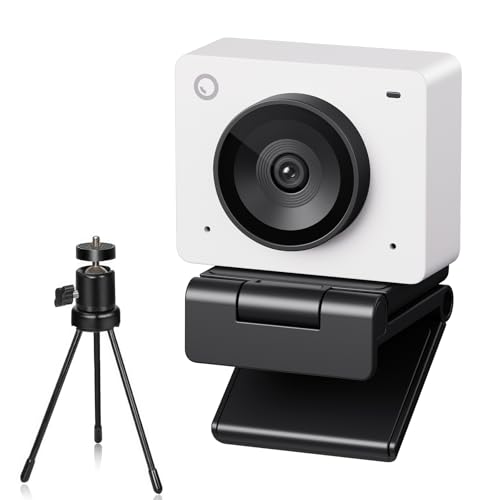
The OBSBOT Meet SE is a USB webcam for PC use with 1080P capture at up to 100FPS. It combines AI tracking, a microphone, a mobile tripod, a privacy cover and plug-and-play use for laptop, desktop and conferencing setups.
It also includes staggered HDR, Beauty Mode and Dynamic Gesture Control 2.0, giving you several ways to frame and adjust video while streaming, teaching, meeting or recording.
Who It Is Best For
This webcam suits buyers who want a USB camera for a laptop or desktop and need tracking, gesture control and simple setup. It is also relevant if you want a webcam that can be mounted on a laptop, desk or screen and used with conferencing or streaming software.
Key Details
| Detail | Verified information and buyer relevance |
|---|---|
| Product name | OBSBOT Meet SE webcam for PC use. |
| Video capture | 1080P at up to 100FPS, with 1080P@60FPS and 720P@150FPS also stated. |
| Image features | AI tracking, staggered HDR and Beauty Mode are included for framing and video adjustment. |
| Gesture control | Dynamic Gesture Control 2.0 supports a hand gesture for lock-on tracking and another for zoom control. |
| Connectivity | USB connectivity for plug-and-play use. |
| Included items | Mobile tripod and Type-C cable are included. |
| Mounting | The mounting clip can attach to laptops, desks or screens. |
| Privacy | A privacy cover is included for covering the lens when not in use. |
| Colour | White. |
Why Buyers Choose It
- 1080P at up to 100FPS gives you a stated high-frame-rate capture option for video use.
- AI tracking and group mode support automatic framing of individuals or groups.
- Gesture control reduces the need for manual camera adjustment during a call or stream.
- The included tripod and mounting clip give you more than one positioning option.
- The privacy cover adds a simple way to cover the lens when the camera is not being used.
How It Works
- Connect the webcam by USB.
- Use the mounting clip to attach it to a laptop, desk or screen, or place it on the included mobile tripod.
- Use AI tracking, group mode, Beauty Mode or staggered HDR as needed for your setup.
- Use the hand gestures shown in the product details to lock onto a target or control zoom.
- Use the privacy cover when you want to cover the lens.
Real World Use
The webcam is set up for laptop and desktop use and is positioned with either the clip or the included tripod. It is stated to work with conferencing and streaming software, and the package also supports Stream Deck, global hotkey control, OSC and API integration.
The privacy cover can also help protect the lens from dust and debris when the camera is not in use.
What To Know Before You Buy
Check that you want the white OBSBOT Meet SE webcam and that the USB connection suits your device. If you plan to use the gesture controls, review the stated gestures and the zoom behaviour before ordering. The camera is supplied with a tripod, Type-C cable and privacy cover, so it already includes several useful setup items.
Common Buyer Questions
Does it work with a laptop?
Yes. The mounting clip can attach to laptops, and the camera is stated for laptop and desktop use.
What resolution does it support?
It supports 1080P at up to 100FPS, with 1080P@60FPS and 720P@150FPS also stated.
Can I control it without touching the camera?
Yes. Dynamic Gesture Control 2.0 includes a gesture for locking onto a tracking target and a gesture for zoom control.
What is included in the package?
A mobile tripod and Type-C cable are included, along with the webcam and privacy cover mentioned in the listing.
Final Buying View
If you want a USB webcam for PC use with AI tracking, gesture control and a stated 1080P high-frame-rate option, this is a clear match. Check the USB connection, the included mounting options and the white finish before choosing.




