Quick Summary
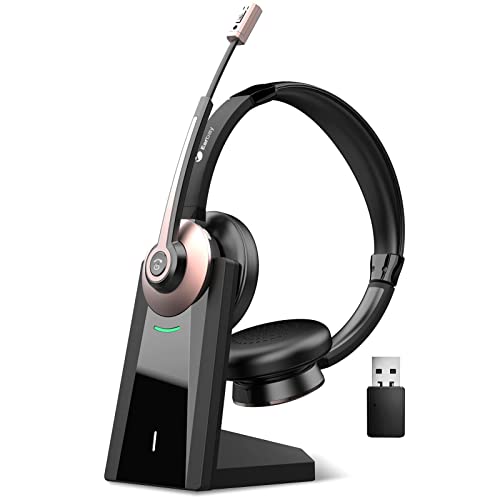
The HP Poly Voyager 4310 UC is a wireless mono headset with a charge stand, built for PC and mobile use. It includes a noise-canceling boom microphone and supports connection to a PC via the included USB-C to USB-A adapter, or to a mobile phone via Bluetooth.
It also includes Microsoft Teams certification and a dedicated Teams button, making it straightforward to access Teams on the headset itself.
Who It Is Best For
This headset suits buyers who want a single-ear design for calls, hybrid working and switching between a computer and a phone. It is also a good fit for anyone who wants a charging stand and Bluetooth connection in the same setup.
Key Details
| Detail | Verified information and buyer relevance |
|---|---|
| Product type | Wireless mono headset with charge stand. |
| Microphone | Noise-canceling boom mic for voice calls and meetings. |
| PC connection | Connects to a PC via the included USB-C to USB-A adapter. |
| Mobile connection | Connects to a mobile phone via Bluetooth. |
| Microsoft Teams | Microsoft Teams certified with a dedicated Teams button. |
| Wireless talk time | Up to 24 hours on a single charge. |
| Charging | Desktop charging stand included. |
| Headset style | Over-the-head, single-ear design with adjustable padded headband and memory foam ear cushion. |
| Wireless range | Up to 164 ft (50 m) with the included BT700 USB-C Bluetooth adapter. |
| Audio over USB | Can also be used as a wired headset with audio over USB cable mode. |
Why Buyers Choose It
- The noise-canceling boom mic and Acoustic Fence technology are intended to reduce background noise during calls.
- The included charging stand gives the headset a dedicated place to charge between uses.
- Wireless connection to two devices at once supports moving between PC use and phone use.
- The dedicated mute controls, including pinch-to-mute and dynamic mute alert, give clear call control.
How It Works
- Connect the headset to a PC using the included BT700 USB-C Bluetooth adapter, or via USB-A with the included USB-C to USB-A adapter.
- Pair it with a mobile phone using Bluetooth.
- Use the boom microphone for calls and mute it with the pinch-to-mute control when needed.
- Charge the headset on the desktop charging stand when not in use.
- If required, use audio over USB cable mode for wired headset use.
Real World Use
The single-ear design leaves one ear uncovered, which suits users who need to stay aware of their surroundings while taking calls. The stated wireless range of up to 164 ft (50 m) gives added movement away from the desk when using the included adapter.
What To Know Before You Buy
Check that you want a mono, single-ear headset rather than a two-ear model. Confirm that your setup matches the included connection options, including USB-C to USB-A adapter use for PC and Bluetooth for mobile phone connection.
Review whether the included charging stand and Microsoft Teams certification are the features you need for your workspace.
Common Buyer Questions
Can it connect to both a PC and a phone?
Yes. It is set up for PC connection through the included adapter and for mobile phone connection via Bluetooth.
Does it include charging support?
Yes. A desktop charging stand is included.
Is it compatible with Microsoft Teams?
Yes. It is Microsoft Teams certified and includes a dedicated Teams button.
How long is the talk time?
Up to 24 hours of wireless talk time on a single charge.
Final Buying View
This headset is a good match for buyers who want a wireless mono headset with PC and phone connectivity, a charging stand and Teams support. Check the connection method and single-ear format before ordering.