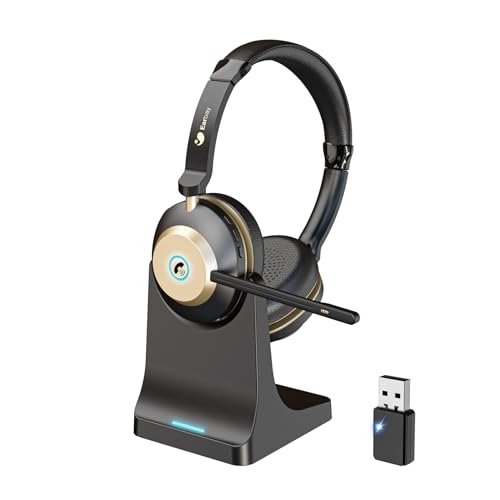
Quick Summary
The Wantek Bluetooth Headset is a wireless headset with microphone for PC use, with Bluetooth 5.2, a USB dongle, a charging base and a mute button. It also has a physical on and off toggle switch, which is intended to make powering the headset straightforward.
This headset is set up for calls and listening on computers, and it can also be used with cell phones. The included USB dongle is useful for computers without Bluetooth or where Bluetooth use is not allowed.
Who It Is Best For
This headset suits buyers who want a wireless computer headset for work calls, online meetings or everyday PC audio use, and who value the supplied USB dongle for connection on compatible computers. It also suits anyone who wants a headset with a mute button and a charging base.
Key Details
| Detail | Verified information and buyer relevance |
|---|---|
| Brand | Wantek. |
| Product type | Bluetooth headset with microphone for PC use. |
| Bluetooth version | Bluetooth 5.2 is stated, which identifies the wireless standard used. |
| Connection option | USB dongle included for computers without Bluetooth or where Bluetooth cannot be used. |
| Controls | Physical on and off toggle switch and a side mute button are stated. |
| Charging | Charging base included. |
| Compatibility | Listed for work, cell phones and computer use. |
| Microphone | Noise cancelling mic is stated in the product title, and the description also mentions a 270° rotatable microphone. |
| Wireless range | Up to 10 m / 33 ft is stated. |
Why Buyers Choose It
- Bluetooth 5.2 is stated, so the headset is positioned as a modern wireless option for computer and phone use.
- The USB dongle gives an extra connection route for computers without Bluetooth or where Bluetooth use is restricted.
- The mute button is placed on the side of the headset, which makes it easy to locate during calls.
- The physical on and off toggle switch provides a simple power control method.
- The 270° rotatable microphone gives a clear, adjustable headset layout for call use.
How It Works
- Turn the headset on using the physical toggle switch.
- Connect it to your device by Bluetooth, or use the supplied USB dongle on a computer where that is needed.
- After the first connection, it is intended to pair automatically.
- Use the side mute button when you want to mute your voice during a call.
- The headset also supports mute use on mobile phone calls and on Zoom, Skype or Teams when used through the Bluetooth dongle.
Real World Use
This headset is set up for work calls, online meetings and general computer audio use. The wireless design removes the need for a cable during use, while the stated range of up to 10 m / 33 ft gives room to move around within that distance. The included charging base gives a defined place to store and charge the headset between uses.
What To Know Before You Buy
Check that you want a headset for PC, cell phone and computer use, and confirm whether you will use Bluetooth directly or the included USB dongle. If your computer does not have Bluetooth, the dongle is the relevant connection route. Review the wireless range, mute controls and charging base included with the headset before ordering.
Common Buyer Questions
Does it work with computers that do not have Bluetooth?
Yes. The included USB dongle is stated for computers without Bluetooth or where Bluetooth cannot be used.
Can I mute calls from the headset?
Yes. A side mute button is stated, and the headset also supports mute use on mobile phone calls and on Zoom, Skype or Teams when used through the dongle.
What wireless version does it use?
Bluetooth 5.2 is stated.
How far is the wireless range?
Up to 10 m / 33 ft is stated.
Final Buying View
This Wantek Bluetooth headset is aimed at buyers who want a wireless headset with microphone, a USB dongle for computer connection, and simple mute and power controls. Check the connection method you need and review the stated wireless range before choosing.