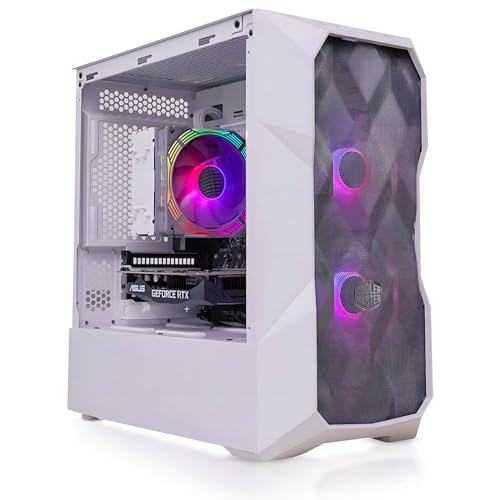
The Skytech Nebula Gaming PC is built for serious gamers who demand premium performance without breaking the bank. Whether you’re into competitive esports titles or immersive AAA games, this machine delivers fast, fluid gameplay at 1080p Ultra settings. Featuring the powerful AMD Ryzen 5 5600 processor and NVIDIA RTX 3050 6GB GDDR6 GPU, it combines efficient multithreaded processing with next-gen ray tracing performance.
Key Features at a Glance:
Processor: AMD Ryzen 5 5600 – 6 Cores / 12 Threads, 3.5GHz Base, 4.4GHz Turbo Boost
Graphics Card: NVIDIA GeForce RTX 3050 6GB GDDR6 (Brand may vary)
Memory: 16GB DDR4 3200MHz RAM with Heatsink
Storage: 1TB NVMe M.2 SSD – 30x faster than a traditional hard drive
Cooling: High Performance Air Cooler with ARGB fans
Power Supply: 650W 80+ Gold Certified PSU
Connectivity: Dual-band Wi-Fi 802.11 AC, HD Audio, and Microphone Support
Operating System: Windows 11 Home 64-bit
Chassis: Skytech Nebula Black Edition – Mesh Front Panel for Optimal Airflow
Bonus: Free Gaming Keyboard & Mouse Included
Technical Specifications
| Component | Specification |
|---|---|
| CPU | AMD Ryzen 5 5600, 6-Core, 12-Thread, 3.5GHz base, 4.4GHz turbo boost |
| Graphics | NVIDIA GeForce RTX 3050 6GB GDDR6 (Brand May Vary) |
| RAM | 16GB DDR4 3200MHz Gaming Memory with Heatsink |
| Storage | 1TB NVMe M.2 SSD – PCIe Gen3 |
| Cooling | High Performance Air Cooler + ARGB Fans |
| Motherboard | AM4 Socket Compatible (Exact model may vary by batch) |
| Power Supply | 650W 80+ Gold Certified PSU |
| Networking | 802.11 AC Dual-Band Wi-Fi |
| USB Ports | Multiple USB 2.0, USB 3.0, and USB 3.2 Gen 1 ports |
| Video Outputs | 1 x HDMI, 1 x DisplayPort Guaranteed (Others may vary) |
| Audio | HD Audio + Integrated Microphone support |
| Case | Skytech Nebula Black Edition, Mesh Front, ARGB Lighting |
| Operating System | Windows 11 Home 64-bit |
| Warranty | 1-Year Parts & Labour, Lifetime Technical Support |
What This Product Is Used For
Perfect for gaming at 1080p Ultra settings, the Skytech Nebula handles everything from competitive shooters like Valorant and Apex Legends to expansive RPGs like Baldur’s Gate 3 and ELDEN RING. Also great for content creation, streaming, and multitasking.
Why We Like This Product (Reviewed by the YPC Team)
At Yorkshire PC Centre, we love the Skytech Nebula for its balanced hardware and value. The Ryzen 5 5600 is a reliable workhorse, and when paired with the RTX 3050, you’re looking at smooth gaming at high settings across modern titles. Plus, the 650W Gold PSU and quality cooling mean this machine is built for the long haul, not just for today’s games.
Pros and Cons
✅ Pros:
Great 1080p Ultra performance across modern titles
Large 1TB NVMe SSD for fast load times
16GB RAM ensures smooth multitasking and gaming
Quality 650W Gold PSU (not a budget power supply)
Excellent airflow with mesh case and ARGB fans
No bloatware – clean Windows 11 install
Free keyboard and mouse included
❌ Cons:
GPU is limited to 1080p or light 1440p gaming
RTX 3050 not ideal for high-end ray tracing
Brand of GPU may vary (not always from top-tier brands)
Alternatives Worth Considering
Skytech Blaze 3.0 – RTX 4060 + Ryzen 5 5600
A bit pricier, but with better 1440p performance.CyberPowerPC Gamer Xtreme i5-13400F + RTX 4060 Ti
For gamers wanting next-gen Intel and stronger GPU.Lenovo Legion T5 – Ryzen 7 + RTX 3060
Higher-end CPU and GPU combo, suitable for VR gaming.
Tips on How to Use Correctly
Keep your drivers (especially GPU) updated via NVIDIA GeForce Experience.
Enable XMP in BIOS to maximise RAM performance.
Install games on the NVMe SSD for the fastest load times.
Ensure case airflow isn’t blocked by furniture or wall proximity.
Use an HDMI 2.1 or DisplayPort cable to get full FPS output on modern monitors.
Comparison: RTX 3050 vs RTX 3060
| Feature | RTX 3050 6GB | RTX 3060 12GB |
|---|---|---|
| CUDA Cores | 2304 | 3584 |
| Ray Tracing Cores | 2nd Gen | 2nd Gen |
| VRAM | 6GB GDDR6 | 12GB GDDR6 |
| Ideal Resolution | 1080p | 1440p |
| Performance (avg) | 15–25% lower | 15–25% higher |
If you’re gaming at 1080p, the RTX 3050 is still a solid choice for high settings.
Buyer’s Guide: Choosing the Right Gaming PC in 2025
When choosing a gaming PC in 2025, consider the following:
CPU & GPU Balance: The Ryzen 5 5600 + RTX 3050 is a great mid-tier combo. Ideal for most modern games.
Storage: Always go for NVMe SSDs over HDDs. Load times and system responsiveness are night and day.
Power Supply Quality: Look for Gold-rated PSU (like the 650W in this PC) to ensure stable, long-term performance.
Future-Proofing: Opt for systems with upgrade potential – this PC supports future GPU and RAM upgrades.
Cooling & Airflow: Mesh-front cases with ARGB fans, like the Nebula, help maintain safe temperatures during long gaming sessions.
Top 10 Frequently Asked Questions (FAQ)
1. Can I upgrade the GPU later?
Yes, the 650W PSU supports GPUs up to RTX 4070 without needing a replacement.
2. Does this support 1440p gaming?
Yes, at medium settings for most titles. It’s optimised for 1080p Ultra.
3. Is the RTX 3050 good for ray tracing?
It supports ray tracing but is best used with DLSS enabled to maintain frame rates.
4. Can I upgrade to 32GB RAM?
Yes, there are available DIMM slots to expand memory.
5. Is this VR ready?
Yes, but performance will depend on the specific VR title. Entry-level VR works well.
6. Does it include Wi-Fi and Bluetooth?
It includes Wi-Fi (802.11 AC) but not Bluetooth. A USB Bluetooth dongle can be added.
7. What brand is the GPU?
It varies by stock availability. It may be MSI, Gigabyte, Zotac, or others.
8. Is the system overclockable?
The CPU is unlocked, but overclocking is not recommended without better cooling.
9. How loud is the system under load?
It remains relatively quiet thanks to the efficient ARGB fans.
10. Can I dual boot with Linux?
Yes, but this requires BIOS configuration and partition management.
Looking for more options?
Browse our full range of Gaming PC's for other great choices to suit your space, goals, and budget.