




Veno Scorp NeonZilla – Affordable Gaming Power with Style
The Veno Scorp NeonZilla Gaming PC is a budget-friendly gaming desktop that combines solid mid-range performance with vibrant ARGB style, ideal for casual and entry-level gamers, students, or creators working on a budget.
At its heart is the Intel Core i7-4770, a 4-core/8-thread processor running at up to 3.9GHz, delivering smooth multitasking and great performance in popular titles like Fortnite, Valorant, CS2, Apex Legends, and more.
The dedicated NVIDIA GeForce GTX 1660 Ti 6GB graphics card provides enough horsepower for high settings at 1080p, supports dual monitors, and is VR capable (depending on the headset requirements). It’s also an ideal GPU for GPU-based rendering, video editing, and light AI workloads.
Storage is handled by a 256GB SSD for quick boot-ups and a 1TB HDD for large games, apps, or project files. 16GB of DDR3 RAM ensures smooth multitasking and game performance.
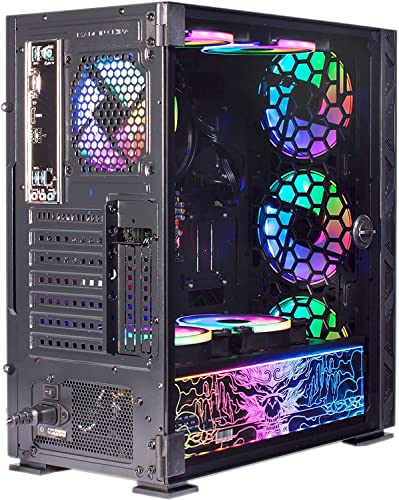
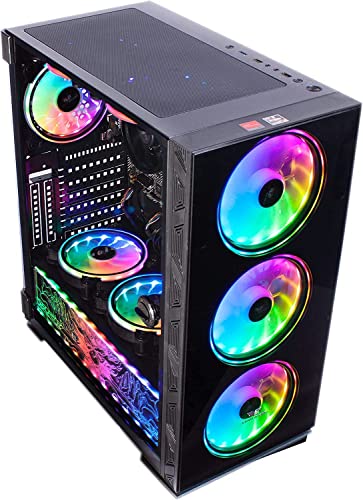
Built inside the Veno Scorp NeonZilla 8 ARGB Gaming Case, with ARGB LED fans, this PC is perfect for anyone wanting to combine functionality and visual flair. And yes – Wi-Fi is included, so you’re ready to go straight out of the box.
🔍 Key Highlights:
Intel Core i7-4770 – 4-core, 8-thread, 3.9GHz Max Turbo
NVIDIA GTX 1660 Ti 6GB – Reliable performance for 1080p gaming
16GB DDR3 RAM – Ideal for multitasking, streaming, and gaming
Storage Combo – Fast 256GB SSD + 1TB HDD for data, games, and media
Wi-Fi Ready – Includes 300Mbps USB WiFi adapter
NeonZilla ARGB Case – Stylish with built-in RGB fans
500W 80+ Bronze PSU – Efficient and reliable power delivery
Windows 10 Home 64-bit – Pre-installed and activated
⚙️ Full Technical Specification:
| Component | Specification |
|---|---|
| CPU | Intel Core i7-4770 – 4 Cores, 8 Threads, 3.9GHz Turbo, 8MB Cache |
| GPU | NVIDIA GeForce GTX 1660 Ti – 6GB GDDR6, HDMI, DisplayPort, DVI |
| Motherboard | Intel H81 / B85 Platform – USB 3.0, SATA III, Gigabit LAN |
| RAM | 16GB DDR3 – Dual Channel, 1600MHz |
| Storage | 256GB 2.5” SSD (OS Drive) + 1TB 7200RPM HDD (Storage Drive) |
| Power Supply | 500W 80+ Bronze Certified PSU |
| Case | Veno Scorp NeonZilla 8 ARGB Mid Tower – Tempered Glass Panel, RGB Fans |
| Connectivity | 3 x USB 3.0, 6 x USB 2.0, Audio Out, Mic In, Headphone Jack |
| Networking | 300Mbps USB WiFi Adapter, Gigabit Ethernet |
| Operating System | Windows 10 Home 64-bit – Activated |
| Display Support | Dual Monitor Ready (HDMI + DP or DVI) |
| Warranty | 1 Year Return to Base (RTB) |
✅ Pros and Cons:
Pros:
Reliable 1080p gaming with GTX 1660 Ti
Fast SSD for system performance + 1TB HDD for storage
Pre-installed Windows 10 – ready to use out of the box
Included WiFi – no need for Ethernet or upgrades
Bright ARGB case with airflow fans for a premium look
VR capable for supported headsets
Supports dual monitors – ideal for productivity and streaming
Cons:
Uses DDR3 RAM – slower than modern DDR4/DDR5 setups
Older generation CPU – fine for gaming, but not ideal for CPU-heavy tasks
Limited upgrade path for future hardware
No USB-C ports or PCIe Gen4 compatibility
🎯 What This PC Is Used For:
1080p gaming at high settings in esports and modern AAA titles
Streaming & content creation on platforms like Twitch or YouTube
Students or work-from-home users needing power and storage
VR gaming (on minimum to medium settings, depending on title)
Light photo/video editing using apps like Adobe Photoshop or Premiere
⭐ Why We Like This Product (YPC Team Review):
The Veno Scorp NeonZilla hits a sweet spot for budget-conscious gamers. It’s VR-capable, dual monitor ready, and packed with just enough power for 1080p gaming, all inside a flashy, well-cooled RGB case. The combo of SSD and HDD gives you both speed and space, while the included WiFi adapter makes setup plug-and-play. For its price, it’s a fantastic entry-level system.
🔁 Alternatives Worth Considering:
| Model | Key Difference | Why Consider |
|---|---|---|
| Veno Scorp Ryzen 5 Build | Newer Ryzen 5 5600G APU | Faster CPU, no discrete GPU |
| YPC RTX 3060 Tower | i5 10400 + RTX 3060 | Better gaming performance at higher cost |
| Refurbished HP EliteDesk Gaming Bundle | Smaller form factor | Good for offices or tight spaces |
📊 Comparison Table:
| Feature | NeonZilla i7-4770 | Ryzen 5 APU Build | RTX 3060 Tower |
|---|---|---|---|
| CPU | i7-4770 (3.9GHz) | Ryzen 5 5600G | i5-10400 |
| GPU | GTX 1660 Ti 6GB | Vega 7 (Integrated) | RTX 3060 12GB |
| RAM | 16GB DDR3 | 16GB DDR4 | 16GB DDR4 |
| Storage | 256GB SSD + 1TB HDD | 500GB NVMe SSD | 1TB NVMe SSD |
| WiFi Included | Yes | Yes | Yes |
| RGB Case | Yes | Yes | Yes |
| VR Ready | Yes (Entry-Level) | No | Yes (Full VR) |
💬 Top 10 FAQs:
1. Can the GTX 1660 Ti run modern games?
Yes, it can run most modern games at 1080p on high settings with 60–100 FPS.
2. Is the system upgradable?
Yes, you can upgrade the GPU, SSD/HDD, and PSU, but the platform is limited by DDR3 and an older chipset.
3. Does this include WiFi?
Yes – it includes a 300Mbps USB WiFi adapter out of the box.
4. Can I add a second monitor?
Yes, the GTX 1660 Ti supports dual displays via HDMI, DP, or DVI.
5. Is it compatible with VR headsets like Oculus Rift or HTC Vive?
Yes, but check your specific headset’s requirements for CPU compatibility.
6. Can I upgrade the RAM?
Yes, but it uses DDR3, so upgrades are limited to older memory types.
7. Does it come with RGB lighting?
Yes – the NeonZilla case features ARGB fans and a tempered glass side panel.
8. Is Windows pre-installed and activated?
Yes – Windows 10 Home 64-bit is installed, activated, and ready to use.
9. What type of PSU is included?
A 500W 80+ Bronze rated PSU ensures clean, efficient power delivery.
10. What is the warranty policy?
You get a 1-Year Return to Base (RTB) warranty covering all core components.
🧠 Tips for Using the NeonZilla PC:
Run Windows Updates & GPU driver updates after first boot
Install games on the HDD to save SSD space
Use MSI Afterburner to monitor temps and GPU performance
Clean dust filters and fans every 3 months for peak airflow
Pair with a 144Hz 1080p monitor for a smooth gaming experience
Use a wired connection for online competitive gaming if possible
🛒 Buyer’s Guide – Who Should Buy This PC?
Choose this PC if you:
✅ Want a budget-friendly desktop for 1080p gaming
✅ Need a ready-to-go PC with Windows and WiFi
✅ Like RGB lighting and ARGB style cases
✅ Want a balance of SSD speed and HDD storage
✅ Prefer a full-size desktop over a small form factor
✅ Are gaming on a tight budget but still want solid GPU performance
Final Verdict: The Veno Scorp NeonZilla offers fantastic value for entry-level to mid-tier gamers. It’s a fun, flashy, and functional way to start your gaming journey without breaking the bank.
Looking for more options?
Browse our full range of Gaming PC's for other great choices to suit your space, goals, and budget.


