


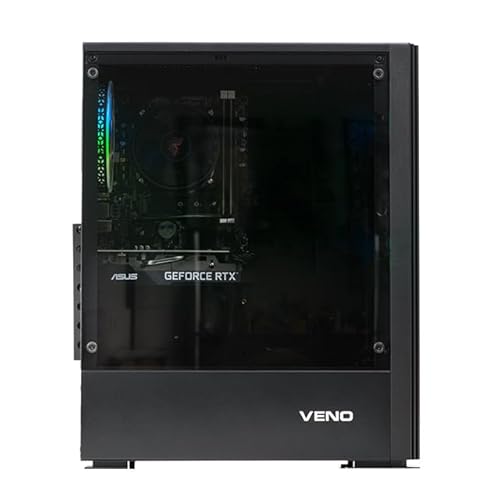

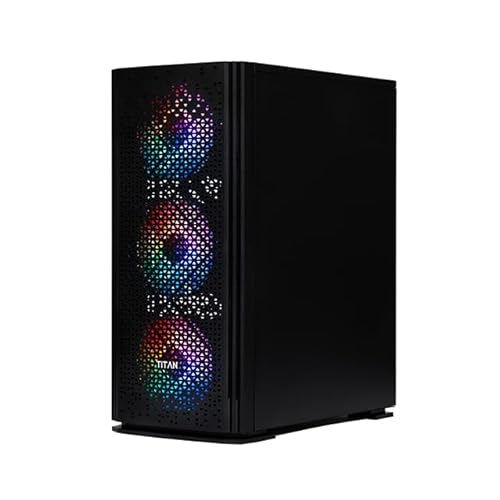
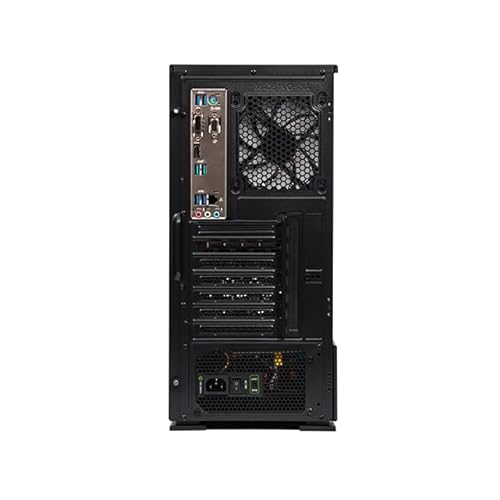

The Veno Scorp Dual 24″ Monitor Gaming PC Bundle is a complete, ready-to-use desktop solution built for gaming, multitasking, and productivity. Powered by the reliable Intel Core i7-3770 and paired with the AMD Radeon RX 550 4GB graphics card, this system is perfect for 1080p gaming, streaming, office work, and creative tasks.
The bundle includes two brand-new 24” Full HD monitors, a new RGB gaming keyboard and mouse, and the robust Titan 4 mid-tower case with 4 ARGB fans, offering exceptional airflow and aesthetics. Whether you’re setting up a gaming station, a work-from-home rig, or a dual-screen productivity setup, this system delivers performance and versatility at an unbeatable value.
With 16GB of fast DDR3 RAM, a 512GB NVMe SSD, Wi-Fi, and Windows 10 Pro pre-installed, the Veno Scorp bundle offers smooth multitasking, fast boot times, and dependable gaming right out of the box.
Technical Specifications
| Component | Specification |
|---|---|
| Processor (CPU) | Intel Core i7-3770 – 4 Cores / 8 Threads, 3.4GHz Base, 3.9GHz Turbo, 8MB Cache |
| Graphics (GPU) | AMD Radeon RX 550 4GB GDDR5 – Supports DirectX 12, OpenCL, Vulkan |
| RAM | 16GB DDR3 (2 x 8GB, Dual Channel, 1600MHz or higher) |
| Storage | 512GB NVMe M.2 SSD (PCIe Gen3, via adapter where applicable) |
| Case | Titan 4 Mid-Tower Gaming Case with 4 x ARGB Fans, Tempered Glass Panel |
| Cooling | Air-cooled with included RGB fans and rear exhaust |
| Power Supply (PSU) | 550W 80+ Certified ATX PSU |
| Operating System | Windows 10 Pro 64-bit – Activated and Pre-installed |
| Wi-Fi | Included USB Wi-Fi Adapter (300Mbps, Dual Band) |
| Audio | 5.1 Channel HD Audio with Mic & Headphone Support |
| USB Ports | 6 x USB 2.0, 2 x USB 3.0 (front and rear I/O) |
| Monitor Bundle | 2 x 24” Full HD (1920×1080) Monitors, 60Hz–75Hz (Brand may vary) |
| Peripherals | New RGB Gaming Keyboard and Mouse |
| Warranty | 1 Year Parts, 2 Year Labour, Lifetime Technical Support |
| Software | 90 Days Norton 360 VPN & Antivirus for Gamers Included |
What This Product Is Used For
1080p Gaming at low to medium settings (Fortnite, Valorant, CS2, LoL)
Dual-screen multitasking – productivity, spreadsheets, design
Work-from-home setups – video calls, Office apps, browsers
Casual streaming and content creation
Media consumption, light editing, and coding
Why We Like This Product (Reviewed by the YPC Team)
The Veno Scorp Dual Monitor i7 RX 550 bundle is one of the most complete value-driven packages we’ve seen. The i7-3770 is a legendary processor with solid multi-threaded performance, and when matched with the RX 550, you get reliable 1080p gameplay and smooth multitasking.
What truly sets this build apart is the dual 24″ monitor setup, offering massive productivity benefits, plus the modern ARGB Titan 4 case, and included gaming peripherals. It’s a fully integrated setup that works great for students, streamers, families, or remote workers wanting to game and work without compromise.
Pros and Cons
✅ Pros:
Intel i7 quad-core CPU with hyperthreading for excellent multitasking
RX 550 handles esports games at 1080p smoothly
512GB NVMe SSD = ultra-fast boot and load times
Dual monitors included – perfect for work, gaming, or streaming
RGB keyboard and mouse included – ready to game out of the box
Wi-Fi included, no cables needed
Clean Windows 10 Pro install with driver support
❌ Cons:
RX 550 not suitable for demanding AAA games on high settings
CPU platform is older (LGA 1155) with limited upgrade options
No Bluetooth (USB dongle can be added)
Alternatives Worth Considering
Veno Scorp Ryzen 5 4500 + RTX 3050 Dual Monitor Bundle
For more demanding 1080p gaming with DLSS and ray tracing.HP EliteDesk Refurb – i7-6700 + GTX 1050 Ti Bundle
Compact office/gaming hybrid, great for desks with less space.Skytech Blaze Mini – Ryzen 3 + GTX 1650
Higher gaming performance but no dual monitor or peripheral bundle.
Tips on How to Use Correctly
Install games and key apps on the NVMe SSD for faster performance.
Use DisplayPort or HDMI for better monitor quality and refresh rate.
Configure dual displays via Windows > Display Settings > Extend Displays.
Keep case fans and vents dust-free for efficient airflow.
Use AMD Adrenalin software to optimise GPU settings and update drivers.
Comparison: RX 550 vs GTX 1050 Ti vs Vega 7 iGPU
| Feature | RX 550 4GB | GTX 1050 Ti 4GB | Vega 7 (Ryzen iGPU) |
|---|---|---|---|
| Architecture | GCN 4.0 | Pascal | Vega |
| VRAM | 4GB GDDR5 | 4GB GDDR5 | Shared (System RAM) |
| 1080p Gaming FPS | 50–60 FPS (Med) | 60–75 FPS (High) | 40–50 FPS (Low–Med) |
| Ray Tracing | No | No | No |
| Upgradeable GPU Slot | Yes | Yes | Depends on system |
Verdict: RX 550 is suitable for esports titles but GTX 1050 Ti and Vega 7 are better matched for different use cases.
Buyer’s Guide: Dual Monitor Gaming PC Bundles in 2025
Why Dual Monitors?
Dual screens boost productivity, enhance streaming capabilities, and allow for more immersive gameplay and multitasking. This bundle is ideal for:
Gamers who want to stream while playing
Students or professionals using spreadsheets, docs, and web tools simultaneously
Creative users needing expanded workspace
What to Look For:
Processor & GPU: The i7-3770 and RX 550 provide excellent base-level gaming and multitasking.
SSD Only Storage: The 512GB NVMe SSD ensures a smooth and fast experience.
RGB & Cooling: The Titan 4 case isn’t just stylish—it’s functional with great airflow.
Wi-Fi Included: No need to buy a separate adapter.
Top 10 Frequently Asked Questions (FAQ)
1. Can I play Fortnite and Valorant on this system?
Yes – 1080p at medium settings delivers 60+ FPS easily.
2. Are the monitors new or refurbished?
The monitors are brand new 24” Full HD panels. Brand may vary.
3. Can I add more storage later?
Yes. The motherboard supports additional SSDs or HDDs via SATA.
4. Can I upgrade the GPU?
Yes. The 550W PSU supports upgrades up to GTX 1660 / RTX 2060 class.
5. Is Windows 10 Pro fully activated?
Yes – it’s pre-installed and activated with updates ready.
6. Does it support Bluetooth?
No Bluetooth by default. A USB Bluetooth adapter can be added.
7. Can this be used for photo or video editing?
Yes. It’s suitable for Adobe Photoshop, Canva, or light Premiere Pro workflows.
8. Does it support dual screen out of the box?
Yes. The RX 550 has HDMI + DVI/DisplayPort for dual monitor setups.
9. Can I upgrade to Windows 11?
Officially, the i7-3770 is not supported by Microsoft for Win11, but it can be installed manually.
10. Is this good for streaming?
Yes. Stream esports titles in 720p–1080p with OBS, Twitch, or YouTube.
Looking for more options?
Browse our full range of Gaming PC's for other great choices to suit your space, goals, and budget.


