




Quick Summary
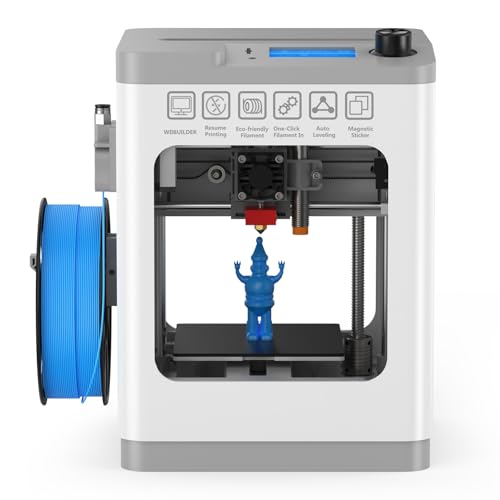
The WEEFUN Tina2 is a fully assembled 3D printer with auto levelling, resume printing, an LCD screen and a removable magnetic build plate. It is set up for use with PLA, PLA Pro and TPU filament, and the package includes a sample PLA filament roll plus a Micro SD card with multiple model files.
For buyers who want a compact desktop 3D printer for straightforward first use, the main points to check are the supported filament types and the included starter items. The product also notes that Tina2 Basic does not have WiFi app function.
Who It Is Best For
This printer is aimed at beginners and users who want an assembled desktop 3D printer that is ready to use out of the box. It also suits home, schoolroom and office use where a compact machine and removable build plate are useful.
Key Details
| Detail | Verified information and buyer relevance |
|---|---|
| Brand | WEEFUN, as named in the product title and description. |
| Model name | Tina2, with the source also referring to Tina2 Basic in the description. |
| Assembly state | Fully assembled, which means it is presented as ready to operate out of the box. |
| Auto levelling | One-touch auto levelling is stated, so manual bed adjustment is not part of the described setup. |
| Printing recovery | Resume printing is stated for power outages or other unexpected stoppages. |
| Display | 2.4 inch LCD display, giving a visible on-device interface. |
| Build plate | Removable magnetic build plate, described as bendable for removing models from the bed. |
| Filament support | Compatible with PLA, PLA Pro and TPU filament. |
| Included items | A sample PLA filament roll and a Micro SD card with multiple model files are included. |
| Usage note | Tina2 Basic is noted as not having WiFi app function. |
Why Buyers Choose It
- Fully assembled, so the printer is presented as ready to use without initial assembly.
- Auto levelling reduces the need for manual bed adjustment during setup.
- Resume printing is stated for interrupted prints after a power outage or unexpected stoppage.
- The removable magnetic build plate supports easier model removal after printing.
How It Works
- Power on the printer and use the LCD screen to operate it.
- Use the one-touch auto levelling function before printing.
- Load a supported filament type, such as PLA, PLA Pro or TPU.
- Start a print from the included Micro SD card files or your own prepared model files.
- If printing stops unexpectedly, use the resume printing function to continue from the memorised position.
Real World Use
The compact desktop format makes this printer easier to place in smaller spaces such as a home desk, classroom or office area. The removable magnetic build plate is relevant when taking finished models off the bed, while the included sample filament and model files give a starting point for first-time use.
What To Know Before You Buy
Check that you want a fully assembled printer rather than a kit. Confirm that your chosen filament is one of the stated supported types, namely PLA, PLA Pro or TPU. The source also notes that Tina2 Basic does not have WiFi app function, so this is worth checking if app connectivity matters to you.
Common Buyer Questions
Is the printer ready to use straight away?
Yes, it is described as fully assembled and includes a sample PLA filament roll plus a Micro SD card with model files.
Which filament types are supported?
PLA, PLA Pro and TPU filament are stated as compatible.
Does it recover after a power cut?
Yes, resume printing is stated for power outages or other unexpected stoppages.
Does it have WiFi app function?
The source notes that Tina2 Basic does not have WiFi app function.
Final Buying View
The WEEFUN Tina2 suits buyers who want a compact, fully assembled 3D printer with auto levelling, resume printing and a removable magnetic build plate. Review the exact model version and supported filament types before ordering, especially if WiFi app function matters to your setup.


