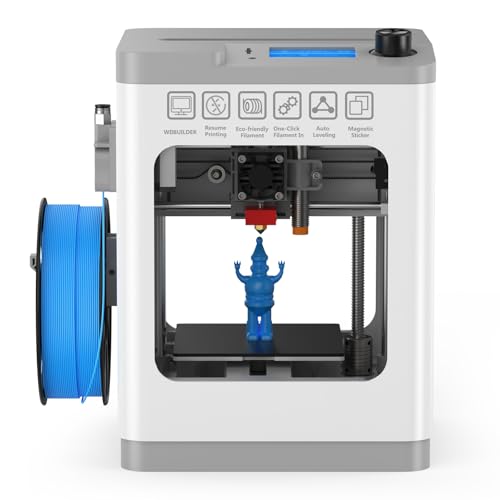
Quick Summary
The ANYCUBIC Kobra S1 Combo is a multicolour FDM 3D printer with a closed CoreXY construction, 600mm/s speed, active drying and LeviQ 3.0. It is set up for printing with PLA, PETG, TPU, ASA and ABS filament, and the source also states that it supports printing while drying with one click.
The combination is aimed at buyers who want a printer with automatic bed levelling, automatic Z-axis offset and remote control through a mobile phone. The bundled ACE PRO is included as standard, and the printer is also described with AI monitoring that can detect spaghetti and notify for inspection, although the camera requirement should be checked before use.
Who It Is Best For
This printer suits buyers looking for a multicolour FDM machine with enclosed CoreXY construction and filament support across several common material types. It also suits users who want automatic levelling support, drying while printing and app-based control in one setup.
It is worth checking the colour setup you want, the filament types you plan to use and whether you will rely on the AI monitoring functions, since camera use is mentioned as a requirement for that feature.
Key Details
| Detail | Verified information and buyer relevance |
|---|---|
| Brand and model | ANYCUBIC Kobra S1 Combo, which identifies the printer model being offered. |
| Printer type | Multicolour FDM printer with a closed CoreXY construction for the stated printing setup. |
| Stated speed | 600mm/s, which is the speed figure given in the title. |
| Levelling technology | LeviQ 3.0 with automatic bed levelling and automatic Z-axis offset. |
| Drying function | Active drying and printing while drying with one click are both stated. |
| Filament compatibility | PLA, PETG, TPU, ASA and ABS filament are listed in the description. |
| Included item | ACE PRO is included as standard. |
| Colour printing | Described as printing in 4 colours, with 8 colours possible when two ACE Pros are connected via the Anycubic Color Engine Hub. |
| Hotend and bed figures | A 320°C full-metal hotend and a hot bed that can be maintained at 120°C are stated. |
| AI monitoring | AI monitoring can detect spaghetti and notify for inspection, and the camera requirement should be checked if you want this feature. |
| Remote control | App remote control through a mobile phone is stated. |
Why Buyers Choose It
- Closed CoreXY construction is stated, which may matter to buyers wanting a printer built around that structure.
- LeviQ 3.0 with automatic bed levelling and automatic Z-axis offset reduces the amount of manual setup needed at the start of a print.
- ACE PRO is included as standard, and the printer is described as able to print while drying with one click.
- Support for PLA, PETG, TPU, ASA and ABS gives buyers several filament options to compare against their own projects.
- The app remote control and elapse-time recording add extra monitoring options for users who want to follow the print process on a phone.
How It Works
- Set up the printer and use LeviQ 3.0 for automatic bed levelling and automatic Z-axis offset.
- Load the filament type you plan to use from the stated compatible options.
- Use ACE PRO when you want printing while drying, as the source states this works with one click.
- If you use the AI monitoring functions, check that the required camera is in place.
- Use the mobile app for remote control and to view the print process as needed.
Real World Use
In day-to-day use, the printer is positioned as a multicolour machine for makers who want more control over filament handling and print monitoring. The enclosed CoreXY construction, drying function and remote app control are the main practical features highlighted in the description.
The note about firmware upgrade suggests checking the machine after purchase before relying on the latest functions. If you want the full multicolour and AI feature set, confirm the included setup and any extra requirements before starting.
What To Know Before You Buy
Confirm whether you want the 4-colour setup as described, or the 8-colour setup that depends on two ACE Pros and the Anycubic Color Engine Hub. The description states that one ACE Pro is included as standard.
Check the filament types you intend to print with against the listed compatibility, especially if your projects depend on PLA, PETG, TPU, ASA or ABS. If you plan to use AI monitoring, make sure the camera requirement is covered.
The printer is also described with a 320°C full-metal hotend and a hot bed maintained at 120°C, so those are useful figures to compare with your intended use.
Common Buyer Questions
Which filament types does it support?
PLA, PETG, TPU, ASA and ABS filament are listed in the description.
Does it include drying support?
Yes. The printer is described with ACE PRO and one-click printing while drying.
How many colours can it print?
It is described as printing in 4 colours, and 8 colours are stated when two ACE Pros are connected via the Anycubic Color Engine Hub.
Does the AI monitoring need anything extra?
Yes. The note states that a camera is required for AI monitoring.
Final Buying View
The ANYCUBIC Kobra S1 Combo is a multicolour FDM printer for buyers who want enclosed CoreXY construction, LeviQ 3.0 and filament drying support in one machine. Check the colour setup, filament compatibility and camera requirement before ordering so the features match your intended use.