Quick Summary
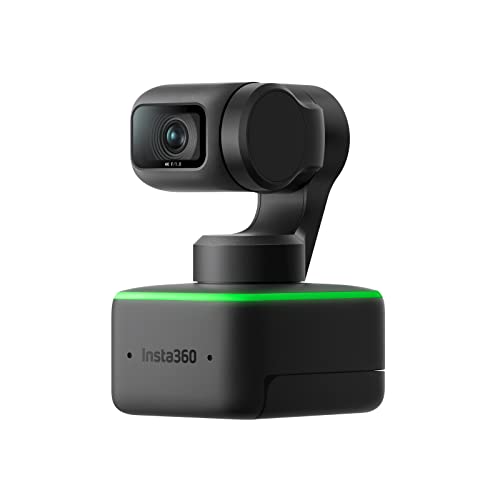
The Insta360 Link is a PTZ 4K webcam with a 1/2" sensor, AI tracking, gesture control, HDR and noise-cancelling microphones. It is built for video calls and live streaming, with specialised camera modes for different ways of framing you and your workspace.
The gimbal design and AI tracking keep the lens following movement, while the Link Controller desktop software lets you manually adjust brightness, exposure and gimbal position.
Who It Is Best For
This webcam suits buyers who want a camera for laptop-based video calls or live streaming and need flexible framing options. It is also relevant if you want to use modes such as Whiteboard Mode, DeskView Mode, Overhead Mode or Portrait Mode.
Key Details
| Detail | Verified information and buyer relevance |
|---|---|
| Product type | PTZ 4K webcam for video calls and live streaming. |
| Sensor | 1/2" sensor for capturing fine detail and dynamic range. |
| Tracking | AI tracking with automatic zooming and framing to follow movement. |
| Gesture control | Supports hand gestures for AI tracking, zoom and Whiteboard Mode. |
| Modes | Whiteboard Mode, DeskView Mode, Overhead Mode and Portrait Mode are included. |
| Audio | Dual noise-cancelling microphones to reduce background noise and amplify your voice. |
| Software control | Link Controller desktop software allows manual adjustment of brightness, exposure and gimbal position. |
| Compatibility | Fully compatible with Zoom, Microsoft Teams, Google Meet and more. |
Why Buyers Choose It
- The PTZ design and AI tracking keep the lens moving with you, which is useful when you do not want to stay fixed in one position.
- Gesture control lets you change key functions without using clicks, which suits quick adjustments during calls or presentations.
- The specialised modes support different framing setups, from desk views to overhead use and portrait framing.
- Dual noise-cancelling microphones are included for clearer voice capture with reduced background noise.
How It Works
- Connect the webcam to your laptop or other setup for video calls or streaming.
- Use AI tracking if you want the lens to follow your movement automatically.
- Use the hand gestures to enable AI tracking, zoom in or out, or switch to Whiteboard Mode.
- Open the Link Controller desktop software to adjust brightness, exposure and gimbal position manually.
- Select the mode that fits your task, such as DeskView, Overhead or Portrait Mode.
What To Know Before You Buy
Check that you want a PTZ webcam rather than a fixed camera, as the moving lens and tracking are part of the main feature set. Review the specialised modes to make sure they suit your intended use, especially if you need desk, overhead or portrait framing. If you rely on specific conferencing software, confirm your setup matches the listed compatibility with Zoom, Microsoft Teams and Google Meet.
Common Buyer Questions
Can the camera follow movement automatically?
Yes. AI tracking with automatic zooming and framing is included so the lens can follow your movement.
Can I control it without using the software?
Yes. Gesture control lets you enable AI tracking, zoom in or out, and switch to Whiteboard Mode using hand gestures.
Which modes are included?
Whiteboard Mode, DeskView Mode, Overhead Mode and Portrait Mode are all included.
Does it include microphone support?
Yes. It has dual noise-cancelling microphones for clearer audio and reduced background noise.
Final Buying View
If you want a 4K PTZ webcam with tracking, gesture control and multiple framing modes, the Insta360 Link offers those verified features in one device. Check that the modes and software controls match how you plan to use it before ordering.