Quick Summary
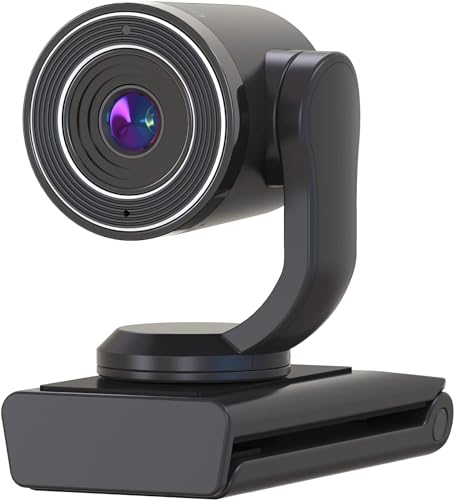
The TOUCAN Streaming USB Webcam is a 1080p HD webcam with 30fps video, a wide 89-degree field of view, and a built-in omnidirectional microphone. It is set up over USB and is described as plug and play for use with a computer or laptop.
The camera is presented for video conferencing, streaming, gaming, recording and virtual online classes. It also includes a privacy feature where the camera head flips down when not in use.
Who It Is Best For
This webcam suits buyers who want a USB camera for online meetings, streaming or recording on a PC, Mac or laptop. It is also relevant for anyone who needs a wide view for more than one person and wants a simple setup without additional drivers or software.
Key Details
| Detail | Verified information and buyer relevance |
|---|---|
| Brand | TOUCAN, for clear product identification. |
| Product type | Streaming USB webcam for computer and laptop use. |
| Video resolution | 1080p HD video for full HD capture. |
| Frame rate | 30fps is stated in the description, so the video output is specified for that rate. |
| Field of view | 89-degree wide field of vision, which helps frame multiple people. |
| Microphone | Built-in omnidirectional microphone for audio capture. |
| Connection | USB connection with an included USB cable and no additional drivers or software required. |
| Compatibility | Compatible with Windows 7 or later and MacOS 10.12 or later. |
| Mounting | Can be placed on a monitor, television, laptop or tabletop, with clamp and screw base mounting mentioned. |
| Privacy feature | Flip-down camera head for privacy when not filming. |
Why Buyers Choose It
- 1080p HD video with 30fps gives a defined video specification for calls, streaming and recording.
- The 89-degree field of view is useful when more than one person needs to fit in frame.
- The built-in omnidirectional microphone keeps video and audio in one USB camera.
- Plug and play setup reduces the need for extra software during installation.
- The flip-down head provides a simple privacy position between uses.
How It Works
- Connect the webcam to a USB port using the included USB cable.
- Use it with a computer or laptop running Windows 7 or later, or MacOS 10.12 or later.
- Open your conference, streaming or recording software and select the camera.
- Position it on a monitor, television, laptop or tabletop as required.
- Flip the camera head down when you want to stop accidental filming.
Real World Use
The wide field of view makes this camera useful for calls where more than one person needs to be visible, such as meetings from a desk or conference room. The USB setup also makes it straightforward to move between a computer, laptop or another supported setup.
What To Know Before You Buy
Check that your device runs Windows 7 or later, or MacOS 10.12 or later before ordering. Confirm that the 89-degree view and 30fps video specification match the way you plan to use the webcam. If you need the camera to sit on a particular surface, review the mounting options and make sure the chosen position works with your screen or tabletop.
Common Buyer Questions
Does it need extra software?
No, it is described as plug and play and does not require additional drivers or software.
Can it work with a laptop?
Yes, it is stated to plug in to a PC, Mac or laptop.
Does it have a privacy feature?
Yes, the camera head flips down to help prevent accidental filming.
What operating systems are supported?
Windows 7 or later and MacOS 10.12 or later are listed as compatible.
Final Buying View
If you want a USB webcam with 1080p HD video, a built-in mic and a wide 89-degree view, this TOUCAN model gives a clear set of verified features to compare. Check your operating system and preferred mounting position before choosing it.