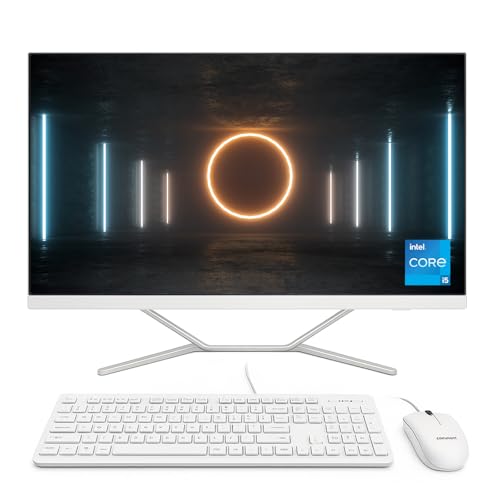


If you’re looking for a clean, all-in-one desktop solution that delivers modern-day performance in a small footprint, the HP 22-dg0100ng All-in-One PC is built to keep your workspace tidy while still ticking all the right boxes for speed, multitasking, and everyday reliability.
Equipped with the Intel N100 quad-core processor, 8GB of RAM, and a fast 512GB SSD, this machine handles office tasks, web browsing, video conferencing, and light creative workloads with ease. Its 21.5-inch Full HD display is sharp and crisp, and Windows 11 comes pre-installed for the latest in security and user experience.
Whether you’re outfitting a minimalist home office, a professional reception desk, or just need a sleek family PC that doesn’t take over the room, this HP All-in-One delivers.
🔍 Full Technical Specifications
| Component | Specification |
|---|---|
| Model | HP All-in-One 22-dg0100ng |
| Display | 21.5-inch Full HD (1920 x 1080) IPS Anti-Glare, 60Hz, 250 nits |
| Processor | Intel N100 (4-core, 4-thread, 6MB cache, up to 3.4GHz burst frequency) |
| RAM | 8GB DDR4-3200 (1 x 8GB, upgradable) |
| Storage | 512GB M.2 PCIe NVMe SSD |
| Graphics | Integrated Intel UHD Graphics (Intel 12th Gen) |
| Webcam | Integrated HD webcam with dual array digital microphones |
| Audio | Dual 2W stereo speakers |
| Networking | Wi-Fi 5 (802.11ac), Bluetooth 5.0, Gigabit Ethernet (RJ-45) |
| Ports | 2 x USB-A 3.2 Gen 1, 2 x USB-A 2.0, 1 x HDMI-out, 1 x headphone/mic combo |
| Operating System | Windows 11 Home |
| Keyboard & Mouse | Included (wired, colour-matched) |
| Form Factor | All-in-One, edge-to-edge display, white/black finish |
✅ Pros and ❌ Cons
Pros:
✔️ Fanless Intel N100 processor for ultra-quiet operation
✔️ Fast 512GB SSD ensures rapid boot times and app loading
✔️ IPS Full HD display provides accurate colours and sharp images
✔️ HDMI-out port supports a second monitor for productivity
✔️ Built-in webcam and mic make it ready for video calls
✔️ Slimline, cable-free desktop setup ideal for compact spaces
Cons:
❌ Integrated graphics limit 3D rendering and gaming use
❌ 8GB RAM is sufficient but not future-proof for power users
❌ No touchscreen functionality
❌ Single RAM channel (1 x 8GB) reduces memory bandwidth efficiency
🎯 What This Product is Used For
This model is perfect for:
Office productivity (Word, Excel, email, Teams/Zoom)
Home admin and light multitasking
Streaming in Full HD (Netflix, YouTube, BBC iPlayer)
Casual creative work (photo edits, light design)
Students and families sharing a central home PC
Remote work and virtual meetings
It’s not built for high-end gaming, CAD, or video editing, but it shines in everything else.
💬 Why We Like This Product (YPC Team Review)
At our YPC reception desk, we need systems that are silent, reliable, and look good in public spaces. The HP 22-dg0100ng nailed all three. It’s fanless, so it runs silently even during long sessions. The Full HD screen is perfect for managing schedules and emails side by side. Setup took minutes — keyboard and mouse were included, and there were no tangled cables to sort.
Honestly, for the price point, it’s one of the cleanest, most efficient AIOs we’ve tested in a compact space.
🔄 Alternatives Worth Considering
Need something a bit different? Check out these solid alternatives:
Acer Aspire C24 | Intel Core i3 | 8GB RAM | 512GB SSD
Offers slightly more CPU power and a larger display for only a little more.Lenovo IdeaCentre AIO 3 | Ryzen 3 5300U | SSD + HDD Combo
Better multitasking power and dual-drive storage — ideal for media-heavy use.HP Pavilion 24 All-in-One | Intel Core i5 | Full HD Touchscreen
Touchscreen experience and better future-proofing if you want extra headroom.
💡 Tips on Using the HP 22-dg0100ng Correctly
Add a second monitor using the HDMI-out port to improve productivity
Keep it updated: Windows 11 performs best with regular system and security updates
Use cloud storage: Pair with OneDrive or Google Drive to save local SSD space
Upgrade RAM if needed: 8GB is enough, but upgrading to 16GB makes a big difference for multitaskers
Reduce startup apps: Keep the system fast by disabling unused startup programs
Use keyboard shortcuts: With no touchscreen, learn Windows 11 gestures and shortcuts for efficiency
Place in open areas: The anti-glare screen is great in bright rooms, especially for open-plan offices
🆘 FAQs
1. Can I upgrade the RAM?
Yes, the RAM is upgradable to 16GB (max supported), with one free DIMM slot.
2. Does it support Windows 11 Pro?
Yes, you can upgrade the OS if you need Pro features like BitLocker or domain join.
3. Is the display height adjustable?
No, the stand is fixed-angle. You may need a riser or arm for ergonomic adjustments.
4. Does it have HDMI input?
No, it only supports HDMI-out — for extending the display to an external monitor.
5. Is it fanless?
Yes, the Intel N100 is a low-power chip that requires no active cooling, making it ultra-quiet.
6. Can I use Bluetooth headphones?
Yes, Bluetooth 5.0 is built-in and supports modern wireless audio devices.
7. Does it come with antivirus?
Windows 11 includes Microsoft Defender, which provides basic real-time protection.
8. Is the SSD user-replaceable?
Technically yes, though HP recommends upgrades only by authorised technicians.
9. Does it support dual monitors?
Yes, via HDMI-out, you can connect a second screen.
10. Is the webcam retractable?
No, the webcam is fixed, but it does include a privacy slider.
📘 Buyer’s Guide Summary
The HP 22-dg0100ng is a brilliant choice for users who want quiet, clutter-free performance for everyday use. With a modern quad-core processor, fast SSD, and clean design, it’s built to handle productivity, streaming, and communication without overcomplicating your setup. Whether for home, office, or shared family use, it balances value with function in an elegant all-in-one package.
Looking for more options?
Browse our full range of All In One PC's for other great choices to suit your space, goals, and budget.