
Computer Memory - RAM
Computer memory, often called RAM, is one of the key parts that affects how smoothly a computer handles everyday tasks, games, creative software, browser tabs and office work. The right RAM should be compatible with your device, match your motherboard or laptop requirements and provide the capacity and specification needed for the way you use your computer.
At YPC, you can browse computer memory and RAM for desktops, laptops, upgrades, repairs, gaming builds, office PCs and home workstations. This category helps you compare memory type, capacity, speed, form factor, kit size, compatibility, heat spreaders and listed specifications before choosing.
- Computer Memory - RAM
SpotMarket 8GB DDR4 3200MHz PC4-25600 1.2V 1Rx8 260-Pin SODIMM Laptop RAM Memory Module M471A1K43EB1-CWE
Original price was: £62.90.£58.48Current price is: £58.48. *View On Amazon* - Computer Memory - RAM
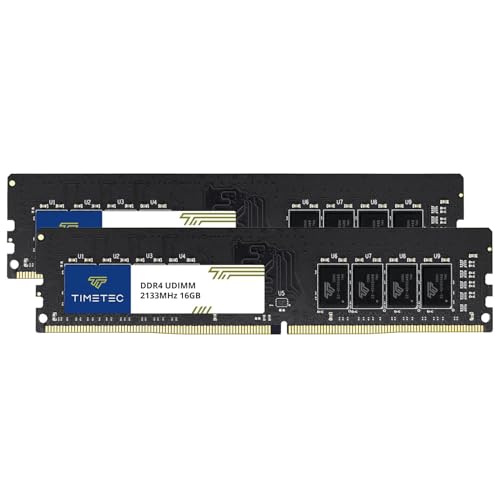
Timetec 32GB KIT (2x16GB) DDR4 2133MHz (PC4-2133P) PC4-17000 UDIMM Desktop RAM – 288-Pin 1.2V CL15 Non-ECC Unbuffered DIMM Memory Module Upgrade
Original price was: £169.99.£162.99Current price is: £162.99. *View On Amazon* - Computer Memory - RAM
Crucial RAM 16GB DDR4 2666MHz CL19 Memory for Mac CT16G4S266M Green
Original price was: £109.02.£102.60Current price is: £102.60. *View On Amazon* - Computer Memory - RAM
Netac Desktop Workstation Kit 32GB (2x 16GB) DDR4 3200MHz C16 XMP 2.0 High Performance White
£185.99 *View On Amazon* - Computer Memory - RAM
2GB (2 x 1GB) DRAM DIMM MEMORY RAM KIT COMPATIBLE WITH CISCO WIDE AREA APPLICATION ENGINE (MEM-WAE-2GB)
£125.00 *View On Amazon* - Computer Memory - RAM
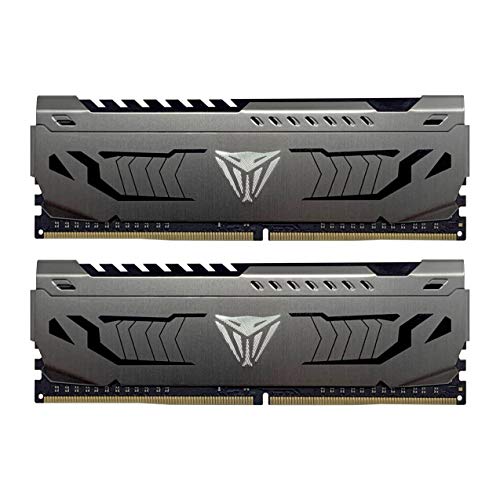
Patriot Viper Steel Gaming Memory Module DDR4 32GB (2 x 16GB) 3600MHz Performance Memory Kit
Original price was: £244.99.£226.99Current price is: £226.99. *View On Amazon* - Computer Memory - RAM
16GB (2 x 8GB) DDR4 3200MHz PC4-25600 260-PIN SODIMM MEMORY RAM KIT COMPATIBLE WITH LAPTOPS/NOTEBOOKS
£104.00 *View On Amazon* - Computer Memory - RAM
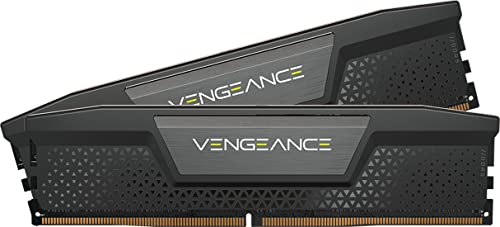
CORSAIR VENGEANCE RGB DDR5 RAM 64GB (2x32GB) Up to 6000MHz CL30-36-36-76 1.40V AMD EXPO Intel XMP 3.0 Desktop Computer Memory – Grey (CMH64GX5M2Z6000Z30)
Original price was: £1,075.99.£699.99Current price is: £699.99. *View On Amazon* - Computer Memory - RAM
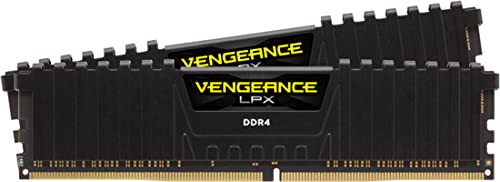
Corsair VENGEANCE LPX DDR4 RAM 16GB (2x8GB) 3000MHz CL16 Intel XMP 2.0 Computer Memory – Black (CMK16GX4M2D3000C16)
Original price was: £147.95.£139.99Current price is: £139.99. *View On Amazon* - Computer Memory - RAM
G.skill Trident Z Neo F5-6000j3036f16gx2-tz5nrw 32gb 2x16gb Ddr5 6000mhz Ram One Size
£748.75 *View On Amazon* - Computer Memory - RAM
Rasalas PC3-10600 8GB Kit (2x4GB) DDR3-1333 PC3 10600U Ram DDR3 2Rx8 PC3-10600U 1333 mhz DDR3 1.5V CL9 240-pin Memory Module Upgrade for Desktop
Original price was: £20.99.£19.99Current price is: £19.99. *View On Amazon* - Computer Memory - RAM
Lexar 16GB DDR4 3200MHz UDIMM Desktop Memory RAM, 288-Pin High-Performance Memory Module Upgrade for PC/Computer, CL22 1.2V
Original price was: £139.99.£118.99Current price is: £118.99. *View On Amazon*










What Is Computer Memory And RAM?
Computer memory, or RAM, is temporary working memory used by a computer while it is switched on. It helps the system keep active programs, browser tabs, files and background processes ready for quick access.
RAM is different from storage. A hard drive or SSD stores files long term, while RAM supports the tasks your computer is currently running. More suitable RAM can help a compatible computer handle more tasks at once, but only when the rest of the system and software can use it properly.
Depending on the product, this category may include desktop RAM, laptop RAM, DDR memory, memory kits, gaming RAM, server memory or upgrade modules where listed.
What Is Computer Memory Used For?
Computer memory is used whenever a computer runs software. Web browsers, games, office programs, video calls, photo editing tools, operating systems and background apps all use RAM while they are active.
A suitable RAM upgrade may help a compatible computer feel smoother when multitasking, opening larger files or running more demanding software. It can also be useful when building a new desktop PC or replacing a faulty memory module.
The right choice depends on your device, motherboard, processor, operating system and the software you use.
How To Choose The Right Computer Memory
Start with compatibility. Check your motherboard, laptop manual or device specification before buying RAM. The memory type, form factor, capacity limit and supported speed should match the system.
Next, choose the right form factor. Desktop computers usually use DIMM memory, while many laptops and compact systems use smaller SODIMM memory where supported. These are not interchangeable.
Also check the memory generation. DDR3, DDR4 and DDR5 are different standards and are not normally interchangeable. A motherboard designed for one generation will not usually accept another.
Key Features To Compare
When comparing computer memory, look at RAM type, capacity, speed, form factor, kit configuration, voltage, latency, heat spreader design and compatibility notes where listed.
Capacity affects how much active work a system can handle. Speed and latency may also matter depending on the computer and workload, but compatibility should always come first.
Memory kits can include one module or multiple modules. If you are upgrading, check whether your computer has spare slots and whether existing RAM can be matched safely with new memory.
Desktop RAM Compared With Laptop RAM
Desktop RAM is usually larger and designed for standard desktop motherboard memory slots. It is commonly listed as DIMM memory.
Laptop RAM is usually smaller and commonly listed as SODIMM memory. It is designed for laptops, compact PCs and some small form factor systems where supported.
The most important point is physical compatibility. A desktop RAM module will not fit a laptop SODIMM slot, and a laptop RAM module will not fit a standard desktop slot.
DDR3, DDR4 And DDR5 RAM
DDR3, DDR4 and DDR5 are different memory generations. They vary in design, compatibility and supported platforms. A computer designed for DDR4 will not usually accept DDR5, even if the module looks similar at first glance.
When buying RAM, check the exact generation required by your motherboard or laptop. Do not choose RAM only by capacity or price.
If you are unsure, check your device specification, existing memory label or motherboard documentation before ordering.
Single RAM Modules Compared With Memory Kits
Single RAM modules can be useful when replacing one module or adding memory to a system with an empty compatible slot.
Memory kits include two or more matched modules. They are often chosen for new PC builds or upgrades where matched capacity and specifications are preferred.
If your motherboard supports dual channel memory, using a matched kit may be useful where suitable. Always check the motherboard manual for the recommended slot layout and memory rules.
Gaming RAM Compared With Standard RAM
Gaming RAM may include higher listed speeds, heat spreaders, RGB lighting or performance focused profiles where listed. It is often chosen for gaming PCs and custom desktop builds.
Standard RAM may be more suitable for office PCs, everyday desktops, laptops and simple upgrades where appearance or higher performance features are not needed.
The right choice depends on your computer. A high specification RAM kit will only be useful if the motherboard, processor and settings support it.
RAM Compared With SSD Storage
RAM and SSD storage do different jobs. RAM helps the computer handle active tasks, while SSD storage holds files, programs and the operating system.
If a computer feels slow when opening files or starting up, storage may be part of the issue. If it struggles when many programs or browser tabs are open, RAM may be more relevant.
Many upgrades involve both memory and storage, but the best choice depends on the problem you are trying to solve.
Beginner, Regular User And PC Builder Guidance
If you are buying RAM for the first time, focus on compatibility before performance. Match the type, form factor, generation and supported capacity to your computer.
Regular users may want to compare capacity, kit size, warranty information where listed, brand, heat spreader design and whether the module matches existing memory.
PC builders may look more closely at speed, latency, memory profiles, motherboard qualified lists, cooler clearance, case airflow and whether the RAM suits the rest of the build.
Use Cases By Computer Type
For everyday home PCs, RAM can support web browsing, email, documents, video calls and general multitasking. Choose capacity based on your operating system and workload.
For gaming PCs, memory should be compatible with the motherboard and processor. Speed, capacity and kit configuration may matter depending on the game and system.
For creative workstations, RAM can be important for photo editing, video editing, music production, design software and large project files. Check software recommendations before buying.
For laptops, upgrade options can be limited. Some laptops have soldered memory or only one accessible slot, so check the device carefully before ordering.
Capacity And Everyday Performance
RAM capacity is usually one of the first things buyers compare. More capacity can help with multitasking and larger workloads, but only if the computer supports it and the software can use it.
A basic system may need less memory than a gaming PC, creative workstation or heavy multitasking setup. However, buying more RAM than your device can support will not help.
Always check the maximum memory capacity supported by your motherboard, laptop and operating system before upgrading.
Speed, Latency And Memory Profiles
RAM speed and latency can affect performance in some systems, but the benefit depends on the motherboard, processor and workload. Compatibility is still the priority.
Some RAM may include memory profiles where listed. These may require enabling settings in the system firmware or BIOS where supported. If not enabled or supported, memory may run at a lower default speed.
Before choosing higher speed RAM, check the motherboard or laptop specification to see what speeds are supported.
Form Factor And Physical Fit
Physical fit matters. Desktop DIMM and laptop SODIMM modules are different sizes and use different slots. Memory generation also affects the notch position and electrical compatibility.
Some desktop RAM has tall heat spreaders or RGB sections where listed. These may affect clearance with large CPU coolers or compact cases.
For small computers, laptops and mini PCs, check the exact module size and supported type before buying.
Compatibility With Motherboards And Processors
RAM compatibility depends on the motherboard, processor and memory controller. A motherboard may list supported memory generations, speeds, capacities and slot configurations.
Some systems are more sensitive to mixed memory modules. Combining different brands, capacities or speeds may work in some cases, but it can also cause instability or reduced performance.
For the safest upgrade, check the device documentation and consider matched modules where suitable.
Compatibility With Laptops And Compact PCs
Laptop RAM upgrades require extra care because not all laptops allow memory replacement. Some models have memory soldered to the motherboard, while others include one or more accessible slots.
Compact PCs may also use laptop style SODIMM modules rather than desktop memory. Check the product manual, existing module label or manufacturer specification before ordering.
Do not assume a laptop can be upgraded simply because similar models can. Device variations can affect compatibility.
ECC, Registered And Server Memory
Some systems require specialist memory such as ECC, registered or buffered RAM where listed. These are commonly associated with servers, workstations or specific professional systems.
Standard desktop RAM is not always suitable for server or workstation motherboards. Likewise, server memory may not work in ordinary consumer PCs.
If your system requires ECC or registered memory, follow the motherboard or system manufacturer specification carefully.
Heat Spreaders, RGB And Case Clearance
Some RAM modules include heat spreaders, lighting or taller designs where listed. These can be useful for appearance, gaming builds or certain desktop setups.
However, tall RAM may interfere with large air coolers, compact cases or tight motherboard layouts. Check clearance before buying, especially if your PC uses a large CPU cooler.
RGB lighting also requires compatible software or motherboard support where listed. Do not assume lighting control will work with every system.
Upgrading Existing RAM
Before upgrading RAM, check how much memory is already installed, how many slots are available and what type of memory is currently used.
If you are adding to existing RAM, try to match the generation, speed, capacity and voltage as closely as possible where suitable. Mixed memory can sometimes run at the speed of the slowest module or may not work reliably.
If reliability matters, replacing existing RAM with a matched kit can sometimes be simpler than mixing old and new modules.
Installing Computer Memory
Installing RAM usually involves opening the computer, locating the memory slots and fitting the module carefully into place. Always follow your device or motherboard instructions.
Switch off the computer, unplug power and take care with static electricity before handling components. Avoid touching the gold contacts and do not force a module into the wrong slot.
If you are unsure about installation, consider getting help from someone experienced with PC upgrades.
Troubleshooting RAM Upgrades
If a computer does not start after a RAM upgrade, switch it off and check that the modules are fully seated in the correct slots. Also check that the memory type is compatible.
Some systems may need a firmware update or BIOS setting adjustment where supported. Memory profiles may also need to be configured correctly.
If problems continue, test one module at a time where suitable and check the motherboard manual for memory troubleshooting guidance.
Safety And Handling Considerations
RAM modules are sensitive electronic components. Handle them carefully by the edges and avoid static discharge, moisture, dust and physical damage.
Do not bend modules, touch the contacts unnecessarily or place them on unsuitable surfaces. Keep packaging until the installation has been checked.
Avoid working inside a computer while it is connected to power. If you are not confident, seek suitable technical help.
Care, Storage And Organisation
Store unused RAM in protective packaging where possible. Keep modules dry, clean and away from static prone surfaces.
If you remove old RAM during an upgrade, label it with the system it came from and the capacity if known. This can help avoid confusion later.
Keep receipts, product details and compatibility notes together so future upgrades are easier to plan.
Useful Accessories To Consider
Computer memory can be supported by other PC upgrade and maintenance items. Useful accessories may include SSD storage, thermal paste, computer tools, anti static wrist straps, compressed air, cable management items and compatible cooling products where suitable.
For full PC builds, motherboards, processors, power supplies, cases, graphics cards and storage drives may also need to be matched carefully.
Choose accessories based on your actual system and upgrade plan rather than buying parts that may not be compatible.
Why Buy From YPC?
At YPC, we understand active lifestyles and the need for practical products that work in real use. Computer memory and RAM should be compatible, reliable and suitable for the computer tasks, upgrades and builds you actually need it for.
This category helps you compare RAM type, capacity, speed, form factor, kit size, compatibility, heat spreader design, laptop suitability and listed specifications without overcomplicating the choice. Browse the computer memory and RAM at YPC, compare the available options and choose the memory that suits your desktop, laptop, workstation or gaming setup.
FAQs
What is computer memory or RAM used for?
Computer memory, or RAM, is used by a computer to run active programs, browser tabs, files and background tasks while the system is switched on.
Is RAM the same as storage?
No. RAM is temporary working memory, while storage such as an SSD or hard drive keeps files and programs long term.
How do I know what RAM is compatible with my computer?
Check your motherboard, laptop manual or device specification for the required RAM generation, form factor, capacity limit and supported speed before buying.
What is the difference between desktop RAM and laptop RAM?
Desktop RAM is usually DIMM memory, while laptop RAM is usually smaller SODIMM memory. They are different physical sizes and are not interchangeable.
Can I mix different RAM modules?
Some systems can use mixed RAM, but it may reduce speed or cause compatibility issues. A matched kit is often simpler where suitable.
Does faster RAM always improve performance?
Not always. Faster RAM only helps where the motherboard, processor and workload can use it. Compatibility should come before speed.
What is DDR4 or DDR5 RAM?
DDR4 and DDR5 are different RAM generations. They are not normally interchangeable, so your computer must support the generation you choose.
Can I upgrade RAM in a laptop?
Some laptops allow RAM upgrades, while others have soldered memory or limited access. Check the exact laptop specification before buying.
 Getting ready for Summer? View our Home and Garden Products

Heading outdoors this winter? Take a look at our Outdoor Clothing.