
Optical Drives
Optical drives are computer accessories or components used to read, play or write compatible disc based media, depending on the product listed. They can be useful for CDs, DVDs, Blu ray discs, software installation, media playback, backups, older file archives and desktop or laptop setups where disc access is still needed.
The right optical drive should match your computer, the disc formats you use and how you plan to connect it. Internal and external designs, read and write support, USB or SATA connection, operating system compatibility and included software should all be checked carefully before buying.
- Optical Drives
YMY External CD/DVD Drive USB 3.0 and USB-C 2 in 1 CD/DVD-RW Recorder, Black
£16.14 *View On Amazon* - Optical Drives
Buffalo MediaStation Desktop 16x External Blu-ray Writer for PC with USB 3.0
£344.72 *View On Amazon* - Optical Drives
KamKorda External CD DVD Drive, USB 3.0 & USB-C, Slim Portable Black
£9.93 *View On Amazon* - Optical Drives
Tbest Internal DVD Drive for PC Slim Optical Writer 9.5mm Ultra Enclosure
£16.41 *View On Amazon* - Optical Drives
Qussedser USB 3.0 Type-C External Blu-ray Optical Drive for Laptop PC
£37.48 *View On Amazon* - Optical Drives
Hitachi-LG GP70 External DVD Drive, Slim Portable DVD Writer, Silver
£49.99 *View On Amazon* - Optical Drives
Veumoie USB Portable 3.5 Inch External Floppy Disk Drive 1.44MB 12 Mbps
£15.44 *View On Amazon* - Optical Drives
Pioneer BDR-UD03 6X Internal Slim SATA 3D Blu-ray Burner, 9.5mm
£56.94 *View On Amazon* - Optical Drives
OPPWONG External DVD Drive, CD Burner and DVD/CD ROM Rewriter
£22.42 *View On Amazon*






What Are Optical Drives?
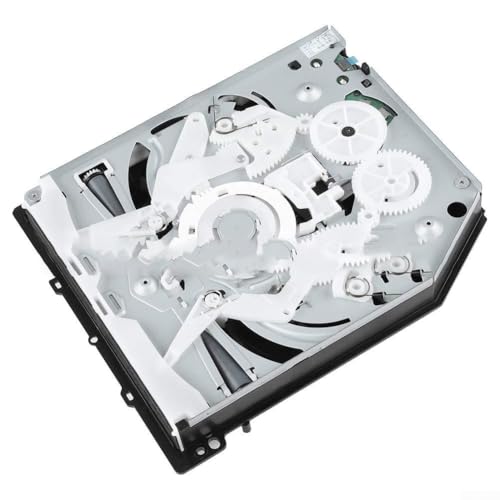
Optical drives are devices that use a laser to read or write data on compatible discs. They may be built into a computer, installed inside a desktop PC or connected externally by USB, depending on the product type.
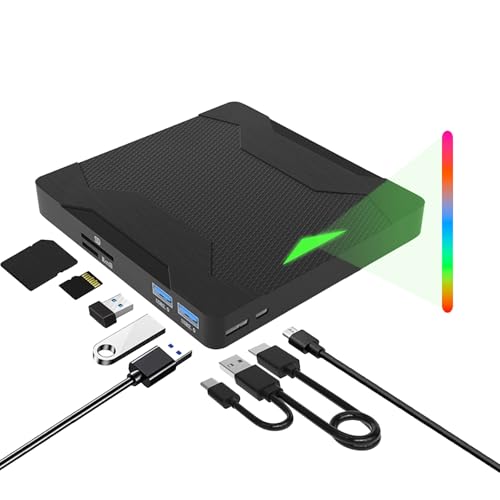
Products in this category may include external DVD drives, internal DVD drives, CD drives, DVD writers, Blu ray drives, laptop compatible drives and desktop optical drives, depending on what is listed.
Some optical drives are designed only to read discs, while others can write or rewrite compatible discs where stated. Some may support CD and DVD formats, while others may also support Blu ray formats where listed. Always check the product description carefully before buying.
What Are Optical Drives Used For?
Optical drives are used for accessing disc based media and files. They can help with installing older software, playing compatible media discs, importing music from CDs, reading archived data, burning discs, creating backups and using older equipment that still relies on physical discs.
They can be useful for home computers, business systems, schools, repair benches, media collections, older laptops, desktop PCs and anyone who occasionally needs disc access. Even though many modern computers no longer include built in optical drives, an external drive can still be practical when a disc is needed.
For some users, an optical drive is a daily tool. For others, it is a useful spare accessory kept for occasional software, music, photos or document archives.
How To Choose The Right Optical Drive
Start by deciding whether you need an internal or external optical drive. An external drive is usually easier to use with laptops and computers that do not have a built in disc drive, provided the connection is compatible. An internal drive may suit desktop PCs with a suitable bay, power connection and data connection.
Next, check the disc formats you need. If you only need CDs and DVDs, a DVD drive or DVD writer may be enough where listed. If you need Blu ray support, make sure the product clearly states Blu ray compatibility. Do not assume all optical drives read every disc type.
Then think about whether you need read only use or writing support. A read only drive may be suitable for playing or accessing discs. A writer may be needed if you want to burn files, music, videos or backups to compatible writable discs where supported.
Also check operating system compatibility, power needs and whether any software is included or required. Some drives may work without extra software for basic disc access, while media playback or disc writing can depend on the computer and software setup.
Key Features To Compare
When comparing optical drives, look at internal or external design, connection type, supported disc formats, read support, write support, power requirements, size, portability, operating system compatibility and included accessories where listed.
Connection type is especially important. External optical drives commonly use USB, but USB connector type and power needs can vary. Internal desktop optical drives may use SATA connections where compatible.
Disc format support should be checked carefully. CD, DVD and Blu ray are not the same, and read and write support may differ. A drive may read one format but not write it, depending on the product.
Portability can also matter. A slim external optical drive can be useful for travel, laptop bags and occasional use, while a full size internal drive may be better suited to a permanent desktop setup.
Included accessories may vary. Some products may include cables, software information, mounting screws or instructions where listed, while others may be supplied as the drive only.
Optical Drives Compared With USB Storage External Hard Drives And Cloud Storage
Optical drives are useful when you need to access physical discs. They are different from USB memory sticks, external hard drives and cloud storage because they are designed around disc based media.
USB storage is usually more convenient for everyday file transfer, especially between modern computers. External hard drives and SSDs are often better for larger backups or regular data storage. Cloud storage can be useful for online access and sharing, depending on the service used.
Optical drives still make sense when the files, software, music or media are already on disc, or when a physical disc format is specifically needed. They are also useful for reading older archives that were saved before USB drives and cloud storage became common.
The best choice depends on whether you need to read existing discs, create new discs or simply store modern files in another way.
Guidance For Beginner Regular And Experienced Users
Beginner users should focus on simple compatibility. If your laptop has no disc drive and you need to read CDs or DVDs, an external USB optical drive may be the most straightforward option where compatible.
Regular users may want to compare portability, read and write support, disc format coverage and how the drive fits into their desk or travel setup. If you use discs often, ease of connection and reliable placement matter.
Experienced users may look more closely at internal drive bays, SATA connections, disc writing support, media software, archive workflows and compatibility with older systems. They may also choose different drives for desktop builds, repair work or media libraries.
For all users, the key point is to check the drive supports the disc type and task you need before buying.
Use Cases By Device And Setup
For laptops, external optical drives are often useful because many modern laptops do not include built in disc drives. Check USB compatibility, power needs and operating system support before buying.
For desktop PCs, internal optical drives may be suitable where the case has a compatible drive bay and the motherboard and power supply provide the required connections. External drives can also be used if internal installation is not practical.
For home media collections, an optical drive can help access CDs, DVDs or Blu ray discs where supported by the drive and playback software. Check media format support carefully before relying on a drive for playback.
For business and office use, optical drives may be useful for older software, document archives or disc based records. Compatibility with current computers and operating systems should be checked.
For computer repair and setup, an optical drive can be useful for reading older installation discs, driver discs or backup media where suitable.
For students and travel users, a compact external drive can be useful for occasional disc access without needing a bulky desktop setup.
Fit Compatibility And Installation Checks
Compatibility is the most important part of choosing an optical drive. For external drives, check the USB connection, operating system support, power requirements and whether your computer has the right port.
For internal drives, check the computer case, drive bay size, SATA data connection, power connector and mounting requirements. Not every modern desktop case includes a visible optical drive bay, so confirm the case layout before buying.
If using a drive for media playback, remember that the drive is only part of the setup. The computer may also need suitable playback software and compatible hardware where required.
If using a drive for writing discs, check both the drive and the blank discs. Writable and rewritable disc formats vary, and not every drive supports every type.
If you are unsure about installation, seek suitable technical support rather than forcing parts or risking damage to the computer.
Disc Format Read And Write Support
Optical drives can vary widely in what they support. Some may read CDs and DVDs only. Some may write DVDs. Some may read Blu ray discs where listed, while others may write compatible Blu ray discs where stated.
Read support and write support are different. A drive that reads a disc format may not necessarily write that format. Always check the product description if you need to burn or create discs.
Disc condition also matters. Scratched, dirty or damaged discs may not read properly, even with a compatible drive. Older discs can also degrade over time, so important files should be backed up where possible.
For music, video or data discs, software and format compatibility can affect use. A drive may detect a disc, but the computer may still need suitable software to open or play the content.
Safety Care Maintenance And Storage
Handle optical drives and discs carefully. Keep discs clean and avoid touching the shiny data side where possible. Store discs in cases to reduce scratches, dust and damage.
Do not force discs into a tray or slot. If a disc does not load properly, stop and check the drive instructions. Forcing a disc can damage both the drive and the media.
Keep external drives on a stable surface while in use. Avoid moving the drive while a disc is spinning, as this may interrupt reading or writing and could damage the disc or drive.
For internal drives, switch off and unplug the computer before installation. Follow safe handling guidance and avoid working inside a computer if you are unsure.
Store external optical drives clean, dry and protected from knocks. Keep cables with the drive so it is ready to use when needed.
Useful Accessories To Consider
Useful accessories can include blank CDs, blank DVDs, blank Blu ray discs where compatible, disc storage cases, USB cables, SATA cables, mounting screws, external drive pouches, cleaning cloths and backup drives.
For desktop installations, you may need a SATA data cable, power connection and suitable drive bay where compatible. For external drives, a protective sleeve or small storage pouch can help keep the drive and cable together.
For long term file safety, consider using an external hard drive, SSD or other backup method alongside disc storage. Important files should not rely on one copy only.
Why Buy Optical Drives From YPC?
At YPC, we understand active lifestyles and the need for practical products that work in real use. Optical drives can vary by connection type, disc support, read and write features, internal or external design, portability and compatibility, so comparing the details helps you choose with more confidence.
YPC helps you browse computer accessories with real everyday needs in mind, whether you are buying for a laptop, desktop PC, home office, media collection, repair setup or occasional disc access. Explore the Optical Drives category to browse the available options and compare the features that matter most for your computer setup.
FAQs
What is an optical drive?
An optical drive is a computer device used to read or write compatible disc based media, such as CDs, DVDs or Blu ray discs where supported by the product.
Do I need an internal or external optical drive?
Choose an external optical drive if you want a simple option for a laptop or computer without a built in drive. Choose an internal drive only if your desktop case and system have the correct bay and connections.
Can all optical drives read DVDs?
No. Many optical drives support DVDs, but not every drive supports every disc format. Always check the product description for CD, DVD and Blu ray compatibility.
Can optical drives write discs?
Some optical drives can write or rewrite compatible discs where listed, while others may only read discs. Check read and write support carefully before buying.
Will an optical drive work with my laptop?
It depends on the laptop, operating system, USB port and drive requirements. Check the product compatibility details before buying, especially for newer laptops with fewer ports.
What is the difference between a DVD drive and a Blu ray drive?
A DVD drive is designed for DVD and often CD use where listed. A Blu ray drive may support Blu ray discs as well, depending on the product. Blu ray support should not be assumed unless stated.
Do optical drives need software?
Basic disc access may work without extra software on some systems, but media playback, disc burning or Blu ray use may require suitable software depending on the computer and disc format.
How should I look after an optical drive?
Keep the drive clean, dry and stable while in use. Avoid moving it while a disc is spinning, do not force discs into the drive and store external drives safely with their cables when not in use.
 Getting ready for Summer? View our Home and Garden Products

Heading outdoors this winter? Take a look at our Outdoor Clothing.