
Photo Printers
Photo printers are designed specifically to produce high-quality, colour-accurate prints of photographs and artwork. Whether you’re a professional photographer, a hobbyist, or a home user preserving family memories, a photo printer gives you control over the look, feel, and finish of your printed images.
Since 1988, we’ve supported photographers, creatives, and everyday users with premium printing technology and expert guidance. Our collection of photo printers includes portable models, dedicated photo labs, and professional-grade A3+ printers, all chosen for performance, colour fidelity, and reliability.
- Photo Printers
KODAK Mini 2 ERA 4PASS Portable Photo Printer, Initial 8 Sheets + 30 Sheet Pack Bundle, Black
Original price was: £84.99.£64.99Current price is: £64.99. *View On Amazon* - Photo Printers
KODAK 4PASS Film Cartridge (4×6") for KODAK Dock and Dock Plus, 80 Sheets
Original price was: £34.76.£28.99Current price is: £28.99. *View On Amazon* - Photo Printers
Polaroid Everything Box Hi Print 4×6 (10x15cm) Bluetooth Photo Printer UK Plug
Original price was: £144.99.£139.00Current price is: £139.00. *View On Amazon* - Photo Printers
Canon SELPHY QX20 portable printer – for Wi-Fi printing straight from your smart device. Dye Sublimation, 2 sizes of peel and stick Prints and USB-C Charging – Red (Without Ink/Paper)
Original price was: £124.99.£120.00Current price is: £120.00. *View On Amazon* - Photo Printers
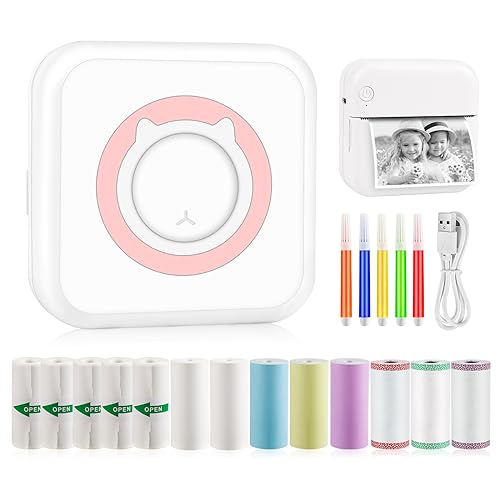
eSynic Mini Thermal Printer for Phone Portable Photo Printer with 10 Rolls Of Thermal Paper Inkless Bluetooth Sticker Printer for Android IOS Kid Sticker Machine for Photos, Journals, Study Notes
Original price was: £25.95.£16.70Current price is: £16.70. *View On Amazon* - Photo Printers
Polaroid Hi-Print – 2nd Generation – Bluetooth Connected 2×3 Pocket Photo, Dye-Sub Printer – White
Original price was: £89.99.£68.00Current price is: £68.00. *View On Amazon* - Photo Printers
KODAK Step Wireless Mobile Photo Colour Printer (White) Go Bundle
£84.99 *View On Amazon* - Photo Printers
Epson EcoTank ET-8550 Ink Tank Printer | Photo Printing | 6-Colour Inks | Wireless | A3+ | Print, Copy, Scan | 10.9cm Touchscreen | Double-Sided Printing | Rear Paper Feed
Original price was: £779.99.£649.99Current price is: £649.99. *View On Amazon*






Why Choose a Photo Printer?
Photo printers deliver much more than standard colour output. They are optimised for image clarity, smooth colour gradients, accurate skin tones, and vibrant saturation. Many models use additional ink colours beyond CMYK (cyan, magenta, yellow, black) to enhance photo quality.
Benefits include:
Lab-quality photo prints at home
Borderless printing up to A3+ or larger
Support for glossy, matte, and speciality photo papers
Accurate colour reproduction for professional use
Creative control over output, paper type, and finishes
Photo Printer Buying Guide
📦 Types of Photo Printers
| Type | Description | Best For |
|---|---|---|
| Compact Photo Printers | Small, portable printers for 4×6″ prints | Travel, events, casual home use |
| All-in-One Photo Inkjet | Combines scanning and printing | Home users, families |
| Dedicated A4 Photo Printers | High-resolution output with borderless options | Hobbyists, creative projects |
| A3/A3+ Professional Printers | Supports large format and multiple inks | Photographers, artists, design professionals |
| Sublimation Photo Printers | Dye-sub printing for smooth gradients | Events, ID photos, photo booths |
| Portable Instant Printers | Connect to smartphones, battery-powered | On-the-go printing and social sharing |
🔍 Key Features to Consider
Print resolution: Higher DPI (e.g. 4800 x 1200) produces sharper image detail
Ink system: 4, 6, 8, or 10 ink cartridges, often including grey and photo-specific colours
Paper compatibility: Ensure support for glossy, matte, satin, and fine art papers
Borderless printing: Allows full-bleed photo prints with no white margins
Connectivity: USB, Wi-Fi, SD card, Bluetooth, or direct-from-camera (PictBridge)
Mobile printing: Use apps or cloud services for wireless printing from phones or tablets
Size and portability: Compact models are ideal for casual users or events
Running costs: Consider ink usage, cartridge cost, and paper quality
⚙️ Use Cases and Compatibility
Photographers: Print high-quality photos, proofs, and portfolios in-house
Creative professionals: Use for marketing materials, design proofs, and art prints
Families: Print holiday snaps, baby photos, and memory albums at home
Event organisers: Use instant printers or dye-sub models for on-site photo delivery
Students: Produce vibrant project visuals or creative coursework
Photo printers work with Windows, macOS, and many mobile devices using iOS or Android. Most support mobile apps and wireless printing.
🧠 Expert Tips
For best results, use paper and ink from the same brand as your printer
Choose a printer with six or more inks for improved tonal range and colour depth
Always store photo paper in a cool, dry place to prevent warping or fading
Calibrate your monitor to match your printer output for professional colour accuracy
For gallery-quality results, consider pigment-based ink over dye-based for longer-lasting prints
⚠️ Common Mistakes to Avoid
Using plain office paper instead of photo-specific paper
Overlooking ink compatibility — not all third-party inks maintain colour accuracy
Ignoring print size limitations — not all models support A3 or larger formats
Assuming all printers offer borderless printing
Not adjusting printer settings for different paper types, which can impact quality
🛠️ Maintenance and Care
Run occasional test prints to prevent ink drying or nozzle blockages
Clean print heads if colours appear faded or misaligned
Keep your printer covered or stored in a dust-free environment
Replace ink cartridges before they run completely dry to prevent damage
Use your printer regularly to keep ink flowing and components working smoothly
Recommended Photo Printers
Canon SELPHY CP1500 – Compact, dye-sub printer for lab-quality 6×4” prints
Epson Expression Photo XP-8700 – A4 printer with 6-colour ink for vibrant photos
Canon PIXMA G650 – Ink tank photo printer with low running costs and rich colour depth
Epson EcoTank ET-8500 – A4+ ink tank printer for photography and creative projects
Canon PIXMA PRO-200 – Professional A3+ printer with 8 dye-based inks
Epson SureColor SC-P700 – Premium A3+ printer for gallery-quality pigment prints
FAQs – Photo Printers
1. What is a photo printer?
A photo printer is a printer designed to produce high-quality image prints with accurate colours, smooth gradients, and support for photo paper.
2. What’s the difference between a photo printer and a regular printer?
Photo printers use more advanced ink systems and higher resolution settings for better colour accuracy and image detail. Regular printers focus on text and everyday documents.
3. Do I need special paper for photo printing?
Yes. Glossy, matte, satin, or fine art photo paper is essential for best results. Standard copy paper won’t deliver photo-quality prints.
4. What’s the best printer for professional photo printing?
Look for A3+ printers with 6 or more inks, such as the Epson SureColor or Canon PIXMA PRO range, offering pigment inks and borderless printing.
5. Are instant photo printers good quality?
They’re great for casual use and quick prints, but won’t match the resolution or colour depth of dedicated photo inkjet printers.
6. Can I print photos directly from my phone or camera?
Yes. Many photo printers support wireless printing via apps, AirPrint, or even direct SD card and USB connections.
7. What’s the difference between dye and pigment inks?
Dye inks offer vibrant colours and are often used in compact printers. Pigment inks last longer and are better for archival-quality prints.
8. Can photo printers be used for documents, too?
Yes, though they’re optimised for images. If you need a versatile option, an all-in-one photo inkjet printer is ideal.
9. Do I need to calibrate my photo printer?
For professional work, yes. Calibration helps ensure colours match between screen and print. Most home users can get good results with factory settings.
10. Are photo printers expensive to run?
They can be, depending on ink and paper. Ink tank photo printers offer lower long-term costs than cartridge-based models.
Final Thoughts
Whether you’re printing family memories or selling professional artwork, photo printers give you creative control and unbeatable quality right from your desk. From affordable home models to large-format studio printers, we offer a trusted range of devices for every level of experience and budget.
With expert advice, reliable stock, and decades of experience since 1988, we’re here to help you find the perfect photo printer for your needs. Browse our selection today and turn your digital images into stunning physical prints.
 Getting ready for Summer? View our Home and Garden Products

Heading outdoors this winter? Take a look at our Outdoor Clothing.
Amazon Associate Disclosure
As an Amazon Associate I earn from qualifying purchases.