
USB Cables
USB cables are the backbone of digital connectivity, powering devices, transferring data, syncing smartphones, connecting peripherals, and even supporting high-definition video output. Whether you’re charging your phone, connecting a keyboard, transferring files from an external drive, or running a multi-monitor setup, choosing the right cable ensures fast, stable, and safe performance.
Since 1988, we’ve provided dependable, standards-compliant cables for homes, offices, and professional environments. Our range includes everything from USB-A to USB-C and USB 3.2 Gen 2×2 cables, to USB-C PD chargers and legacy USB-B connections, all backed by expert guidance and trusted quality.
- USB Cables
UGREEN USB C to USB C Cable 240W USB 3.1 Gen 2 10Gbps 4K@60Hz Display USB C Charger Cable Compatible with iPhone Air/17/16, Galaxy S25 Ultra, iPad Pro/Air, MacBook Pro M3, USB-C Monitor, 1M
Original price was: £15.98.£9.89Current price is: £9.89. *View On Amazon* - USB Cables
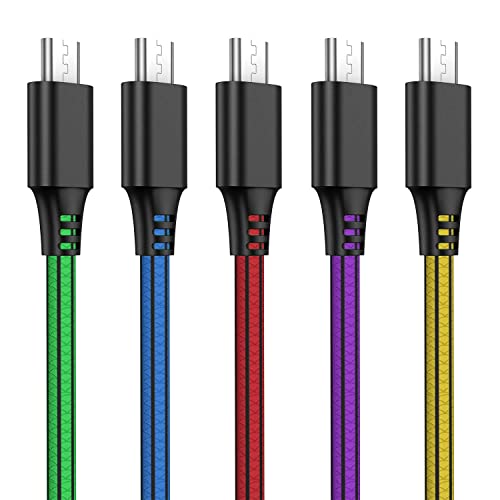
SCHITEC USB C Charger Cable, 5 Pack PVC Type C Fast Charging Data Cable for Samsung Galaxy S21 S20 S10 S9 + S8 Plus Note 9 8, LG G5, Google Pixel XL and More USB-C Devices
Original price was: £10.59.£8.05Current price is: £8.05. *View On Amazon* - USB Cables
2Pack USB C to USB C Charger Cable 1M+2M for iPhone 15 Charger Cable Braided 60W, USB-C to C Fast Charging Cable Type C Lead Long for Apple iPhone 15/Pro Max/Pro/Plus/MacBook Pro/Air/iPad Pro/Samsung
Original price was: £11.24.£8.99Current price is: £8.99. *View On Amazon* - USB Cables
Acer 240W USB C Charger Cable 3m, USB C to USB C cable [Aluminium+Nylon], USB Type C PD Fast Charging for Laptop, Samsung S24/23, MacBook Air/Pro, iPad Pro, Surface Go/Pro, iPhone 17/16 series, etc.
Original price was: £9.99.£7.99Current price is: £7.99. *View On Amazon* - USB Cables
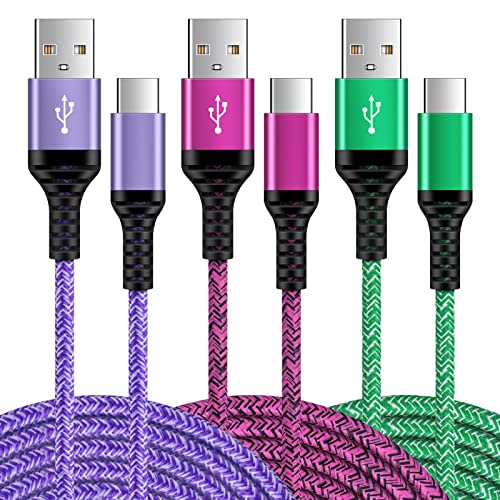
eyjiew USB C Charger Cable[1m, 5-Pack], USB A to USB C Cable 3A Nylon Type C Fast Charging Cord for iPhone 15 16 Plus 17 Pro Max,Galaxy S26 S25 S24 S23 S22 S21 S20 S10, A14 A15 A53 A70
Original price was: £8.99.£7.64Current price is: £7.64. *View On Amazon* - USB Cables
USB C to USB C Cable 60W 2M 4Pack Type C Charger Cable Fast Charge for Apple USBC Charging Lead for iPhone 17/16/15 Pro/Plus/Pro Max/Air for MacBook Pro/Air 2020 for iPad Air 5/Pro 2021
Original price was: £9.99.£8.07Current price is: £8.07. *View On Amazon* - USB Cables
Anker Nano USB C Cable, 240W 1.8m/6 ft Flexible Multi-Color Braided Cord, Fast Charging Type C Charger for MacBook Pro, iPhone 17/16/15, iPad Pro, Samsung Galaxy,and More(Black)
Original price was: £17.99.£12.34Current price is: £12.34. *View On Amazon* - USB Cables
JMROY 2M USBC to USBC Cable 3Pack,60W Nylon Braided C to C Fast Charger Cable, Type C Charging Cord Compatible with MacBook Air, iPad Pro, Galaxy S23 and More Type-C Devices
Original price was: £6.99.£5.64Current price is: £5.64. *View On Amazon* - USB Cables
UGREEN USB-C to USB C Charger Cable 100W Fast Charging 2M Type C to C Cable Compatible with MacBook Pro M4, iPad Pro 2024, iPhone 16 Pro Max, Galaxy S25 Ultra, Dell XPS, Surface Pro 9, Pixel 9
Original price was: £8.99.£6.59Current price is: £6.59. *View On Amazon* - USB Cables
USB to USB C Cable, Fast Charging Type C Cable for iPhone 16/16 Pro Max 15 Pro 15 Plus, iPad, Samsung Galaxy and Other Type-C Devices (2 Pack) (4ft)
Original price was: £6.99.£5.64Current price is: £5.64. *View On Amazon* - USB Cables
USB C to USB C 0.5m Cables 3Pack, 60W PD Braided USB C Charger Cable Short for Car, Type C to Type C Cable Fast Charging for iPhone 16/15 Pro Max, Samsung S25/S24, MacBook Pro/Air, Huawei P80, Pixel
Original price was: £7.99.£6.64Current price is: £6.64. *View On Amazon* - USB Cables
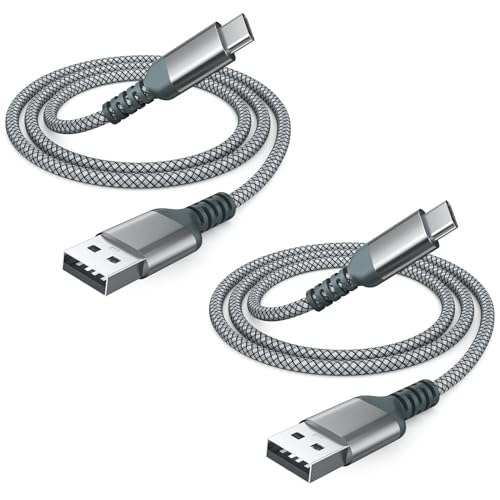
CLEEFUN Long USB C to USB C Cable [3M, 2-Pack], PD 60W Type C to C Fast Charger Charging Lead for MacBook Pro,iPad Air 4/Pro 2020,Samsung Galaxy S25 S24 S23 S22 S21 S20 Note 20 +,iPhone 17 Air 16 15
Original price was: £12.99.£9.99Current price is: £9.99. *View On Amazon* - USB Cables
Ocetea USB C to USB C Cable Short, [2Pack 30CM] 60W 20V/3A PD Fast Charging Data Cable Lead Compatible with iPhone 16 15, MacBook Pro, iPad Pro, Galaxy S24 S23 Ultra, Pixel
Original price was: £6.99.£5.03Current price is: £5.03. *View On Amazon* - USB Cables
HKYUSHINE USB C Charger Cable, 5Pack 3/3/6/6/10FT 3.1A USB A to USB C Cable Braided Type C Charger Cable Fast Charging for iPhone 16 15 Pro Max, Samsung S23 S22 S21, Pixel 6/7/8, Huawei, PS5, Switch
Original price was: £9.99.£8.07Current price is: £8.07. *View On Amazon* - USB Cables
USB C Charger for Samsung Fast Charger USB C Plug & Cable 3M Long 25W Type C Super Fast Phone Charging Android Adaptor UK 2-Pack for Galaxy S26/S25 Ultra/S24/S23/S22/S21/A56/A55/A36/A17/A16/Note 20/10
Original price was: £23.99.£16.13Current price is: £16.13. *View On Amazon*



![Acer 240W USB C Charger Cable 3m, USB C to USB C cable [Aluminium+Nylon], USB Type C PD Fast Charging for Laptop, Samsung S24/23, MacBook Air/Pro, iPad Pro, Surface Go/Pro, iPhone 17/16 series, etc.](https://m.media-amazon.com/images/I/41GI+ZhraPL._SL500_.jpg)
![eyjiew USB C Charger Cable[1m, 5-Pack], USB A to USB C Cable 3A Nylon Type C Fast Charging Cord for iPhone 15 16 Plus 17 Pro Max,Galaxy S26 S25 S24 S23 S22 S21 S20 S10, A14 A15 A53 A70](https://m.media-amazon.com/images/I/51PayZj19UL._SL500_.jpg)
![USB C to Lightning Cable 2M 2Pack [Apple MFi Certified], Fast iPhone Charger Cable Lightning USB C iPhone Charging Cable 2M Long iPad Charger Cable Lead Wire for iPhone 14 Pro/13/12/11/XS Max/XR/X/8](https://m.media-amazon.com/images/I/51M-sRwmI5L._SL500_.jpg)


![TOTVTOT USB C Cable, 3.1A Type C Charging Cable [2M 2Pack] Fast Charger Lead Braided Cord for S22 S21 S20 S10 S9 S8 A02s A03s A12 A22 A20 A32 A52s A70 A90 Sony Xperia,Huawei P30 P20 Google Pixel LG](https://m.media-amazon.com/images/I/41F04UYBKsL._SL500_.jpg)



![CLEEFUN Long USB C to USB C Cable [3M, 2-Pack], PD 60W Type C to C Fast Charger Charging Lead for MacBook Pro,iPad Air 4/Pro 2020,Samsung Galaxy S25 S24 S23 S22 S21 S20 Note 20 +,iPhone 17 Air 16 15](https://m.media-amazon.com/images/I/51FqsZ-8oIL._SL500_.jpg)
![Ocetea USB C to USB C Cable Short, [2Pack 30CM] 60W 20V/3A PD Fast Charging Data Cable Lead Compatible with iPhone 16 15, MacBook Pro, iPad Pro, Galaxy S24 S23 Ultra, Pixel](https://m.media-amazon.com/images/I/31UHurRIQaL._SL500_.jpg)


Why the Right USB Cable Matters
Not all USB cables are created equal. Using the wrong or low-quality cable can cause:
Slow charging or no charging at all
Data loss or transfer interruptions
Device incompatibility
Overheating or damage to ports and batteries
A certified, high-quality cable offers safe power delivery, high-speed data transfer, and reliable connectivity for both old and new devices.
Buying Guide: How to Choose the Right USB Cable
1. Know Your Connector Types
| Connector Type | Use Case | Typical Devices |
|---|---|---|
| USB-A | Standard rectangular plug | Laptops, desktops, chargers, TVs |
| USB-B | Square connector with bevel | Printers, scanners, external drives |
| Mini-USB | Smaller older connector | Cameras, GPS units |
| Micro-USB | Compact older mobile connector | Android phones, power banks, Bluetooth speakers |
| USB-C | Reversible, versatile | Modern phones, tablets, laptops, hubs |
| Lightning (Apple) | Apple-specific | iPhones, iPads, AirPods |
💡 USB-C is now the most common standard, it supports power, data, and video on many modern devices.
2. Understand USB Standards and Speeds
| Standard | Max Speed | Use |
|---|---|---|
| USB 2.0 | 480 Mbps | Basic peripherals like mice and keyboards |
| USB 3.0 / 3.1 Gen 1 | 5 Gbps | External HDDs, hubs |
| USB 3.1 Gen 2 / USB 3.2 Gen 2 | 10 Gbps | SSDs, docking stations |
| USB 3.2 Gen 2×2 | 20 Gbps | High-speed drives, professional devices |
| Thunderbolt 3/4 (USB-C) | 40 Gbps | Video, data, charging, multi-device hubs |
Common USB Cable Types
✅ USB-A to USB-C
For charging and syncing USB-C phones/tablets from standard USB ports
Ideal for older PCs connecting to modern devices
✅ USB-C to USB-C
Fast charging, video output, and high-speed data
Used for MacBooks, Android phones, iPads, and docking stations
Supports USB PD and Thunderbolt (depending on spec)
✅ USB-A to Micro-USB
Used for older Android phones, speakers, and cameras
Still popular for budget accessories and IoT devices
✅ USB-A to Lightning
For iPhones and iPads (certified MFi cables only)
Supports fast charging when used with compatible adapters
✅ USB-C to Lightning
Needed for fast charging iPhones from USB-C chargers
Required for newer Apple devices, supports up to 20W
✅ USB-A to USB-B
For printers and older external hard drives
Often used in office and professional settings
Key Features to Look For
Braided or Reinforced Jacket – Prevents tangling and resists damage
Gold-Plated Connectors – Improve durability and resist corrosion
E-Marker Chip (for USB-C) – Ensures safe power delivery up to 100W
Length Options – Available from 0.3m to 3m+, depending on use
Fast Charge Support – Confirm voltage and current rating (e.g. 5V/3A, 20V/5A)
Certified Compliance – USB-IF or MFi certification for safety and performance
Recommended USB Cable Picks by Use Case
| Use Case | Cable Type | Features |
|---|---|---|
| Fast Charging Android Phone | USB-C to USB-C (PD) | 60W or 100W, braided, 1m |
| iPhone Charging (Fast) | USB-C to Lightning | MFi certified, supports 20W |
| External SSD for Video Editing | USB-C 3.2 Gen 2 | 10 Gbps, short length |
| Home Office Printer Connection | USB-A to USB-B | Reliable and durable |
| Legacy Device Charging | USB-A to Micro-USB | Flexible, 1.5m |
| Car Charger Use | USB-A to USB-C | Short, reinforced, fast charge |
| Universal Travel Cable | Multi-head USB-A to Micro/Type-C/Lightning | Compact and versatile |
Expert Tips for Using USB Cables Safely
Avoid very cheap cables — poor internal wiring can damage devices
Don’t exceed cable length for high-speed data (keep under 2m for USB 3.0+)
Replace damaged cables immediately to avoid shorts or overheating
Look for “Fast Charge” or “PD” labels when charging modern devices
Use a certified charger and cable together for the best performance
FAQ: USB Cables
Can I use any USB-C cable for charging my laptop?
Not all USB-C cables support high-wattage charging. Choose one that supports USB Power Delivery (PD) and is rated for 60W or 100W, especially for laptops.
Is USB-C faster than USB-A?
USB-C refers to the connector, not speed. Speed depends on the USB standard; USB-C 3.1 or Thunderbolt 3 is much faster than USB-A 2.0.
What’s the difference between charging and data cables?
Some low-cost cables only support charging. A data cable allows file transfer. Always check specs or look for “data + charge” labels.
Do USB 3.0 cables work with USB 2.0 ports?
Yes, they’re backwards compatible, but will operate at USB 2.0 speeds when used in those ports.
Are braided cables better?
Yes, they’re more durable, tangle-resistant, and ideal for high-use environments.
How do I know if a USB-C cable supports video?
Look for USB-C cables with DisplayPort Alt Mode or Thunderbolt 3/4 compatibility. Not all USB-C cables carry video.
Stay Connected with Confidence
From charging to data transfer to high-speed connectivity, USB cables are the essential lifeline of your digital world. With over 35 years of trusted experience, we provide a wide range of high-quality, certified USB cables designed for performance, durability, and device safety.
Shop our full range of USB cables today, and connect smarter, faster, and safer.
Looking for more options?
Browse our full range of Computers and Accessories for other great choices to suit your space, goals, and budget.
 Getting ready for Summer? View our Home and Garden Products

Heading outdoors this winter? Take a look at our Outdoor Clothing.