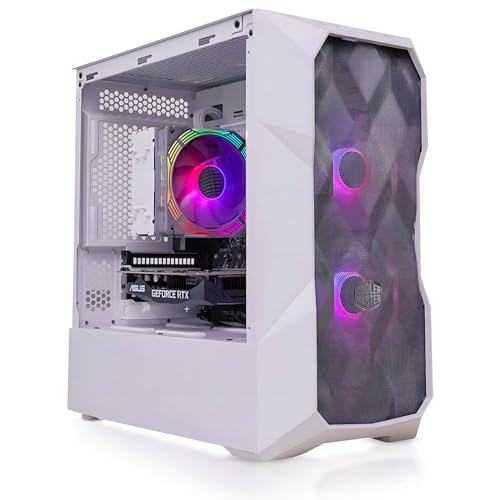
The Veno Scorp NeonZilla Budget Gaming PC is the perfect entry point into PC gaming and everyday computing. Designed for budget-conscious users and casual gamers, this desktop packs just enough performance to run light and older titles at low settings while offering reliable everyday use for school, work, or light content creation.
Powered by a refurbished Intel Core i5 processor, 8GB DDR4 RAM, and a GT 710 2GB graphics card, this PC is ideal for games like Minecraft, Roblox, League of Legends, and Counter-Strike 2 at 720p to 1080p with 25–40 FPS, depending on the game. It’s also an excellent choice for retro gaming, indie games, and emulators.
The eye-catching NeonZilla ARGB case with 4 fans not only keeps your components cool but looks fantastic on any gaming setup.
Key Specs Overview:
Processor: Intel Core i5 (Refurbished, Grade A)
Memory: 8GB DDR4 SDRAM (Brand New)
Storage: 500GB HDD (Refurbished)
Graphics Card: NVIDIA GeForce GT 710 2GB (Brand New)
Case: Veno Scorp NeonZilla ARGB Case (4 x ARGB Fans)
Operating System: Windows 10 (Activated)
Connectivity: 6 x USB 2.0, Gigabit LAN, HD Audio, Mic & Headphone Jacks
Monitor Support: Dual Monitor Output Supported
Warranty: 1 Year Warranty (Parts & Labour)
Technical Specifications
| Component | Specification |
|---|---|
| CPU | Intel Core i5 (Refurbished, Grade A, Model may vary from 4th–6th Gen) |
| Graphics | NVIDIA GeForce GT 710 2GB GDDR3 (Brand New) |
| Memory | 8GB DDR4 SDRAM (1 x 8GB, Expandable, Brand New) |
| Storage | 500GB SATA HDD (Refurbished Grade A) |
| Case | Veno Scorp NeonZilla Gaming Case with 4 x ARGB Fans |
| Motherboard | Refurbished (Model may vary; DDR4 Compatible) |
| Power Supply | 450W Standard ATX PSU (Brand New) |
| Networking | 10/100/1000 Gigabit LAN |
| Audio | Integrated HD Audio, Microphone & Headphone Support |
| USB Ports | 6 x USB 2.0 (Front and Rear) |
| Operating System | Windows 10 Home (Fully Activated) |
| Video Outputs | VGA, HDMI, DVI (GT 710 supports up to 2 monitors) |
| Warranty | 1 Year Warranty (Covers all components) |
What This Product Is Used For
Casual gaming on low settings (Minecraft, Roblox, LOL, CS2)
School or home office tasks (web browsing, email, Office apps)
Streaming video content (YouTube, Netflix, Twitch)
Light emulation and retro gaming
Dual-screen setups for productivity or multitasking
Why We Like This Product (Reviewed by the YPC Team)
At Yorkshire PC Centre, we understand that not everyone needs a powerhouse. The Veno Scorp NeonZilla hits the sweet spot for those wanting to game on a budget or needing a low-cost workstation with style. While performance is modest, the ARGB case and dual-monitor support make this machine a visual standout and a solid daily driver.
Pros and Cons
✅ Pros:
Excellent price-to-performance for casual users
Eye-catching NeonZilla ARGB case with 4 fans
GT 710 supports dual monitors – great for multitasking
Upgradable – extra RAM slots and SATA ports available
Windows 10 fully activated – no setup headaches
Good for retro or indie games and emulators
❌ Cons:
Older refurbished CPU and HDD
GT 710 not suitable for modern AAA gaming
No USB 3.0 or SSD included by default
Loud under load due to standard cooling fans
Alternatives Worth Considering
Veno Scorp Entry Gaming PC (i5 + GT 1030 + SSD)
A step up with an SSD and stronger GPU.Skytech Chronos Mini – Ryzen 3 + GTX 1650
Higher price, but real 1080p gaming and modern hardware.HP EliteDesk Refurb Bundle – i5 + SSD + Integrated GPU
Best for productivity, not gaming, but fast and affordable.
Tips on How to Use Correctly
Install your most-used programs and games on the 500GB HDD. If speed becomes an issue, consider upgrading to an SSD.
Keep the inside clean. Use compressed air every few months to avoid dust build-up in the ARGB fans.
Stick to older or lightweight games – this system shines with emulators and games made pre-2015.
Update your GPU drivers from NVIDIA for best compatibility.
Comparison: GT 710 vs GT 1030
| Feature | GT 710 2GB | GT 1030 2GB |
|---|---|---|
| Architecture | Kepler | Pascal |
| Memory Type | DDR3 | GDDR5 |
| Performance | Very Low | Entry-Level Gaming |
| Average FPS (1080p) | 20–40 FPS | 45–60 FPS |
| Price Difference | ~£30–£40 | Worth it if budget allows |
Buyer’s Guide: Choosing a Budget Gaming PC in 2025
Key Considerations:
Refurbished vs. New
The CPU, HDD, and motherboard here are Grade A refurbished – great for keeping costs low, but may show light signs of previous use.Graphics Power
GT 710 is a basic card. It works well for older or less intensive games but not suited for ray tracing or AAA titles.RAM & Storage
8GB DDR4 is enough for casual use but upgrading to 16GB or adding an SSD will dramatically improve speed and performance.Case & Cooling
The NeonZilla case is stunning and well-ventilated, but fan noise may be noticeable under load.Upgrades
This PC has room for future upgrades. Add an SSD or better GPU when your budget allows.
Top 10 Frequently Asked Questions (FAQ)
1. Is the GT 710 good for gaming?
Only for older or indie games. Expect low FPS on modern titles.
2. Can I upgrade to an SSD?
Yes, there are free SATA ports. We recommend a 240GB SSD for boot drive.
3. Is the processor new?
No. It’s a refurbished Intel Core i5 (Grade A), but fully tested and warrantied.
4. Does this support dual monitors?
Yes, via HDMI + VGA or DVI. Ideal for productivity.
5. Can I run Fortnite?
Yes, on lowest settings at 720p with around 30 FPS.
6. Can I upgrade the RAM?
Yes, up to 16GB supported. 2 DIMM slots available.
7. What’s the noise level like?
Moderate under load due to multiple ARGB fans.
8. Is Windows 10 included and activated?
Yes, it’s pre-installed and activated. No product key entry needed.
9. Will it support an RTX card if I upgrade later?
The PSU isn’t powerful enough for RTX cards. PSU upgrade would be needed.
10. Is Bluetooth included?
No, but a USB Bluetooth adapter can be added easily.
Looking for more options?
Browse our full range of Gaming PC's for other great choices to suit your space, goals, and budget.